Data Flow: Encapsulation & De-encapsulation
Encapsulation
Encapsulation is the process of wrapping data with the necessary protocol information (called headers and sometimes footers) at each OSI layer as data is prepared for transmission.
This added information helps devices:
- Identify the sender and receiver
- Understand how to deliver and manage the data
- Handle errors, order, size, and addressing
Step-by-Step Encapsulation (Sender Side)
As data goes from Layer 7 down to Layer 1:
| OSI Layer | What It Adds | Resulting Data Unit | Example Info Added |
|---|---|---|---|
| Layer 7–5 (App/Pres/Sess) | Message from the app | Data | HTTP request, file content, email text |
| Layer 4 (Transport) | TCP/UDP header | Segment | Source/destination ports, sequence number |
| Layer 3 (Network) | IP header | Packet | IP addresses (sender & receiver) |
| Layer 2 (Data Link) | MAC header + trailer | Frame | MAC addresses, CRC (error check) |
| Layer 1 (Physical) | Converts frame to bits | Bits | 0s and 1s transmitted via cable/Wi-Fi |
At the end of encapsulation, the message becomes raw bits sent over the network.
De-encapsulation
De-encapsulation is the reverse process: the receiving device removes the headers/trailers at each layer as data travels up the OSI stack, from Layer 1 to Layer 7.
Each layer:
- Reads the information intended for it (e.g. IP or MAC address)
- Removes its header/trailer
- Passes the cleaned data up to the next layer
Step-by-Step De-encapsulation (Receiver Side)
| OSI Layer | What It Does | What It Extracts |
|---|---|---|
| Layer 1 (Physical) | Receives the raw bits | Converts them back into frames |
| Layer 2 (Data Link) | Reads/removes MAC header/trailer | Verifies destination MAC, errors |
| Layer 3 (Network) | Reads/removes IP header | Checks destination IP |
| Layer 4 (Transport) | Reads/removes TCP/UDP header | Identifies correct app via port |
| Layer 5–7 (Session–App) | Delivers clean data to app | HTTP message, file, email, etc |
At the end of de-encapsulation, the app receives the original message exactly as it was sent.
Concrete Example – Visiting www.example.com
-
User Action (Layer 7):
You typewww.example.comin your browser and hit Enter → this creates an HTTP GET request. -
Encapsulation Begins:
- Layer 4: TCP adds source/dest ports (e.g. port 443 for HTTPS)
- Layer 3: IP adds sender & receiver IP addresses
- Layer 2: MAC addresses are added for local delivery
- Layer 1: The full message is converted into electrical signals (bits)
-
Transmission:
The bits travel over the network (Wi-Fi, cable) to the destination (Google’s server). -
De-encapsulation Begins:
- The server receives bits (Layer 1), rebuilds frames (Layer 2), checks the IP and port (Layers 3–4), and finally extracts the original HTTP request (Layer 7).
-
Server Response:
The server sends back the requested web page using the same process in reverse.
Key Points to Remember
- Encapsulation: Each OSI layer adds protocol info (headers/footers) → prepares the data for delivery.
- De-encapsulation: Each layer removes its header → reconstructs the original message.
- The process ensures data is delivered to the right device, to the right application, and in the correct form.
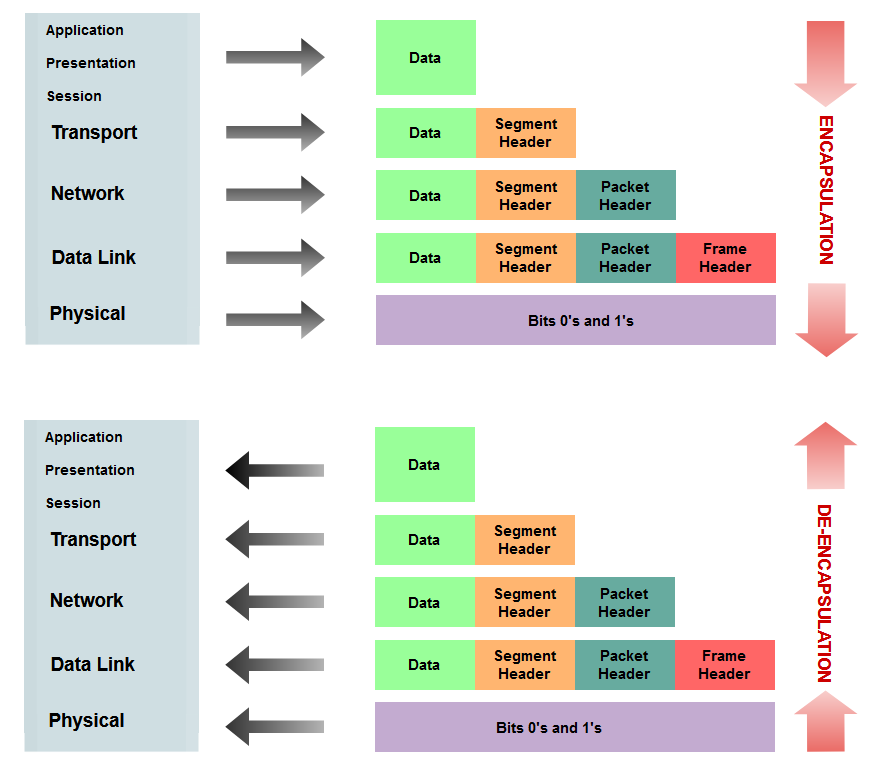 Image from : https://medium.com/@boutnaru/the-networking-journey-data-encapsulation-and-de-encapsulation-45d8057fb2e4