Local Area Networks (LANs)
- A LAN (Local Area Network) is a network confined to a relatively small area, such as a building or a group of nearby buildings.
- Routers are used to connect separate LANs, enabling communication between them.
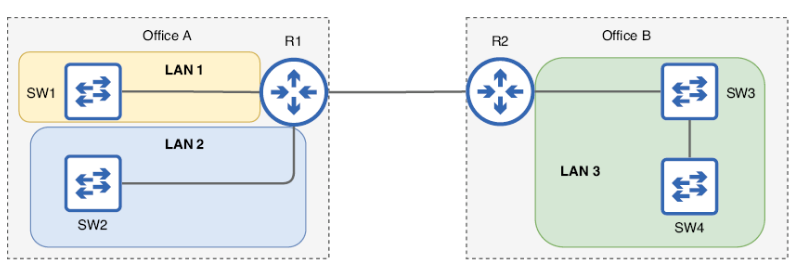 Two offices with two switches in each office. In Office A each switch is a separate LAN because the switches are connected via a router. In Office B both switches are in the same LAN because they are directly connected to each other.
Ethernet Frame Structure
An Ethernet Frame is the basic unit of data transmission in an Ethernet network. It consists of:
- Ethernet Header – Contains crucial control information
- Packet – The encapsulated data being transmitted
- Ethernet Trailer – Includes error-checking information
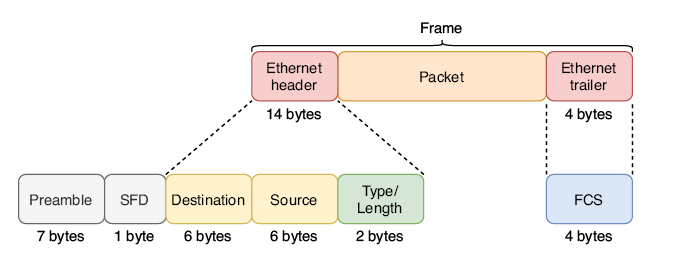 The contents of the Ethernet header and trailer. They are split into multiple fields, each serving a different purpose. The fields of the header are the Destination, Source, and Type/Length. The trailer consists of a single field: the Frame Check Sequence (FCS). Although not considered part of the Ethernet frame, the Preamble and SFD are sent with each frame.
Ethernet Header Fields
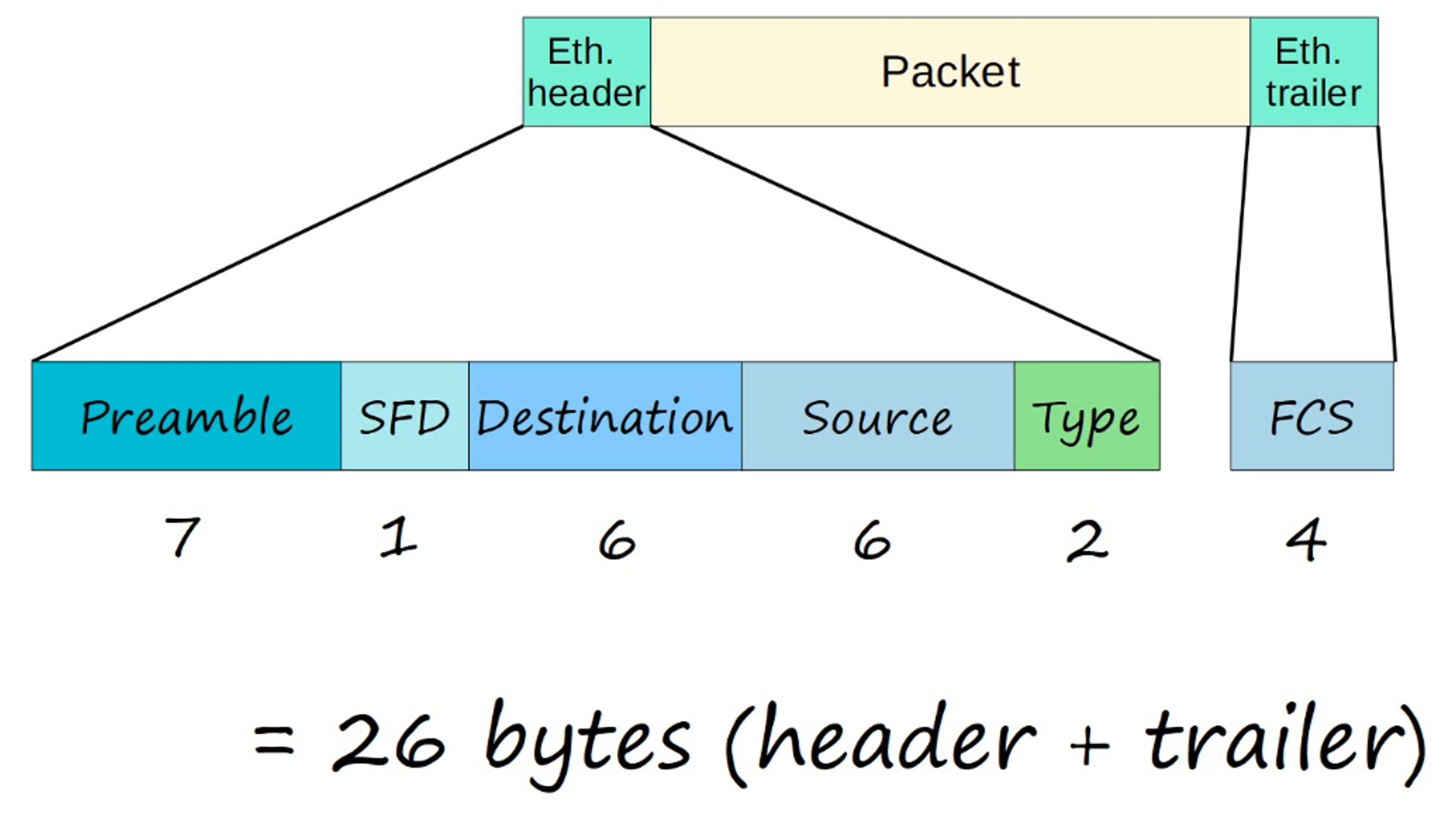
The Ethernet Header is composed of five fields:
-
Preamble:
- Length: 7 bytes (56 bits)
- Consists of a sequence of alternating 1’s and 0’s (
10101010repeated 7 times) - Purpose: Allows devices to synchronize their receiver clocks before data transmission begins
-
SFD (Start Frame Delimiter):
- Length: 1 byte (8 bits)
- Bit pattern:
10101011 - Purpose: Marks the end of the preamble and the beginning of the actual data in the frame
-
Destination & Source Addresses:
- Length: 6 bytes each (48 bits)
- These are Layer 2 addresses known as MAC Addresses (Media Access Control)
- Purpose: Identify the sending and receiving devices on the network
-
Type/Length:
- Length: 2 bytes (16 bits)
- This field can indicate either:
- The length of the encapsulated packet (if the value is 1500 or less)
- The type of protocol in the encapsulated packet (if the value is 1536 or greater)
- Common types:
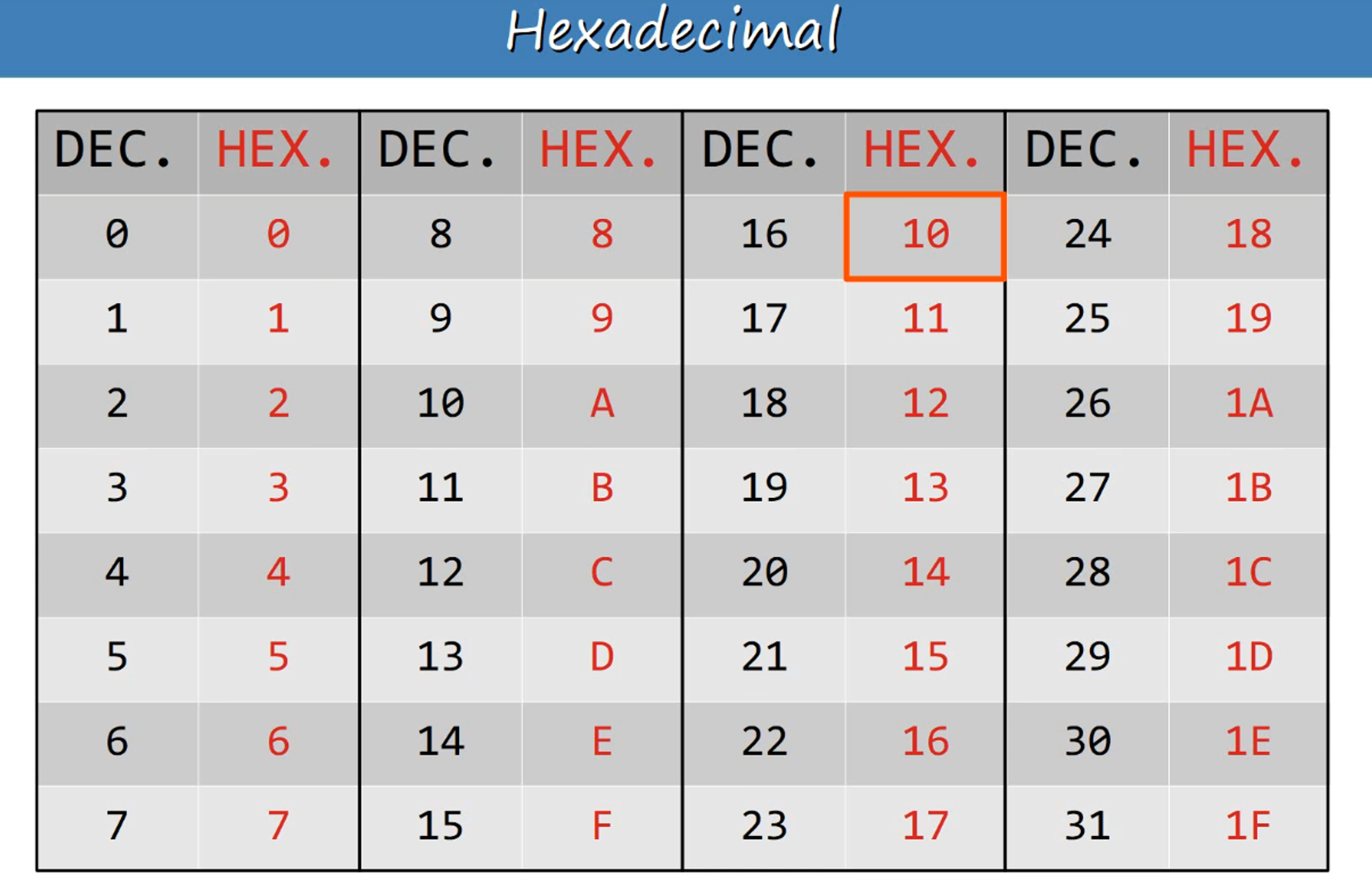
- IPv4: 0x0800 (hexadecimal) = 2048 (decimal)
- IPv6: 0x86DD (hexadecimal) = 34525 (decimal)
Ethernet Trailer
The Ethernet Trailer contains the Frame Check Sequence (FCS):
- Length: 4 bytes (32 bits)
- Purpose: Detects corrupted data by using a Cyclic Redundancy Check (CRC) algorithm on the frame’s contents
Total Size of an Ethernet Frame: 26 bytes (combining the header and trailer)
MAC Address (Media Access Control)
- A MAC Address is a unique 6-byte (48-bit) address assigned to a device when it is manufactured.
- Also known as the Burned-In Address (BIA).
- Globally Unique:
- The first 3 bytes represent the OUI (Organizationally Unique Identifier), assigned to the device manufacturer.
- The last 3 bytes are unique to the specific device.
Example:
E8:BA:70:11:28:74E8:BA:70represents the OUI11:28:74is the unique identifier for the device
MAC Address Table
Each switch maintains a Dynamic MAC Address Table, which is populated by the Source MAC Address of incoming frames.
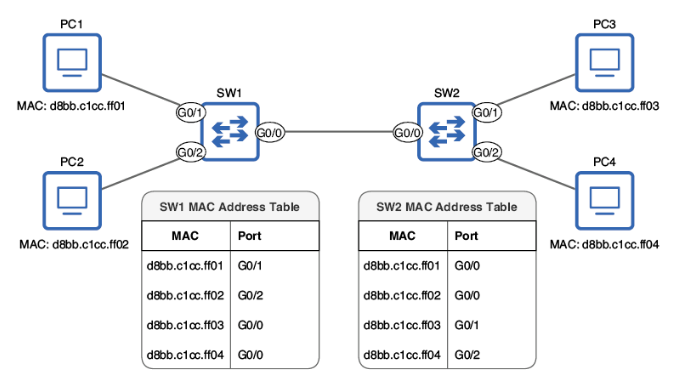 A network with two switches, each with two PCs connected. SW1 and SW2 have learned the MAC address of each PC by examining the Source field of frames received on their ports as the PCs communicate with each other. SW1 knows it can reach PC1 via its G0/1 port, PC2 via its G0/2 port, and PC3/PC4 via its G0/0 port. SW2 knows it can reach PC1/PC2 via its G0/0 port, PC3 via its G0/1 port, and PC4 via its G0/2 port.
Frame Handling Process
- Unknown Unicast Frame:
- If the switch does not recognize the destination MAC address (i.e., it is not in the MAC Address Table), the switch will flood the frame. This means it will forward the frame out of all interfaces except the one it received the frame on.
- Known Unicast Frame:
- If the MAC address is recognized (i.e., it is in the MAC Address Table), the switch will forward the frame to the correct interface.
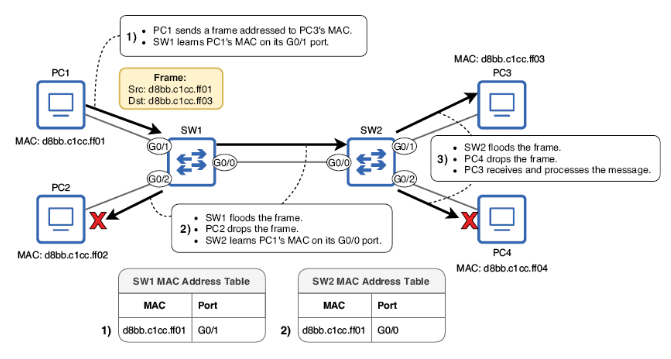 PC1 sends a unicast frame to PC3, but neither SW1 nor SW2 have an entry for the destination MAC address in their MAC address table. (1) PC1 sends the frame, and SW1 learns PC1’s MAC address. (2) SW1 floods the frame. SW2 learns PC1’s MAC address. PC2 drops the frame. (3) SW2 floods the frame. PC4 drops the frame. PC3 receives and processes it.
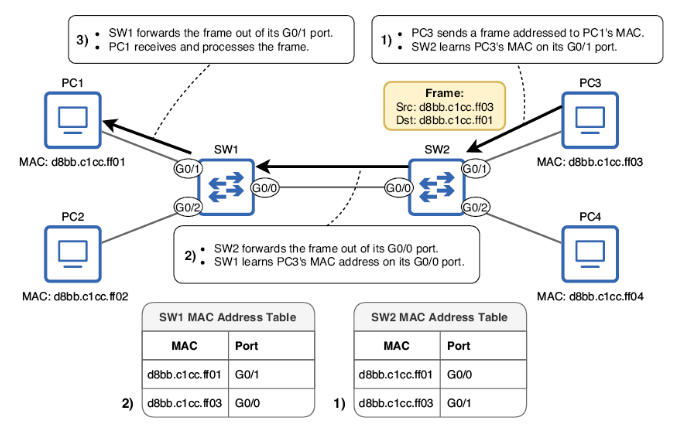 PC3 replies to PC1’s message. (1) PC3 sends the frame, and SW2 learns PC3’s MAC address. (2) SW2 forwards the frame out of its G0/0 port, and SW1 learns PC3’s MAC address. (3) SW1 forwards the frame out of its G0/1 port, and PC1 receives and processes it.
Note
Dynamic MAC Addresses are automatically removed from the MAC Address Table after 5 minutes of inactivity.
Minimum Ethernet Frame Size
The minimum size for an Ethernet Frame (Header + Payload + Trailer) is 64 bytes.
Given that the Ethernet Header and Trailer together occupy 18 bytes, the minimum size for the Data Payload (Packet) must be:
- 64 bytes - 18 bytes = 46 bytes
If the Payload is smaller than 46 bytes, padding bytes (a series of zeros) are added to reach the minimum size of 46 bytes.
Address Resolution Protocol (ARP)
When a PC needs to communicate with a device but does not know its MAC address, it uses an ARP Request.
What is ARP?
- ARP stands for Address Resolution Protocol.
- It is used to discover the Layer 2 (MAC) address corresponding to a known Layer 3 (IP) address.
- ARP involves two types of messages:
- ARP Request (from the source)
- ARP Reply (from the destination)
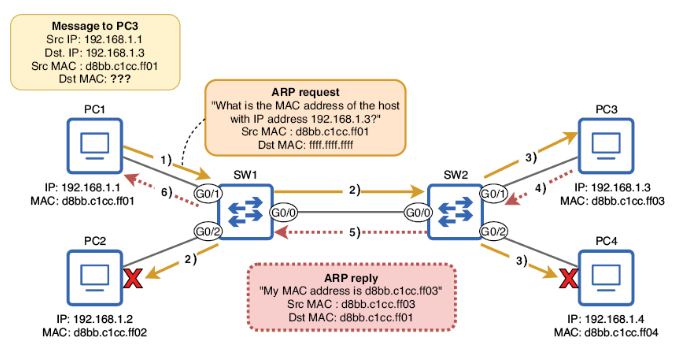 An ARP request and reply exchange between PC1 and PC3. PC1 wants to send a message to PC3 but does not know PC3’s MAC address, so PC1 uses ARP to learn PC3’s MAC address.
ARP Request
- Broadcast: The ARP Request is sent to all devices on the network except the one that sent it.
- Contains:
- Source IP Address
- Destination IP Address
- Source MAC Address
- Broadcast MAC Address: FFFF.FFFF.FFFF
ARP Reply
- Unicast: The ARP Reply is sent only to the device that sent the ARP Request.
- Contains:
- Source IP Address
- Destination IP Address
- Source MAC Address
- Destination MAC Address
PING Utility
PING is a network utility used to test the reachability of a device and measure the round-trip time for messages sent to a destination.
How PING Works
- It uses two ICMP messages:
- ICMP Echo Request
- ICMP Echo Reply
- PING is a Unicast process.
- Command format:
ping <ip-address>
PING in Cisco IOS
- By default, a Cisco IOS sends 5 ICMP Echo Requests and expects 5 Echo Replies.
- Default packet size: 100 bytes
- PING results:
.(period) – Indicates a failed ping!(exclamation mark) – Indicates a successful ping
Useful Cisco IOS Commands
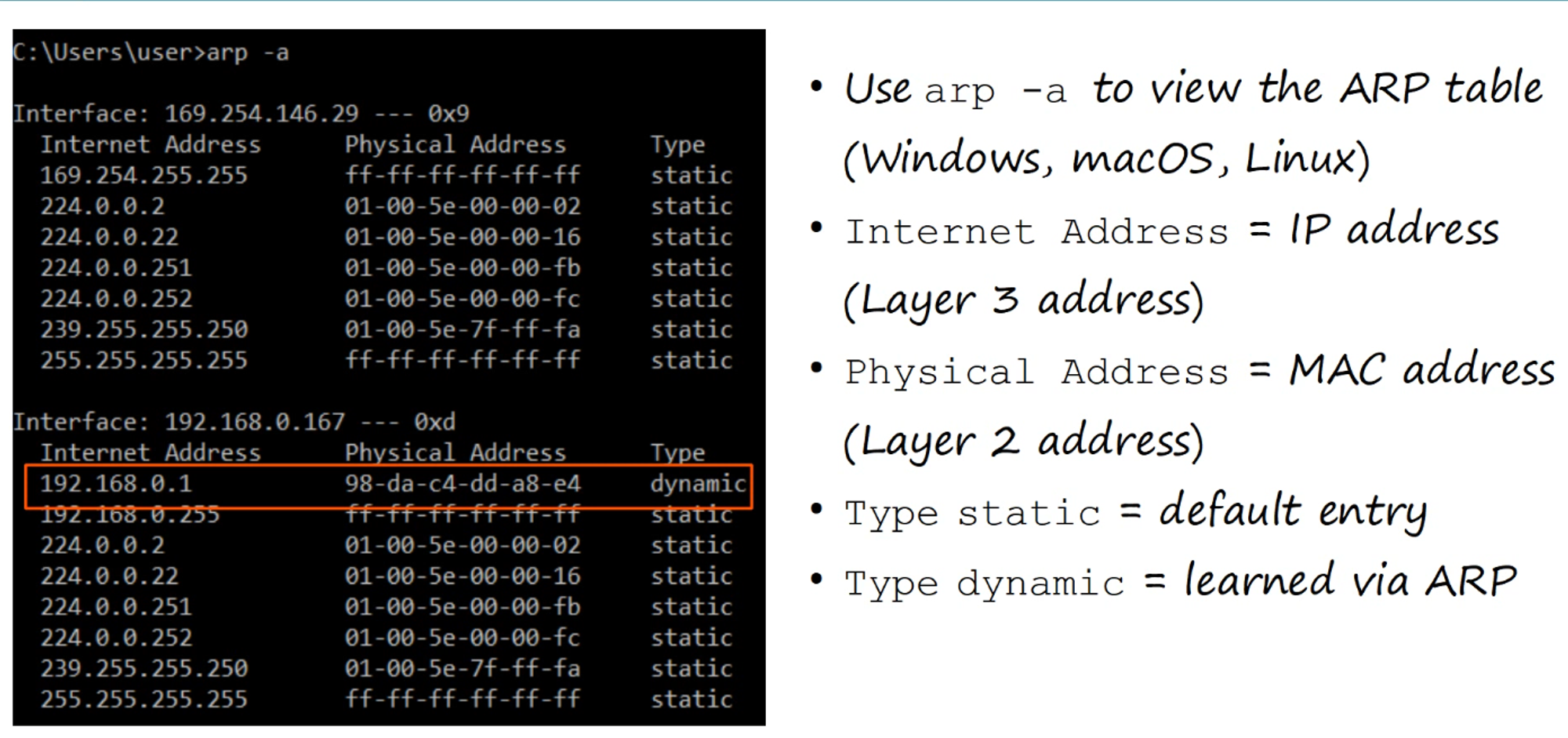
ARP Table Command
- Command:
show arp - Displays the ARP table of the device.
MAC Address Table Commands
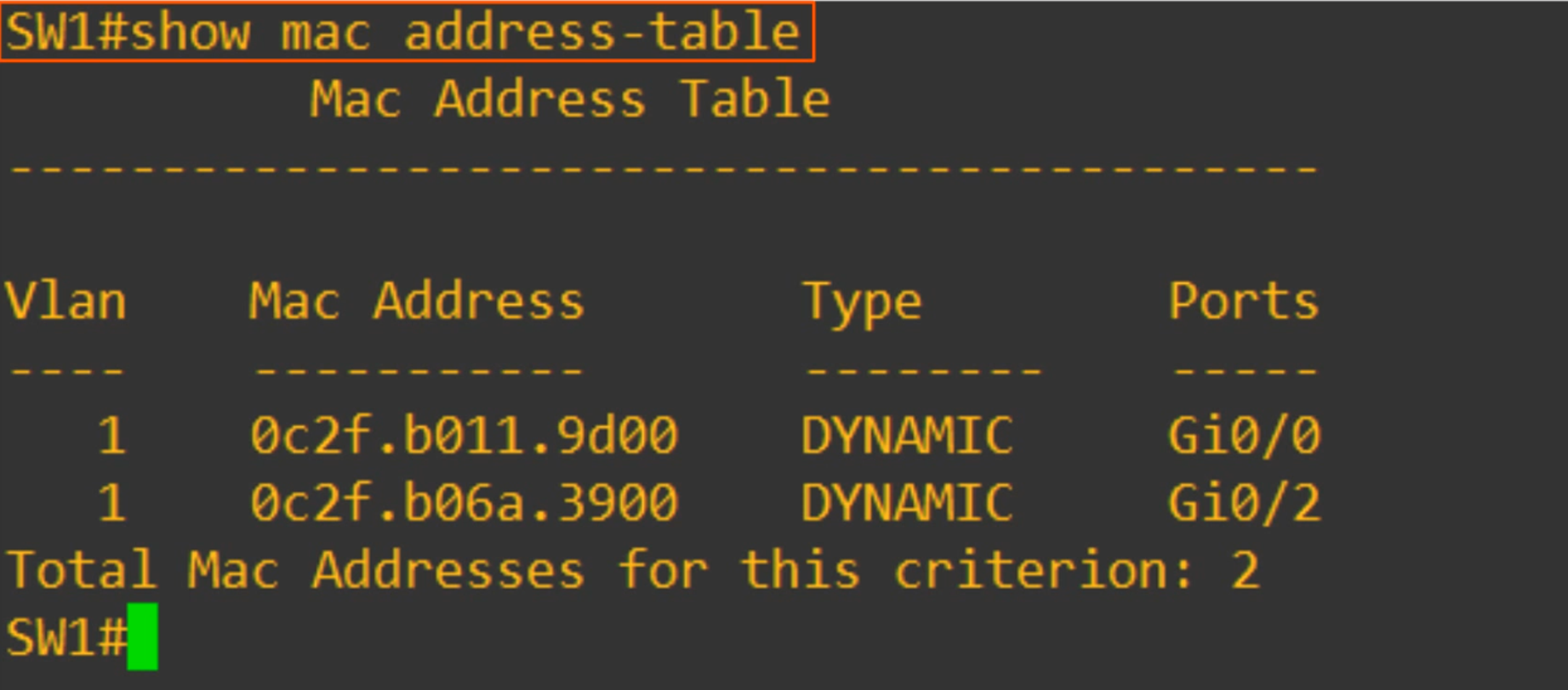
- Command:
show mac address-table- Displays the MAC address table of the switch, showing:
- VLAN
- MAC Address
- Type
- Ports (interfaces)
- Displays the MAC address table of the switch, showing:
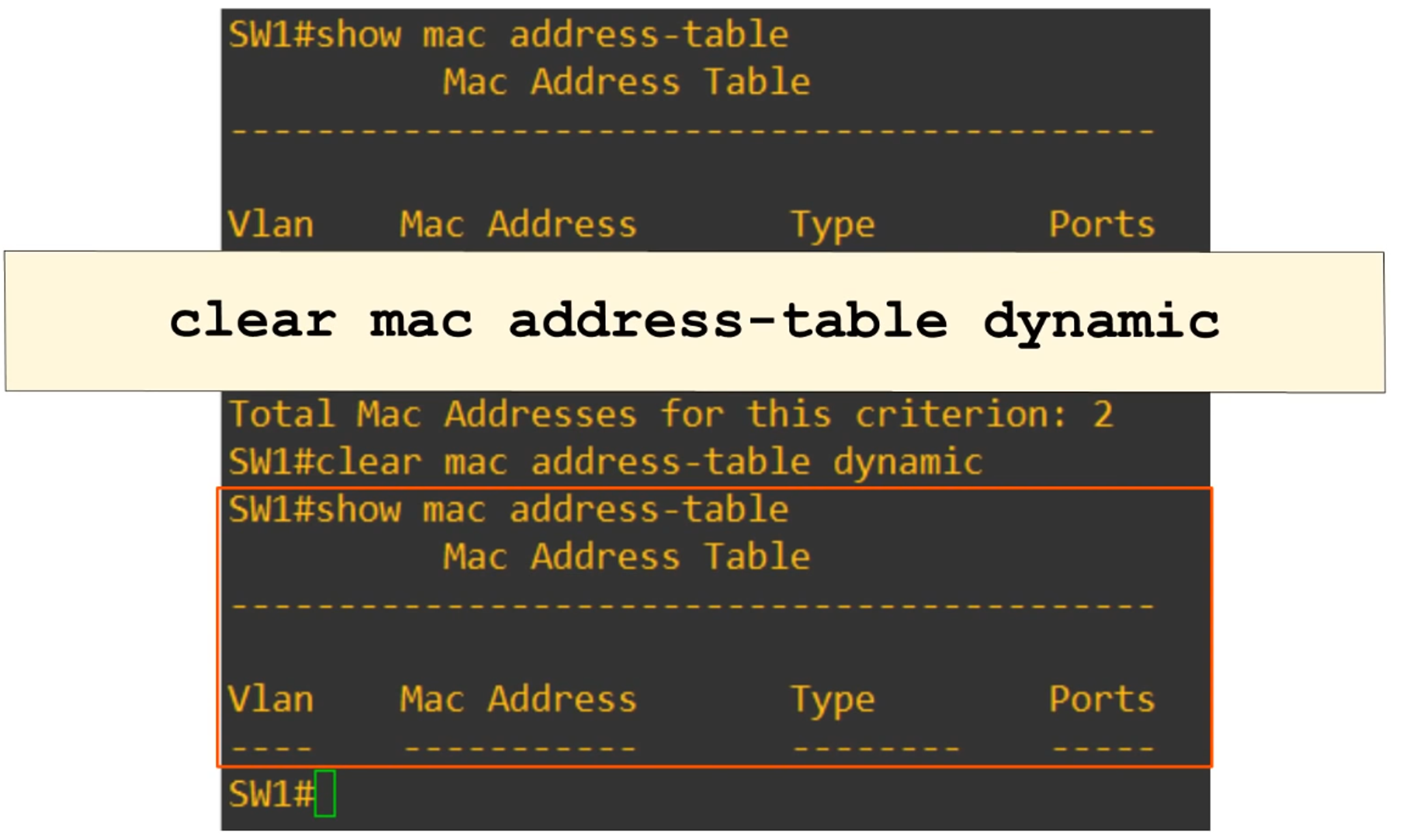
Clearing the MAC Address Table
-
Command:
clear mac address-table dynamic <optional MAC address>- Clears the entire MAC address table on the switch.
- If a specific MAC address is provided, only that entry will be cleared.
-
Command:
clear mac address-table dynamic interface <optional Interface>- Clears MAC table entries for a specific interface on the switch.