OSI Model - Network Layer (Layer 3)
- Purpose: Provides connectivity between end hosts on different networks (i.e., outside of the LAN).
- Key Functions:
- Logical addressing (IP addresses).
- Path selection between source and destination.
- Devices: Routers operate at Layer 3.
Routing
- Switches (Layer 2 devices) connect and expand networks within the same LAN. They do not separate different networks.
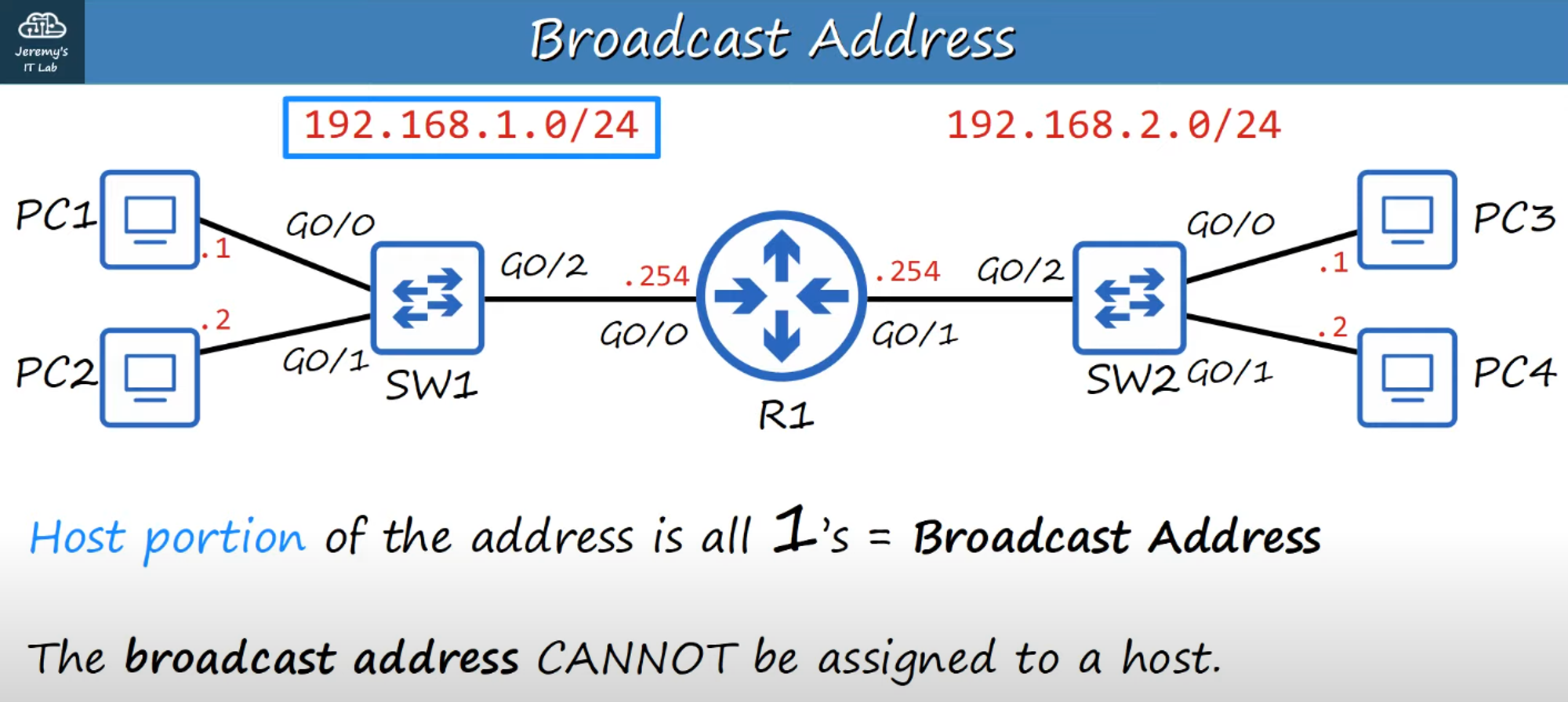
- Routers: By introducing a router between two switches, you split the network into two separate networks, each with its own network IP address.
Example:
- Network 1: 192.168.1.0/24 (255.255.255.0)
- Network 2: 192.168.2.0/24 (255.255.255.0)
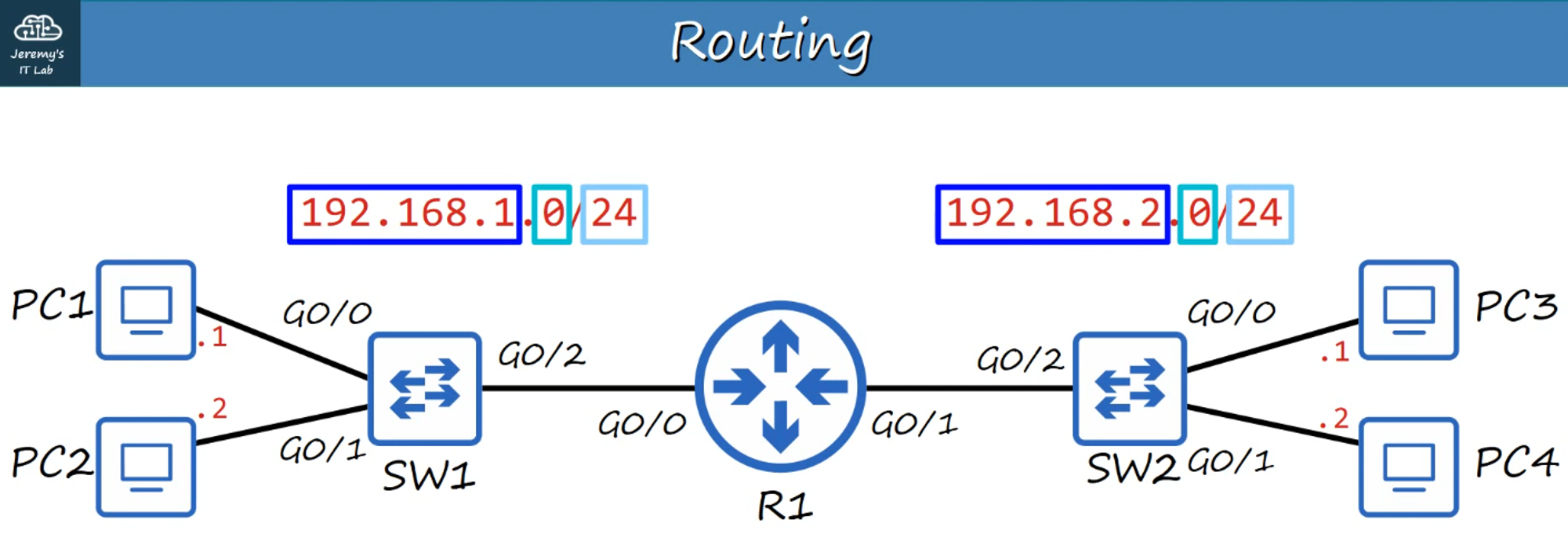
Routers have unique IP addresses for each of their interfaces, depending on their location:
- G0/0 Interface: 192.168.1.254/24
- G0/1 Interface: 192.168.2.254/24
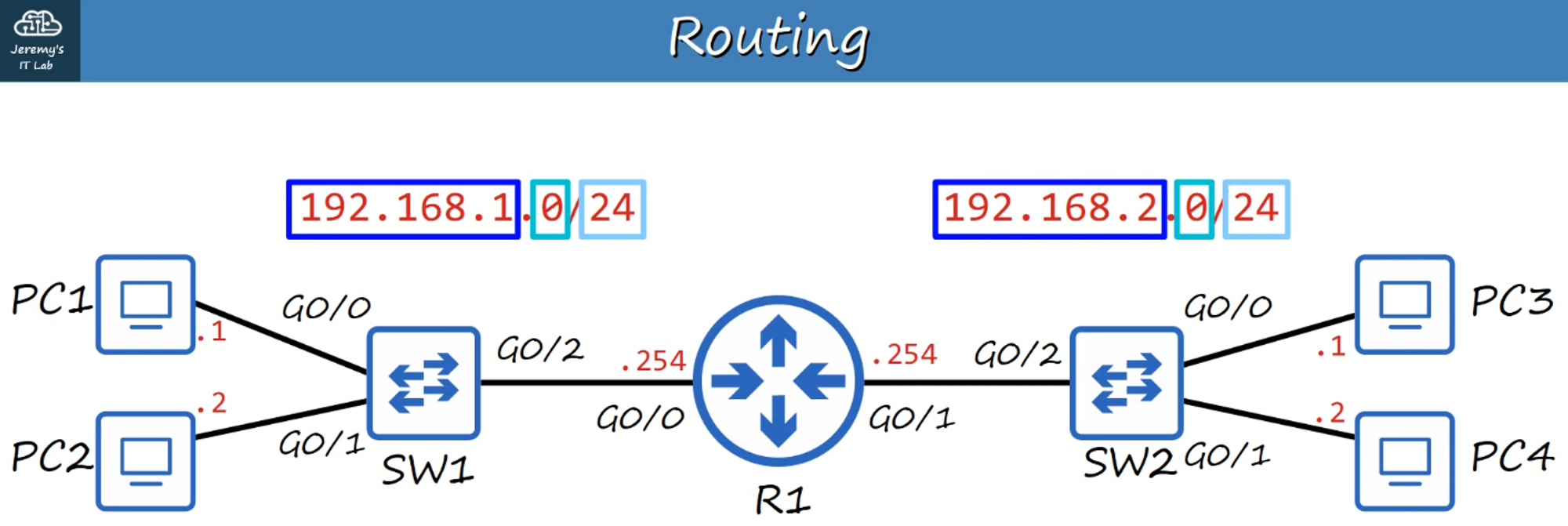
- The IP address of a router’s interface depends on the network address of the LAN it connects to.
- The network portion of an IP address is the same for all hosts on a given LAN.
Example:
- 192.168.1.100
- 192.168.1.105
- 192.168.1.205
All of these IP addresses belong to the same network because the network portion (192.168.1) is the same, while the host portion (100, 105, 205) is unique.
- Broadcast Messages: When a broadcast message reaches a router, it does not continue beyond the local LAN; it stays within the switch/hosts.
IPv4 Header
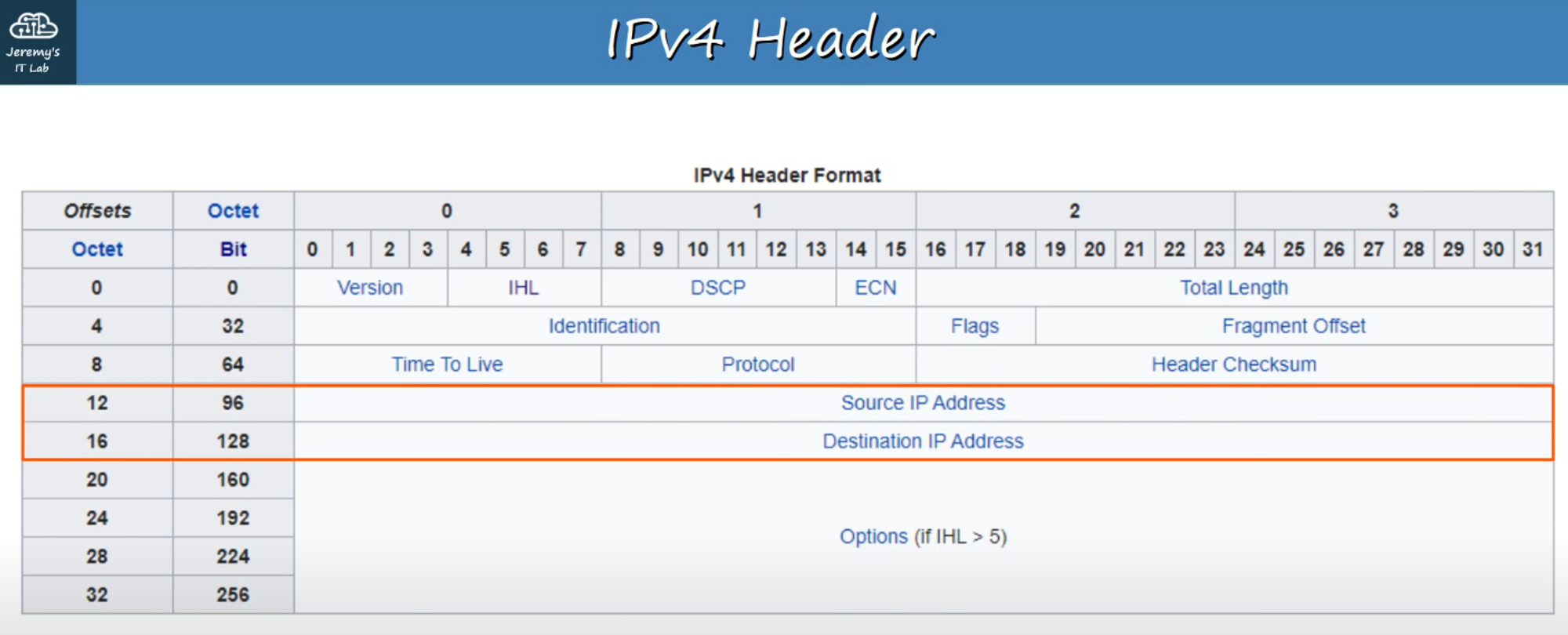
- IPv4 (Internet Protocol version 4): The primary Layer 3 protocol in use today.
- IPv4 Headers: Contain more fields than Ethernet headers.
- Important fields include the Source IP Address and Destination IP Address, each 32 bits (4 bytes) in length.
Example:
- IP Address: 192.168.1.254
- Each decimal number in an IP address represents 8 bits, and these 8-bit groups are referred to as octets.
Binary Representation:
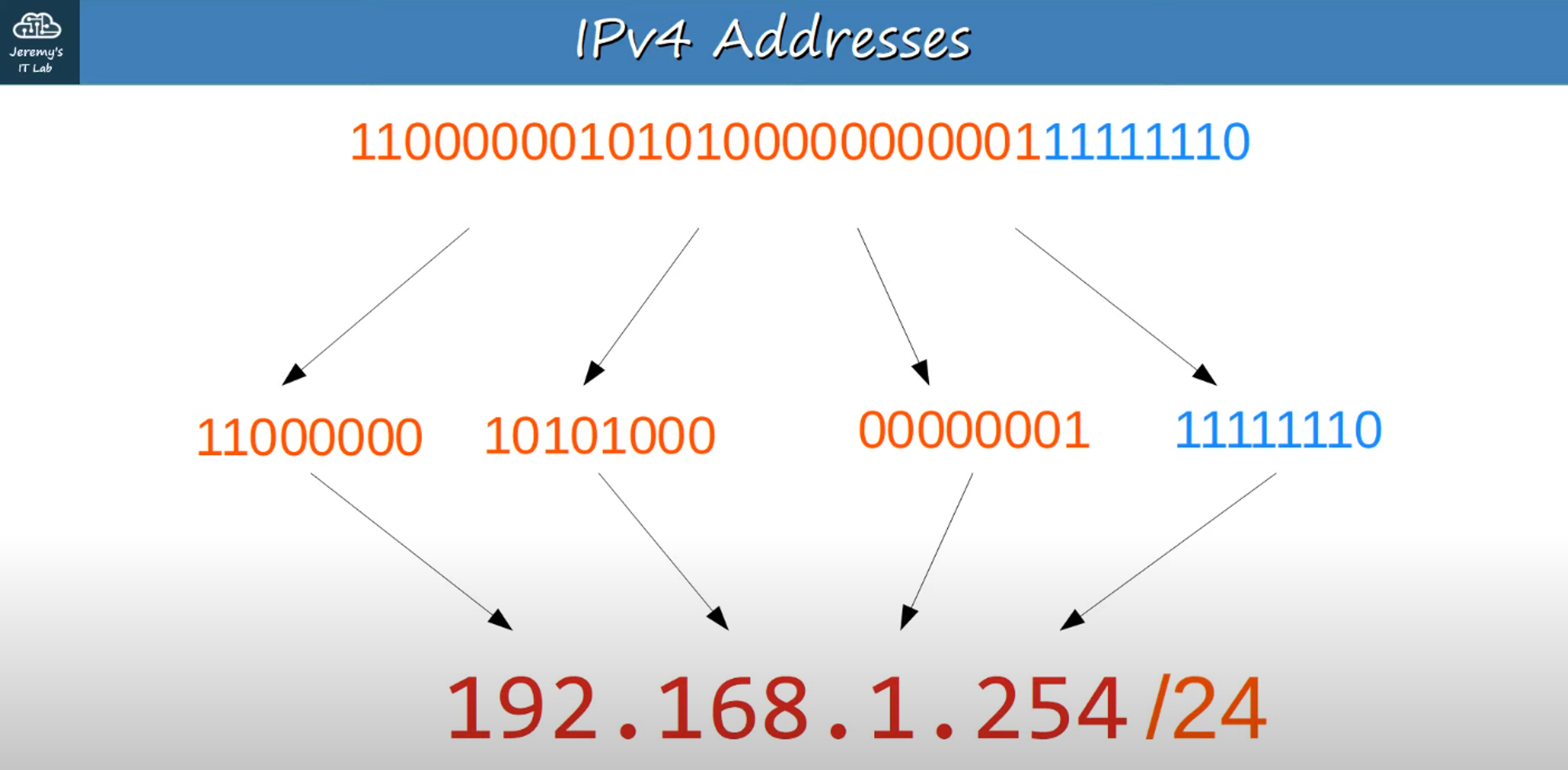
- 192.168.1.254 → 11000000 . 10101000 . 00000001 . 11111110
- Note: Binary is difficult to read for humans, so we use the Dotted Decimal format.
Review of Decimal and Hexadecimal
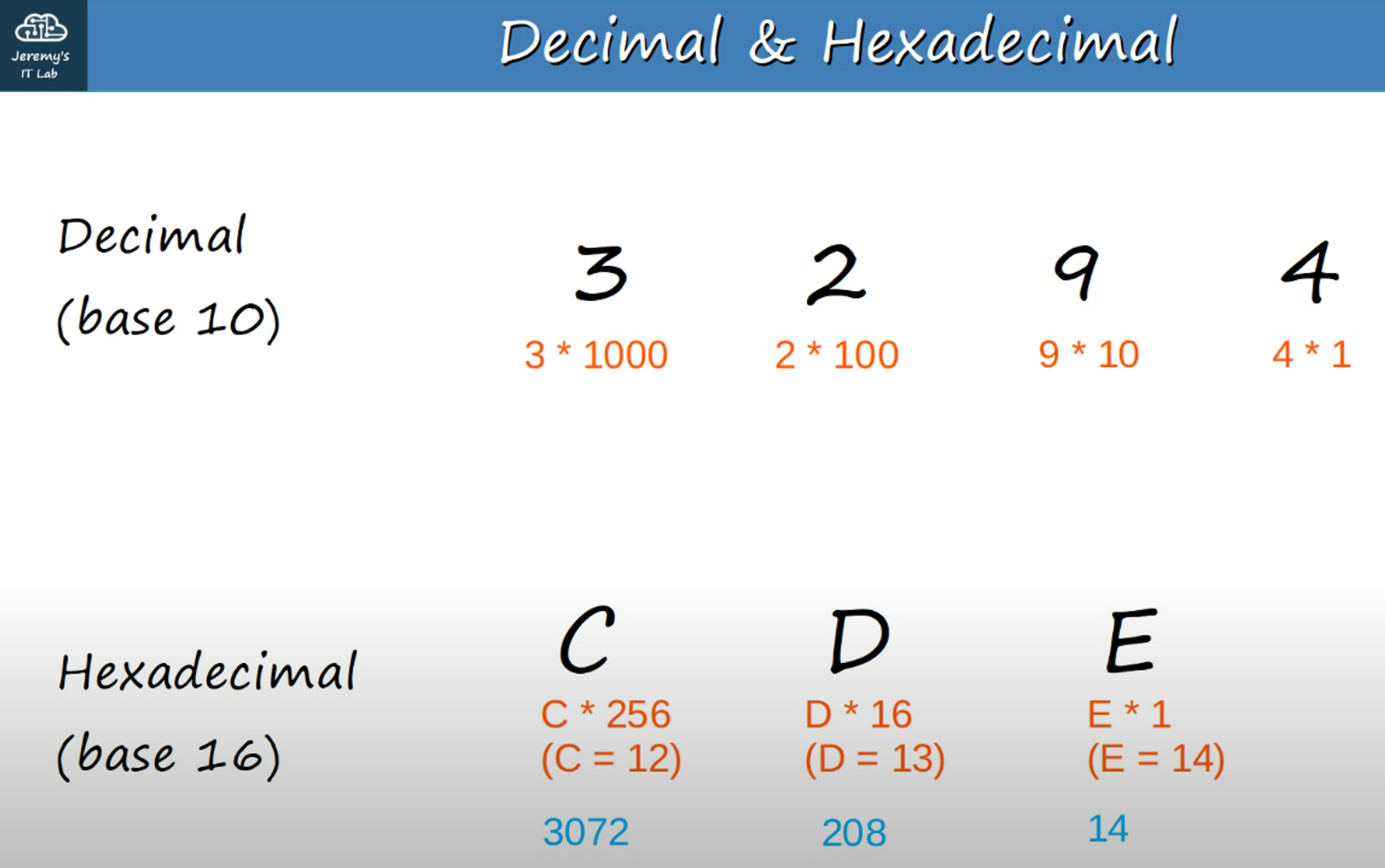
- Decimal (Base 10):
- Example: 3294 = (3 * 1000) + (2 * 100) + (9 * 10) + (4 * 1)
- Hexadecimal (Base 16):
- Example: 3294 in hexadecimal is CDE
C (C * 256 / 12 * 256 = 3072) // 256ths position D (D * 16 / D=13 so 16*13 = 208) // 16ths position E (E * 1 / E = 14) // 1s position- Adding these up, we get 3294.
Converting Binary to Decimal
Example 1: Convert 10001111 to Decimal.
- Steps:
1 * 128 = 128 1 * 8 = 8 1 * 4 = 4 1 * 2 = 2 1 * 1 = 1- Add them up: 128 + 8 + 4 + 2 + 1 = 143
Example 2: Convert 01110110 to Decimal.
- Steps:
1 * 64 = 64 1 * 32 = 32 1 * 16 = 16 1 * 4 = 4 1 * 2 = 2- Add them up: 64 + 32 + 16 + 4 + 2 = 118
Example 3: Convert 11101100 to Decimal.
- Steps:
1 * 128 = 128 1 * 64 = 64 1 * 32 = 32 1 * 8 = 8 1 * 4 = 4- Add them up: 128 + 64 + 32 + 8 + 4 = 236
Converting Decimal to Binary
Example 1: Convert 221 to Binary.
- Steps:
221 - 128 = 93 → 1 in the "128" slot → 10000000 93 - 64 = 29 → 1 in the "64" slot → 11000000 29 - 32 = not possible → 0 in the "32" slot 29 - 16 = 13 → 1 in the "16" slot → 11010000 13 - 8 = 5 → 1 in the "8" slot → 11011000 5 - 4 = 1 → 1 in the "4" slot → 11011100 1 - 2 = not possible → 0 in the "2" slot 1 - 1 = possible → 1 in the "1" slot → 11011101- The binary representation of 221 is 11011101.
Example 2: Convert 127 to Binary.
- Steps:
127 - 128 = not possible → 0 in the "128" slot 127 - 64 = 63 → 1 in the "64" slot → 01100000 63 - 32 = 31 → 1 in the "32" slot → 01110000 31 - 16 = 15 → 1 in the "16" slot → 01111000 15 - 8 = 7 → 1 in the "8" slot → 01111100 7 - 4 = 3 → 1 in the "4" slot → 01111110 3 - 2 = 1 → 1 in the "2" slot → 01111111 1 is possible → 1 in the "1" slot → 01111111- The binary representation of 127 is 01111111.
Example 3: Convert 207 to Binary.
- Steps:
255 - 207 = 48 → The remainder helps find where the 0's are. 32 + 16 = 48 → This indicates the 0's in the binary.- The binary representation of 207 is 11001111.
IPv4 Addresses
IP addresses are the Dotted Decimal conversion of a series of binary numbers broken into four octets.
Example: 192.168.1.254/24
- The /24 indicates that the first 24 bits represent the network portion of the address.
- In this case, 192.168.1 is the network portion (first 3 octets), and .254 is the host portion (last octet).
Converting Binary to IPv4 Address
Example 1: Convert 10011010010011100110111100100000 to IPv4.
- Steps:
10011010 . 01001110 . 01101111 . 00100000 154 + 78 + 111 + 32 = 154.78.111.32- The IPv4 address is 154.78.111.32/16 (154.78 = Network, 111.32 = Host).
Example 2: Convert 00001100100000001111101100010111 to IPv4.
- Steps:
00001100 . 10000000 . 11111011 . 00010111 12 + 128 + 251 + 23 = 12.128.251.23- The IPv4 address is 12.128.251.23/8 (12 = Network, 128.251.23 = Host).
IPv4 Address Classes
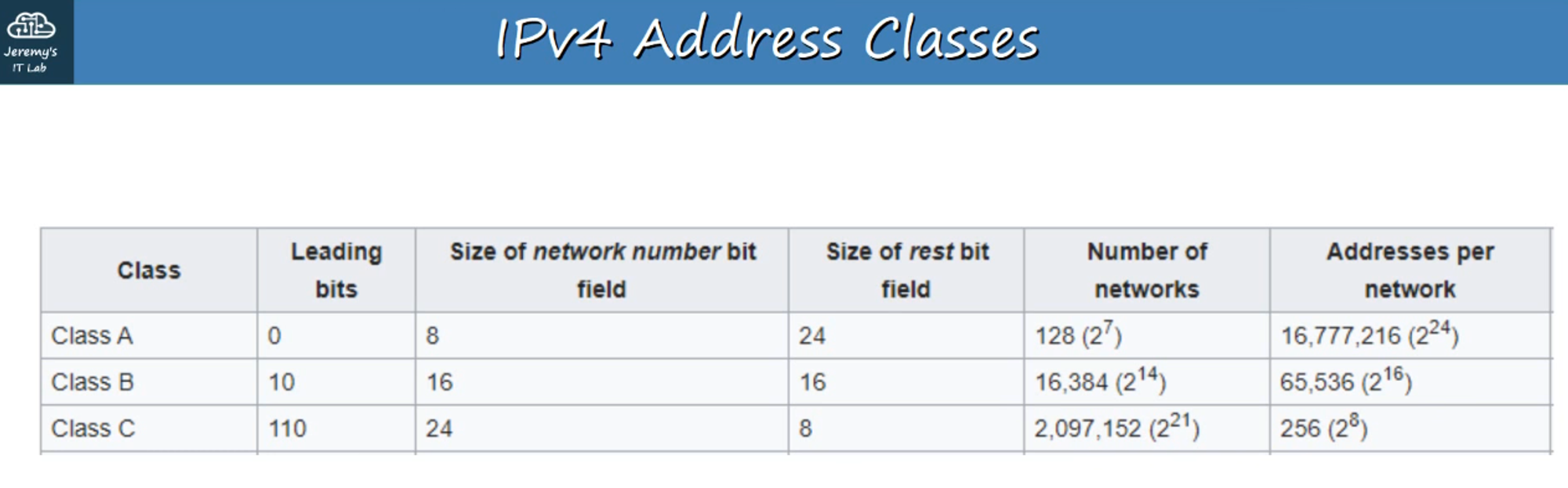
IPv4 addresses are divided into 5 different classes, determined by the first octet.
| Class | First Octet Binary | First Octet
Numeric Range | |-------|--------------------|---------------------------| | A | 0xxxxxxx | 0-126 (+127 for loopback) | | B | 10xxxxxx | 128-191 | | C | 110xxxxx | 192-223 | | D | 1110xxxx | 224-239 (Multicast) | | E | 1111xxxx | 240-255 (Experimental) |
Netmask
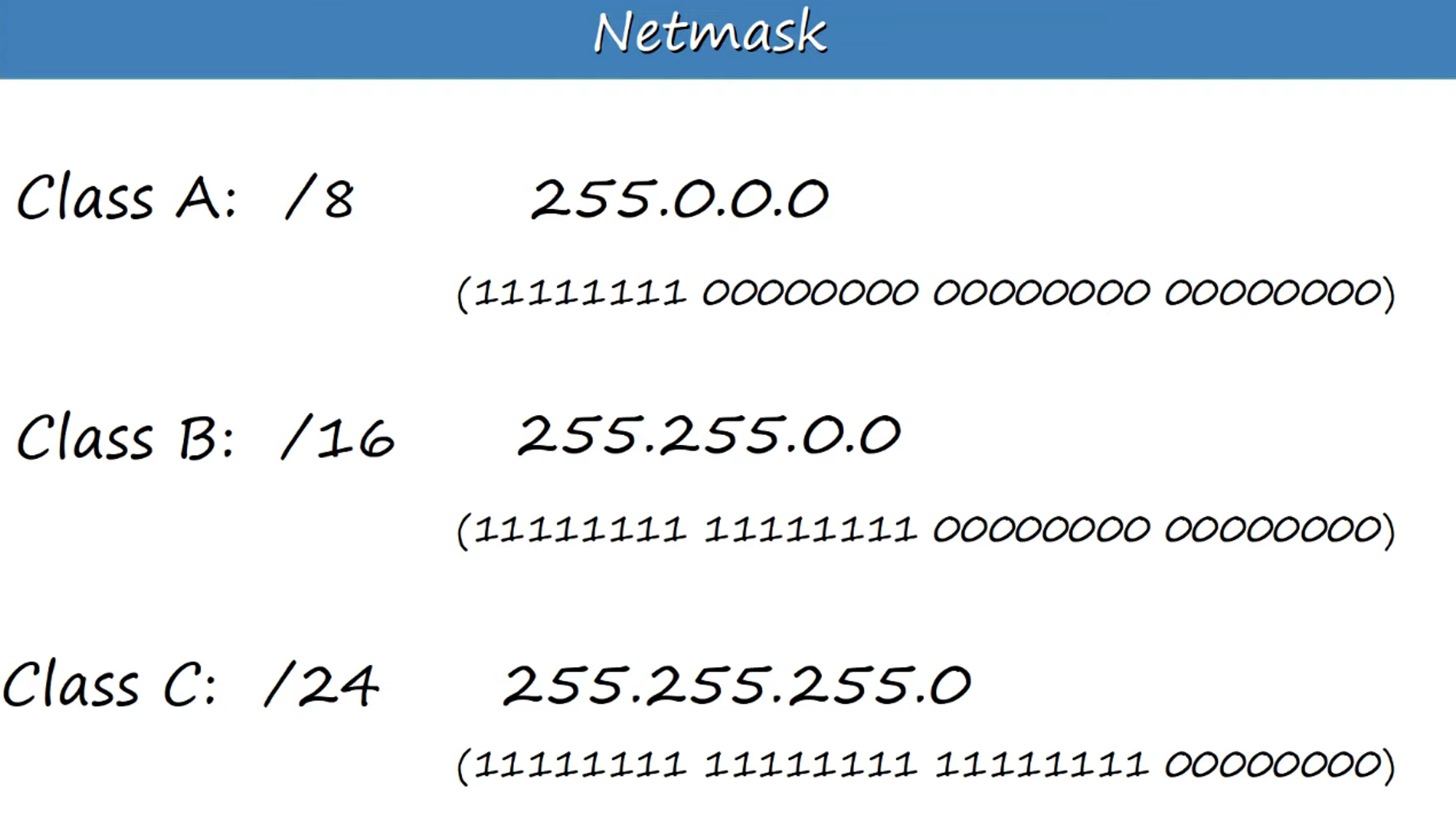
A netmask is written like a Dotted Decimal IP address and indicates the length of the network portion of an address.
- Class A: /8 → 255.0.0.0
- Class B: /16 → 255.255.0.0
- Class C: /24 → 255.255.255.0
Network Addresses
- If the host portion of an IP address is all 0’s, it signifies the network address—the identifier of the network itself.
Example: 192.168.1.0/24 represents a network address and cannot be assigned to a host.
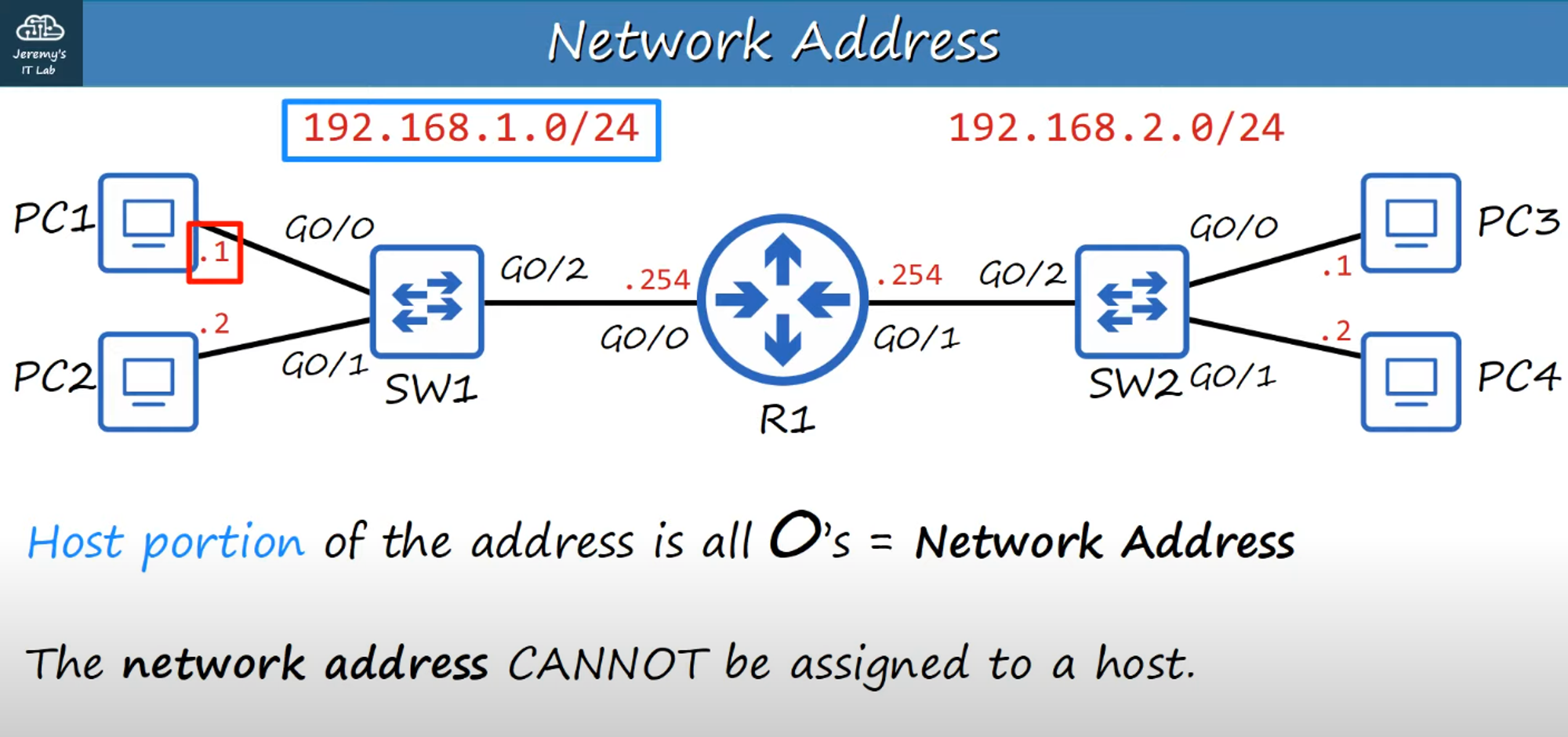
- If the host portion of an IP address is all 1’s, it represents the broadcast address for the network and cannot be assigned to a host.
Example:
- Destination IP: 192.168.1.255 (Broadcast IP address)
- Destination MAC: FFFF.FFFF.FFFF (Broadcast MAC address)
- Because of these two reserved addresses, the range of usable host addresses is 1 to 254 for a /24 network.