- Although we will briefly look at other types of WIRELESS NETWORKS, in this section of the course we will be focusing on WIRELESS LANs using WI-FI
- The STANDARDS we use for WIRELESS LANs are defined in IEEE 802.11
- The term WI-FI is a trademark of the WI-FI ALLIANCE, not directly connected to the IEEE
- The WI-FI ALLIANCE tests and certifies equipment for 802.11 standards compliance
- However, WI-FI has become the common term that people use to refer to 802.11 WIRELESS LANs and that term will be used through the course videos
WIRELESS NETWORKS
- WIRELESS NETWORKS have some issues that we need to deal with
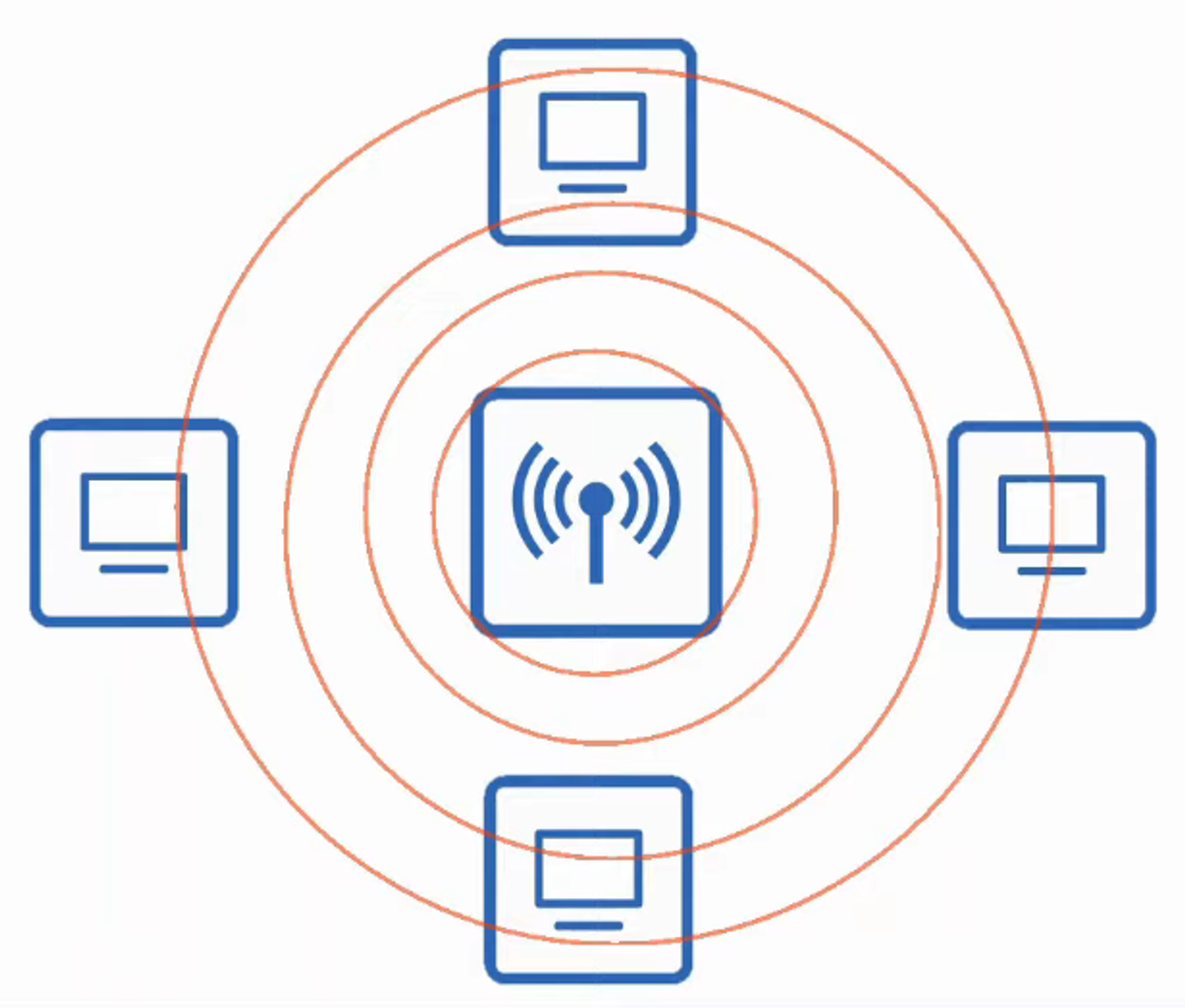
- ALL DEVICES within range receive ALL FRAMES, like DEVICES connected to an ETHERNET HUB
-
Privacy of DATA within the LAN is a greater concern
-
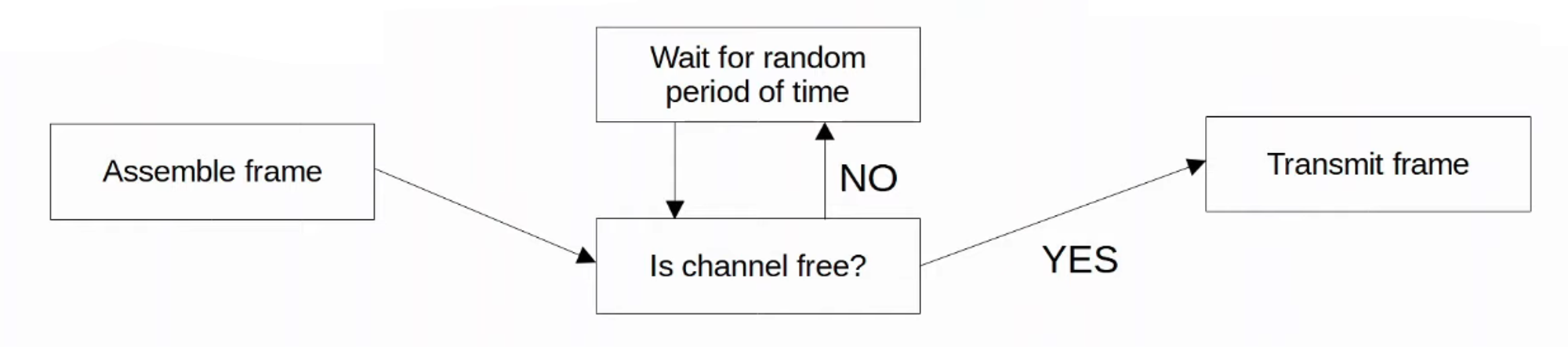
CSMA/CA (Carrier Sense Multiple Access with Collision Avoidance) is used to facilitate HALF-DUPLEX communications
-
CSMA / CD is used in WIRED NETWORKS to detect and recover from COLLISIONS
-
CSMA / CA is used in WIRELESS NETWORKS to avoid COLLISIONS
-
When using CSMA / CA, a DEVICE will wait for other DEVICES to STOP TRANSMITTING before it TRANSMITS DATA itself.
-
WIRELESS COMMUNICATIONS are regulated by various INTERNATIONAL and NATIONAL bodies
-
WIRELESS SIGNAL COVERAGE AREA must be considered
- Signal Range
- Signal ABSORPTION, REFLECTION, REFRACTION, DIFFRACTION, and SCATTERING
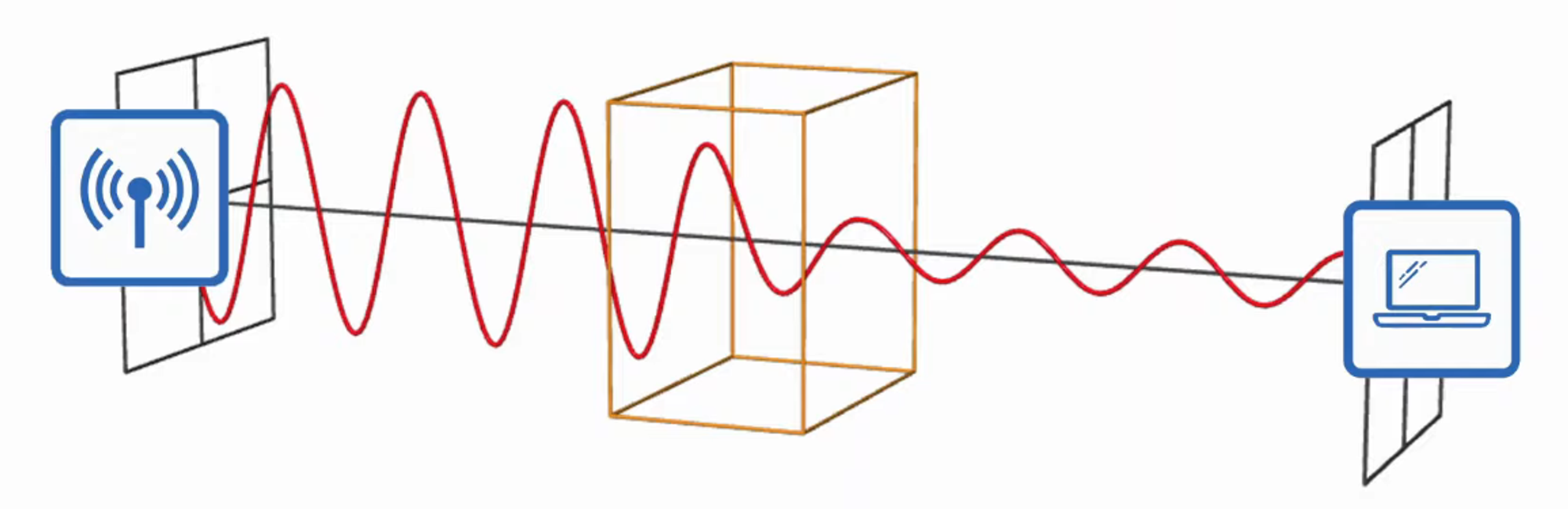
SIGNAL ABSORPTION
- ABSOPTION happens when a WIRELESS SIGNAL PASSES THROUGH a material and is converted into HEAT, weakening the SIGNAL
SIGNAL REFLECTION
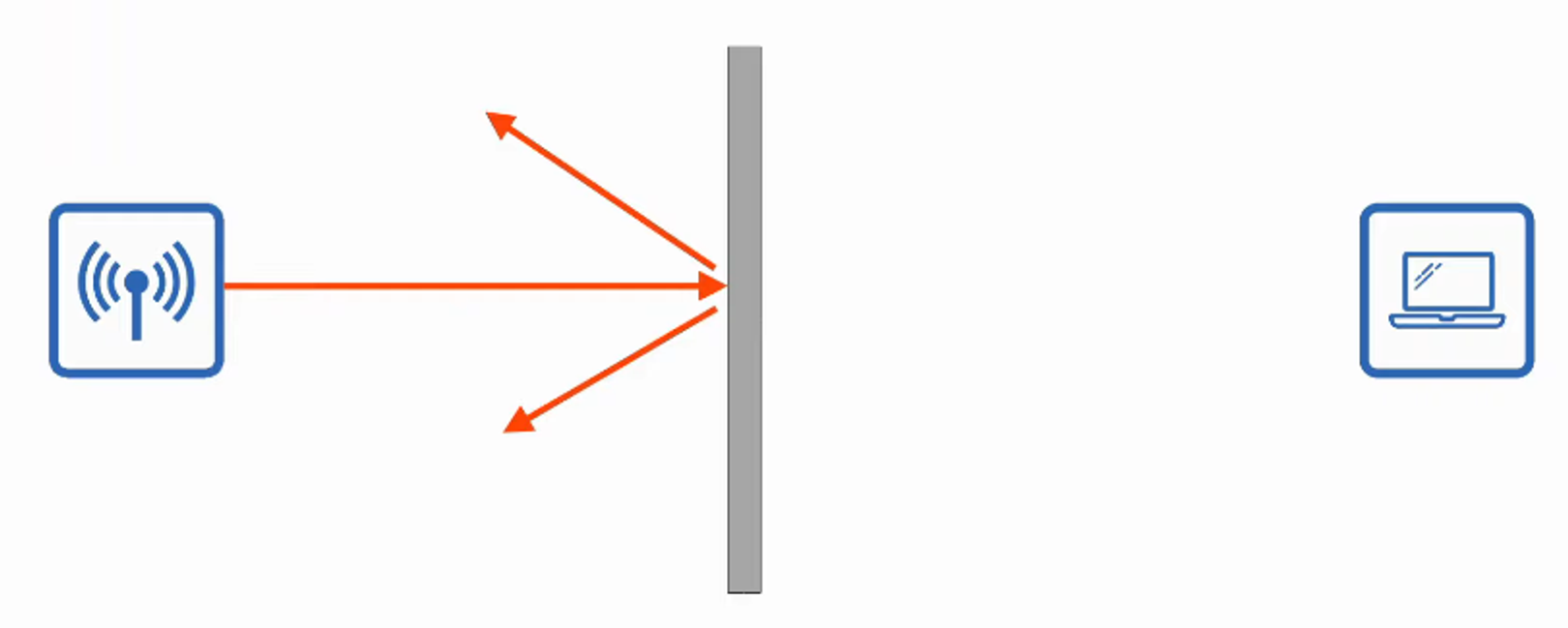
- REFLECTION happens when a SIGNAL BOUNCES off a material (like metal)
- This is why WI-FI reception is usually POOR in elevators. The SIGNAL bounces off the metal and very little penetrates into the elevator
SIGNAL REFRACTION
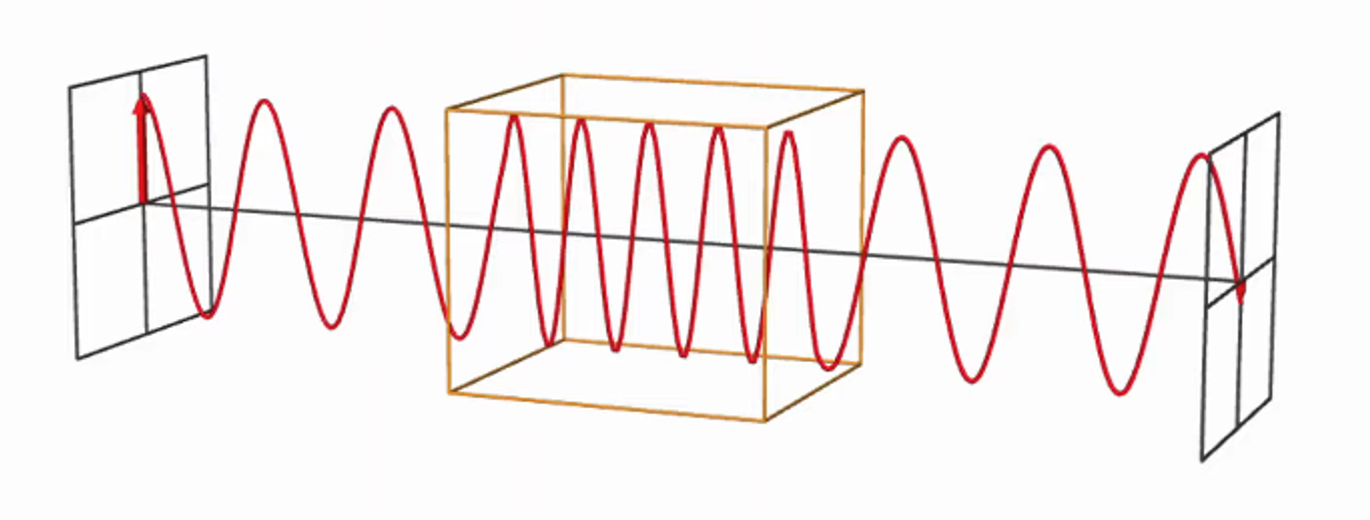
- REFRACTION happens when a WAVE is BENT when entering a medium where the SIGNAL travels at a different speed
- For example, glass and water can refract waves
SIGNAL DIFFRACTION
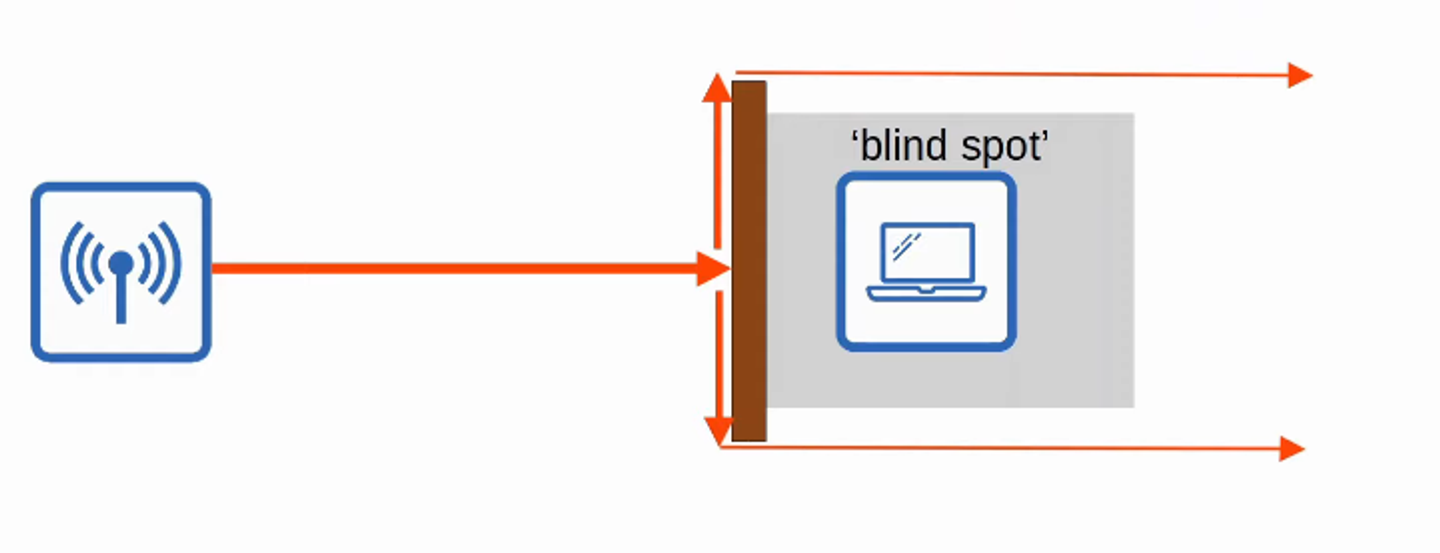
- DIFFRACTION happens when a WAVE encounters an OBSTACLE and travels AROUND it
- This can result in “BLIND SPOTS” behind the obstacle
SIGNAL SCATTERING
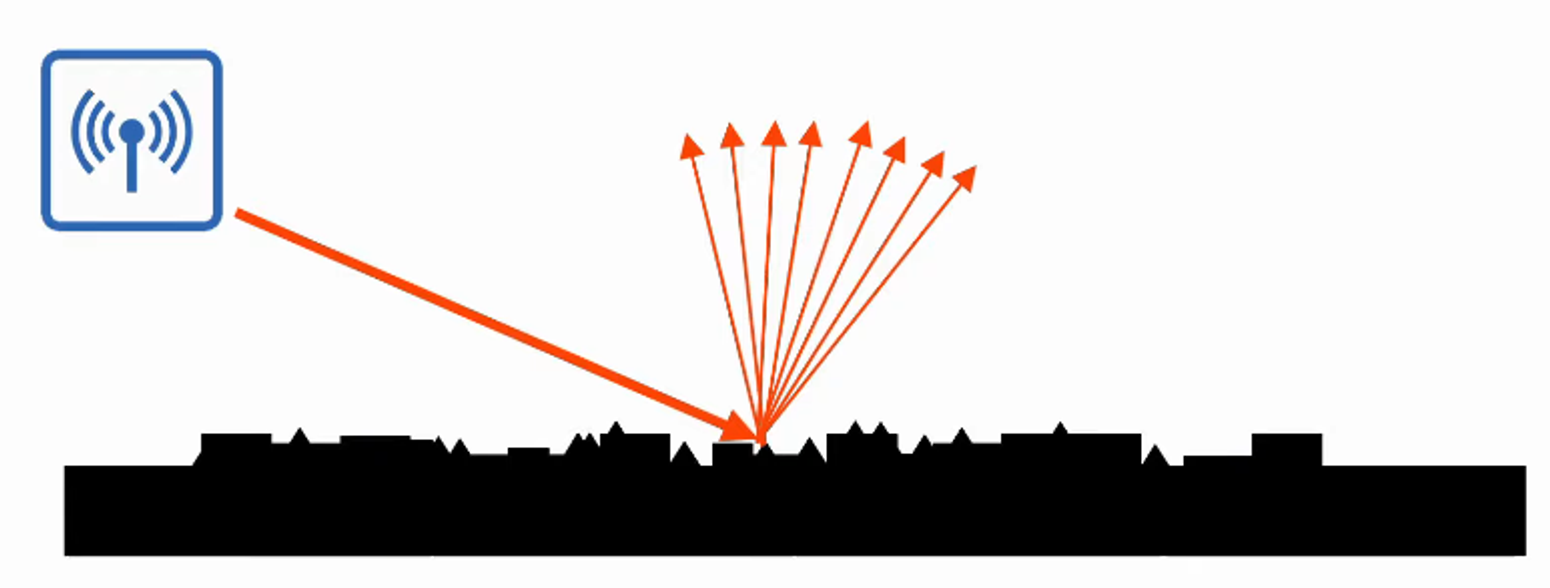
- SCATTERING happens when a material causes a SIGNAL to SCATTER in all directions
- Dust, smog, uneven surfaces, etc. can cause scattering
- Other DEVICES using the SAME CHANNELS can cause INTERFERENCE
- For example, a WIRELESS LAN in your neighbor’s house / apartment
RADIO FREQUENCY (RF)
- To send WIRELESS SIGNALS, the SENDER applies an ALTERNATING CURRENT to an antenna
- This creates ELECTROMAGNETIC WAVES which propagate out as WAVES
- ELECTROMAGENETIC WAVES can be measured in multiple ways - for example AMPLITUDE and FREQUENCY
- AMPLITUDE is the MAXIMUM STRENGTH of the ELECTRIC and MAGNETIC FIELDS
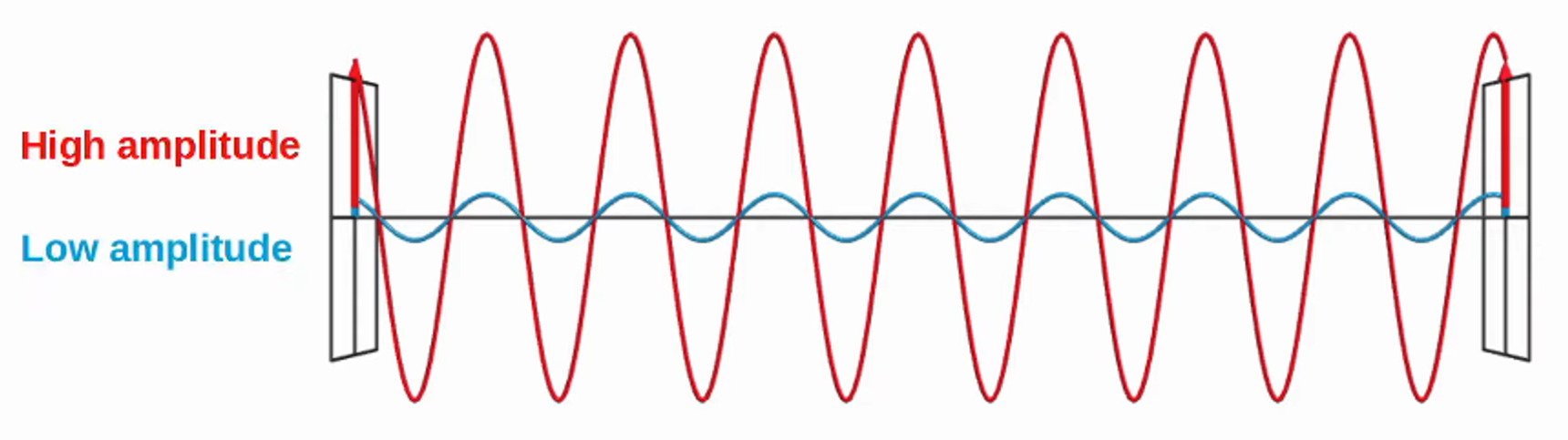
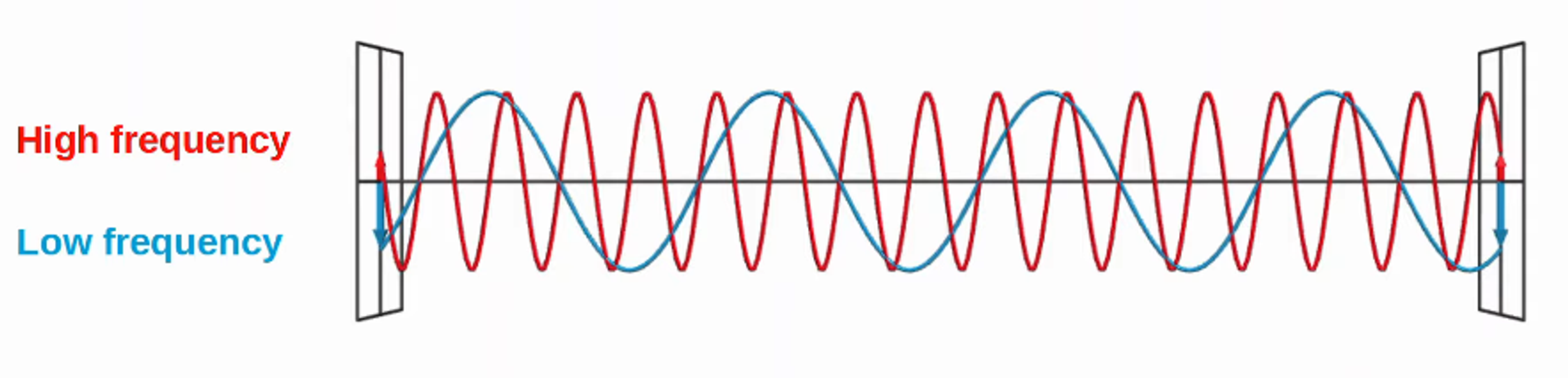
- FREQUENCY measures the number of UP / DOWN CYCLES per a GIVEN UNIT of TIME
- The most COMMON measurement of FREQUENCE is HERTZ
- Hz (HERTZ) = cycles per second
- kHz (KILOHERZ) = 1,000 cycles per second
- MHz (MEGAHERZ) = 1,000,000 cycles per second
- GHz (GIGAHERTZ) = 1,000,000,000 cycles per second
- THz (TERAHERTZ) = 1,000,000,000,000 cycles per second
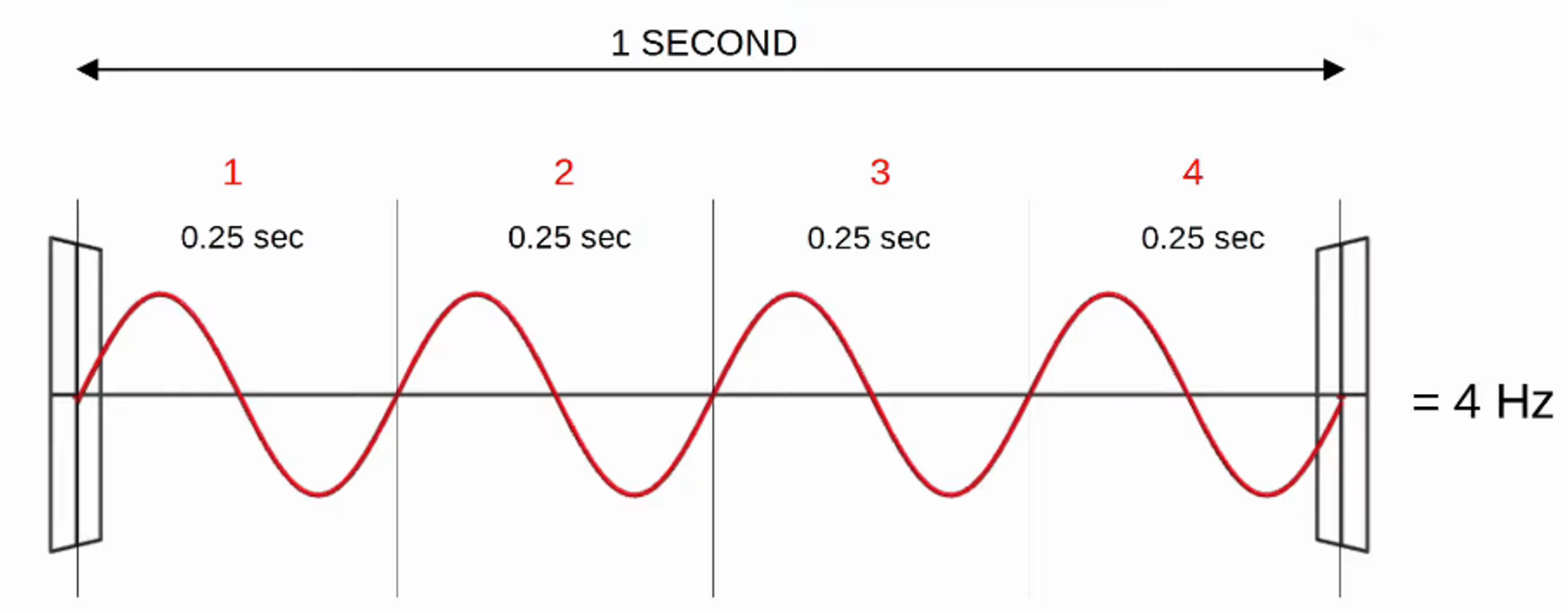
4 CYCLES per 1 SECOND = 4 HERTZ
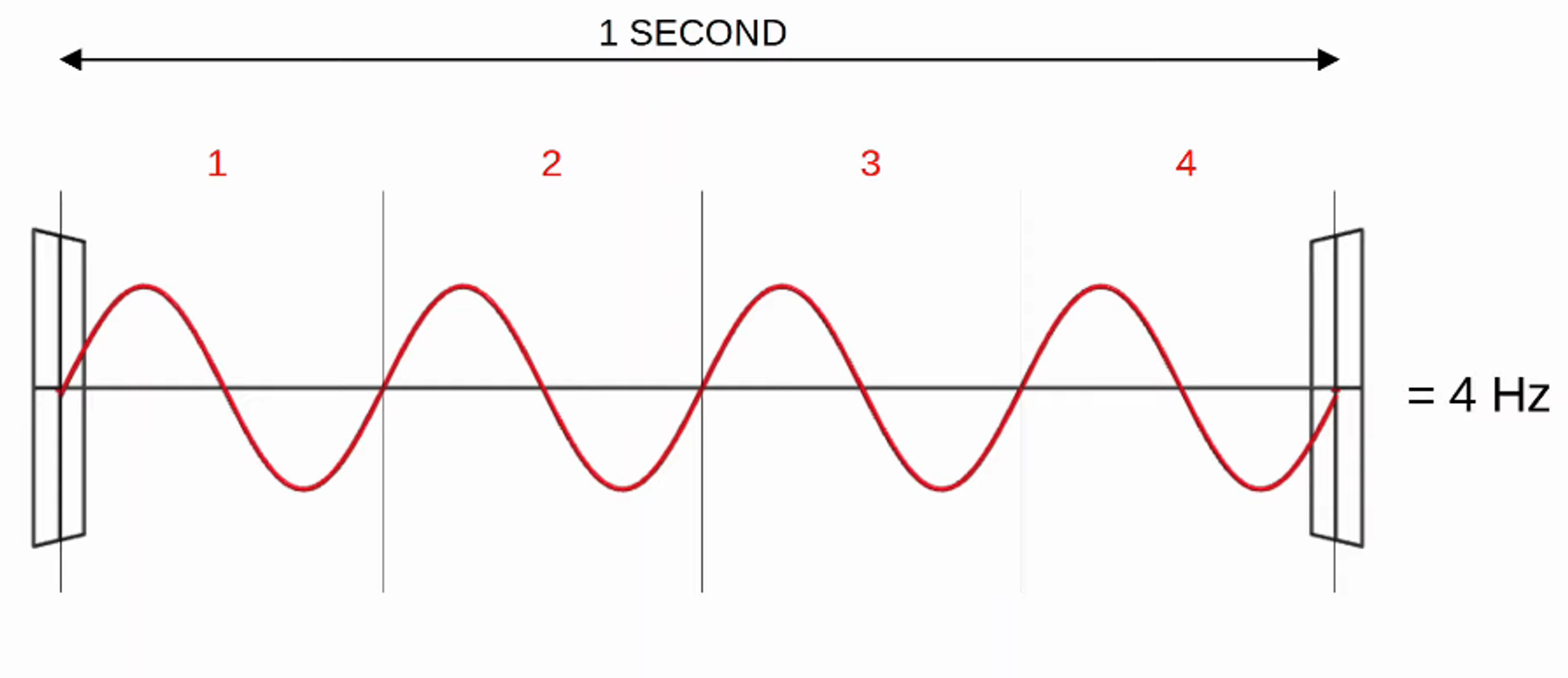
- Another important term is PERIOD, the amount of TIME of ONE CYCLE
- If the FREQUENCY is 4 Hz, the PERIOD is 0.25 SECONDS
- The VISIBLE FREQUENCY RANGE is ~400 THz to 790 THz
- The RADIO FREQUENCY RANGE is 30 Hz to 300 GHz and is used for many purposes.

Je continue avec la suite du contenu, en respectant le format demandé :
RADIO FREQUENCY BANDS
-
WI-FI uses TWO MAIN BANDS (FREQUENCY RANGES)
-
2.4 GHz band
- Range is 2.400 - 2.4835 GHz
-
5 GHz band
- Range is 5.150 - 5.825 GHz
- Divided into FOUR SMALLER BANDS:
- 5.150 - 5.250 GHz
- 5.250 - 5.350 GHz
- 5.470 - 5.725 GHz
- 5.725 - 5.825 GHz
-
The 2.4 GHz band typically provides FURTHER REACH in open space and BETTER PENETRATION of obstacles such as walls.
- HOWEVER, more DEVICES tend to use the 2.4 GHz BAND so INTERFERENCE can be a BIGGER PROBLEM compared to 5GHz
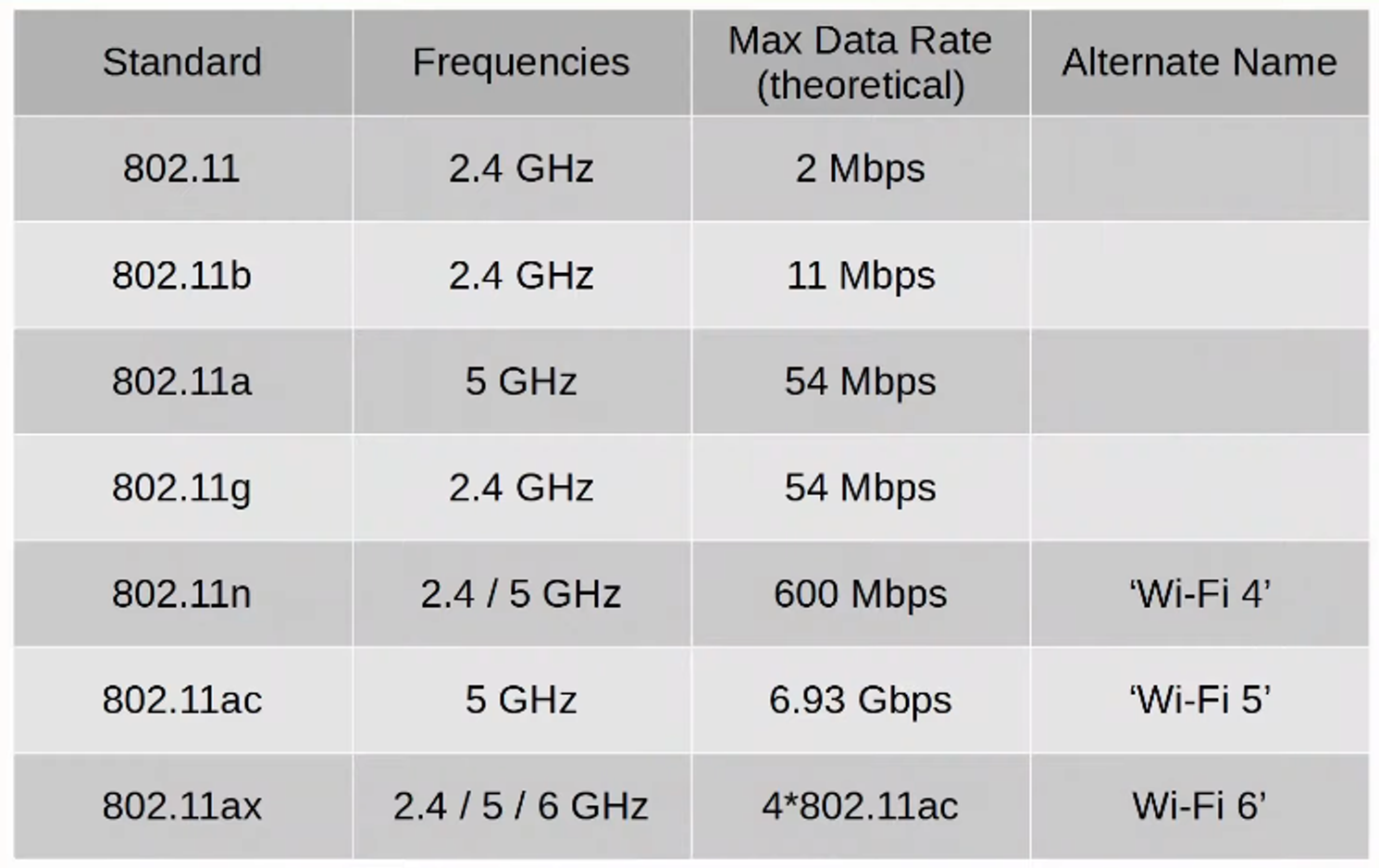
** WI-FI 6 (802.11ax) has EXPANDED the spectrum range to include a band in the 6 GHz RANGE
CHANNELS
- Each BAND is divided up into MULTIPLE “CHANNELS”
- DEVICES are configured to TRANSMIT and RECEIVE traffic on one (or more) of these CHANNELS
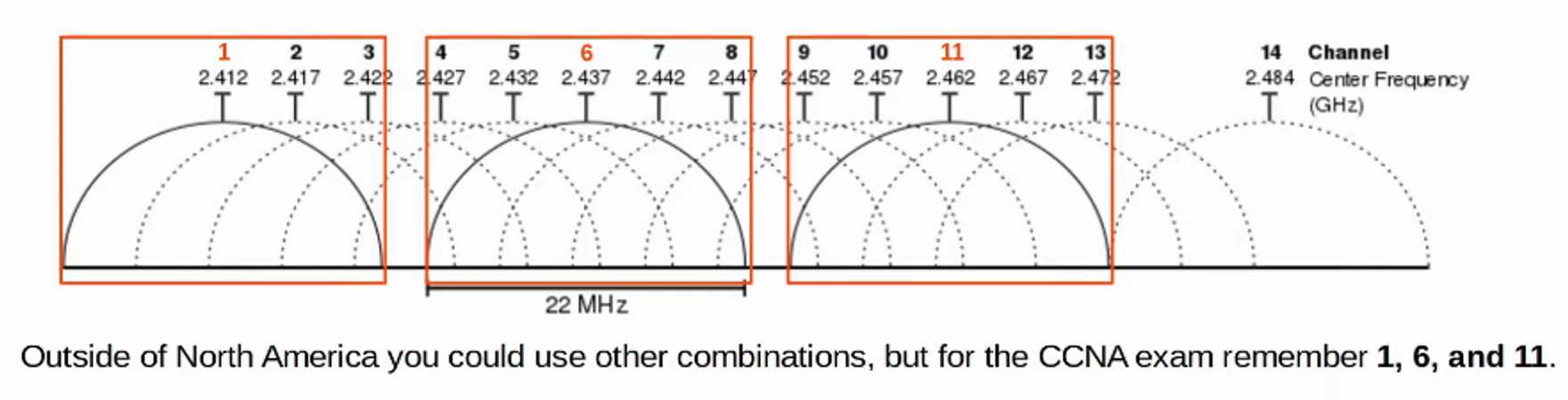
- The 2.4 GHz BAND is divided into several CHANNELS, each with a 22 MHz RANGE
- In a SMALL WIRELESS LAN with only a single ACCESS POINT (AP), you can use ANY channel
- However, in larger WLANs with multiple APs, it’s important that adjacent APs don’t use OVERLAPPING CHANNELS. This helps avoid INTERFERENCE
- In the 2.4 GHz BAND, it is recommended to use CHANNELS 1, 6 and 11
-
The 5 GHz BAND consists of NON-OVERLAPPING channels so it’s much EASIER to avoid INTERFERENCE between adjacent APs
-
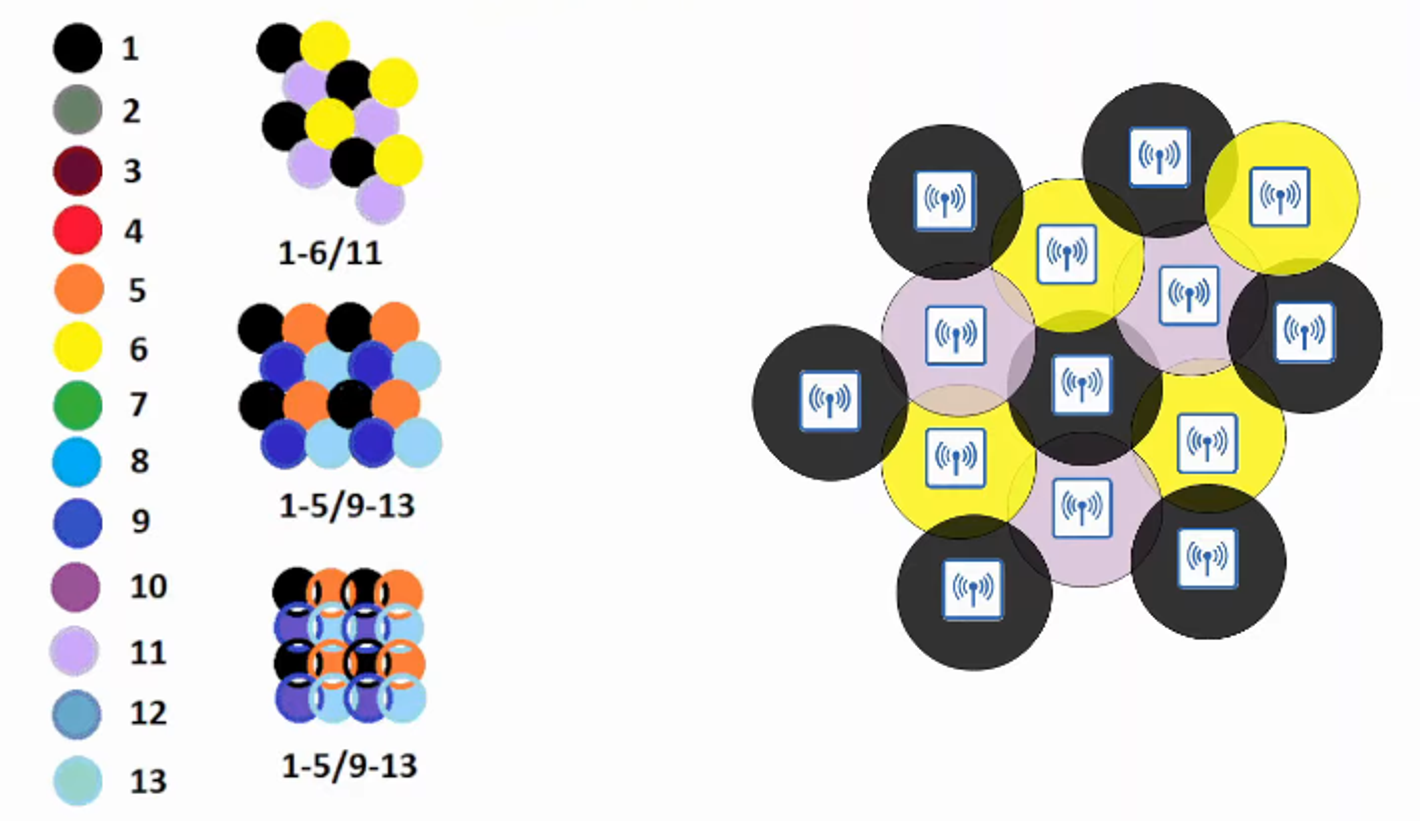
Using CHANNELS 1, 6, 11, you can place APs in a “HONEYCOMB” pattern to provide COMPLETE coverage of an area without INTERFERENCE between CHANNELS
WI-FI STANDARDS (802.11)
SERVICE SETS
- 802.11 defines different kinds of SERVICE SETS which are groups of WIRELESS NETWORK DEVICES
- There are THREE MAIN TYPES:
- INDEPENDENT
- INFRASTRUCTURE
- MESH
- ALL DEVICES in a SERVICE SET share the same SSID (Service Set Identifier)
- The SSID is a HUMAN-READABLE NAME which identifies the SERVICE SET
- The SSID does NOT have to be UNQUE
SERVICE SETS : IBSS
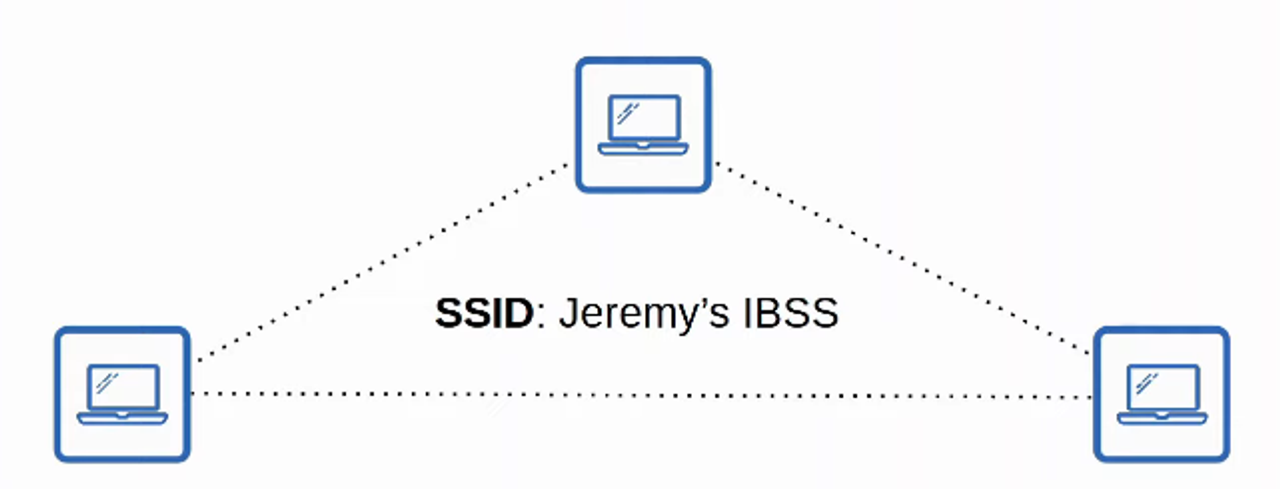
- An IBSS (INDEPENDENT BASIC SERVICE SET) is a WIRELESS NETWORK in which TWO or MORE WIRELESS DEVICES connect directly without using an AP (ACCESS POINT)
- Also called an AD HOC NETWORK
- Can be used for FILE TRANSFER (ie: AirDrop)
- Not scalable beyond a few DEVICES
SERVICE SETS : BSS
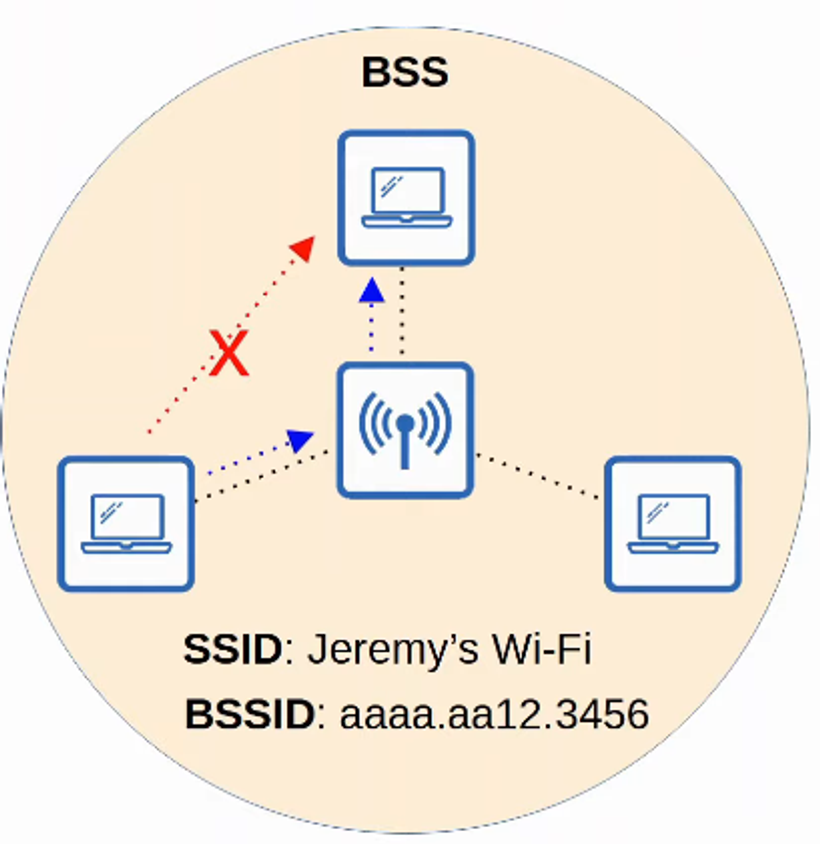
- A BSS (BASIC SERVICE SET) is a kind of infrastructure SERVICE SET in which CLIENTS connect to each other via an AP (ACCESS POINT) but not DIRECTLY to each other
- A BSSID (BASIC SERVICE SET ID) is used to uniquely identify the AP
- Other APs can use the SAME SSID but NOT THE SAME BSSID
- The BSSID is the MAC ADDRESS of the APs RADIO
- WIRELESS DEVICES request to associate with the BSS
- WIRELESS DEVICES that have associated with the BSS are called “CLIENTS” or “STATIONS”
- The AREA around an AP where its SIGNAL is usable is called a BSA (BASIC SERVICE AREA)
SERVICE SETS: ESS
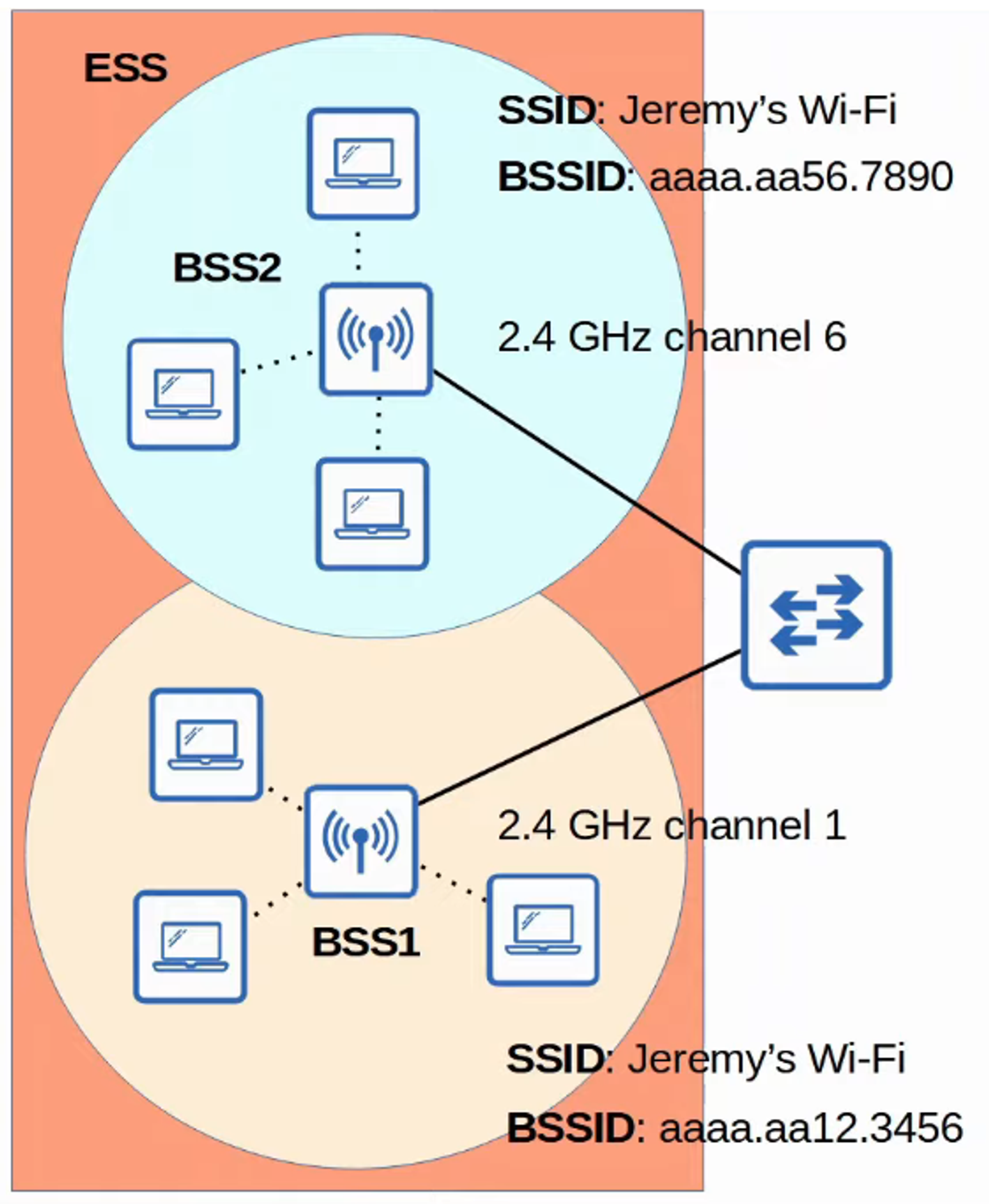
- To create LARGER WIRELESS LANS beyond the range of a SINGLE AP, we use an ESS (EXTENDED SERVICE SET)
- APs with their own BSSs are connected by a WIRED NETWORK
- Each BSS uses the SAME SSID
- Each BSS has a UNIQUE BSSID
- Each BSS uses a DIFFERENT channel to avoid INTERFERENCE
- CLIENTS can pass between APs without having to RECONNECT, providing a SEAMLESS WI-FI experience when moving between APs
- This is called ROAMING
- The BSAs should overlap about 10-15%
SERVICE SETS: MBSS
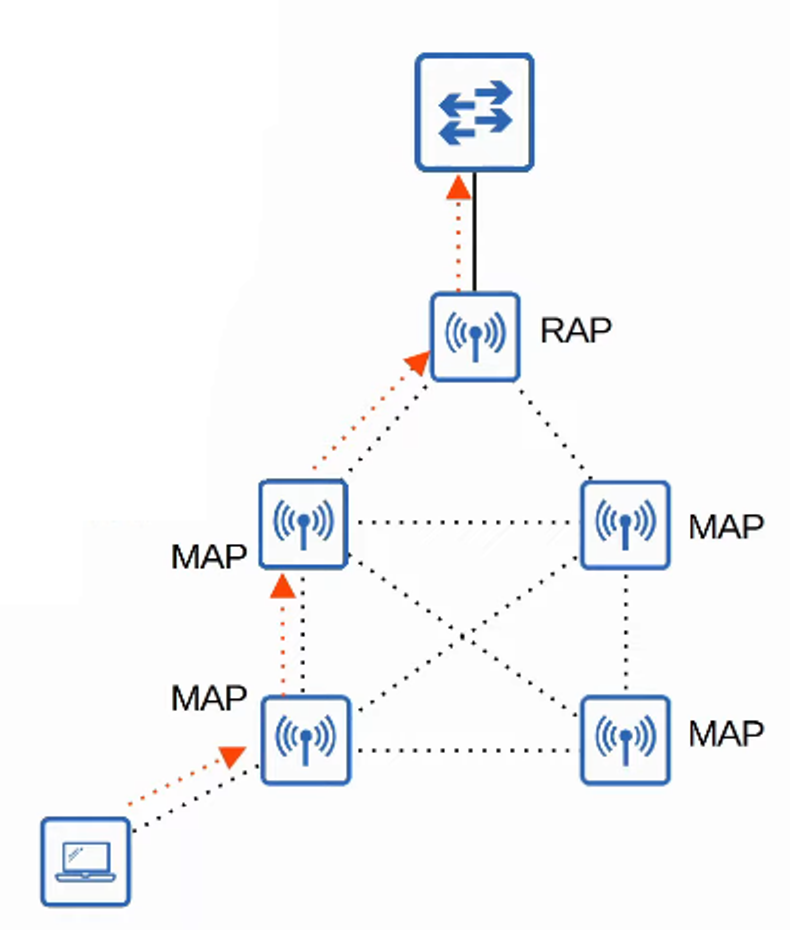
- An MBSS (MESH BASIC SERVICE SET) can be used in situations where it’s difficult to run an ETHERNET connection to every AP
- MESH APs use TWO RADIOS:
- ONE provides BSS to WIRELESS CLIENTS
- ONE forms a “BACKHAUL NETWORK” which is used to BRIDGE traffic from AP to AP
- At least ONE AP is connected to the WIRED NETWORK and it is called the RAP (ROOT ACCESS POINT)
- The OTHER APs are called MAPs (MESH ACCESS POINTS)
- A PROTOCOL is used to determine the BEST PATH through the MESH (similar to how DYNAMIC ROUTING PROTOCOLS are used to determine the BEST PATH to a DESTINATION)
DISTRIBUTION SYSTEM
- Most WIRELESS NETWORKS are not STANDALONE NETWORKS
- Rather, they are a way for WIRELESS CLIENTS to connect to the WIRED NETWORK INFRASTRUCTURE
- In 802.11, the UPSTREAM WIRED NETWORK is called the DS (DISTRIBUTION SYSTEM)
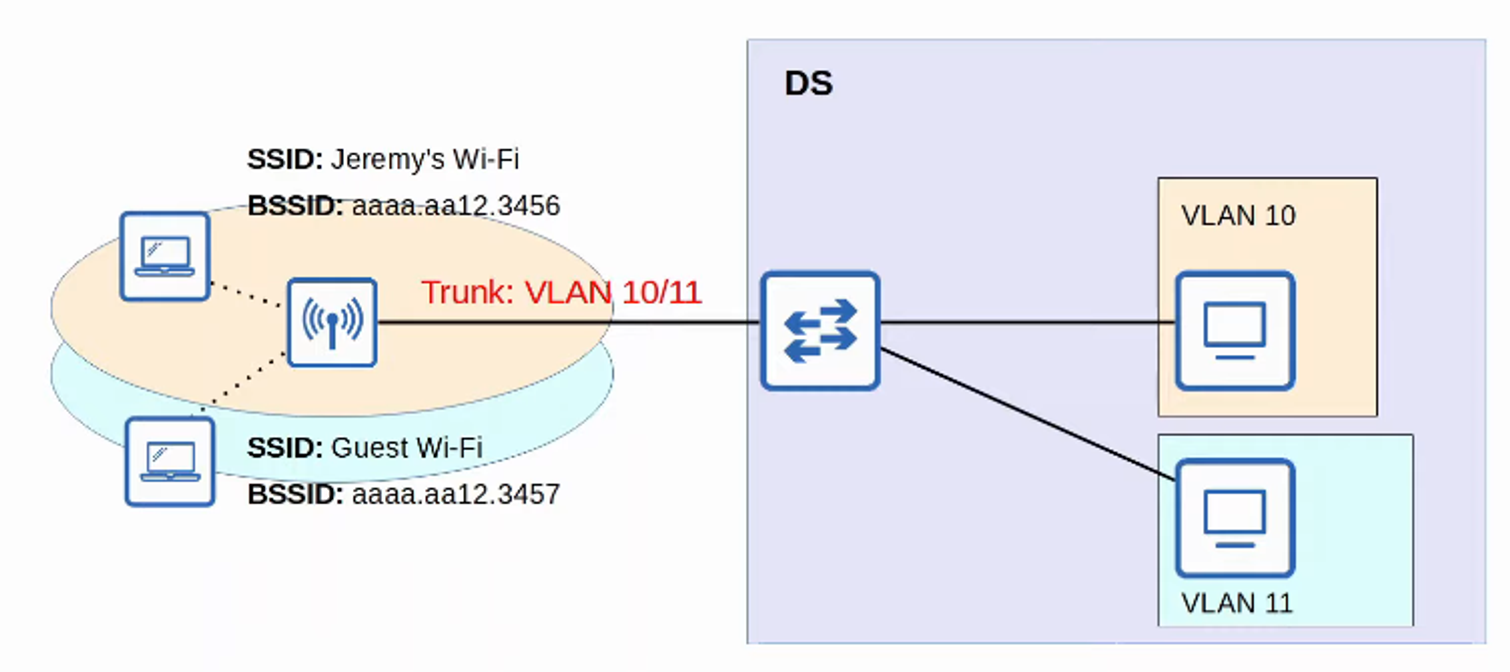
- Each WIRELESS BSS or ESS is mapped to a VLAN in the WIRED NETWORK
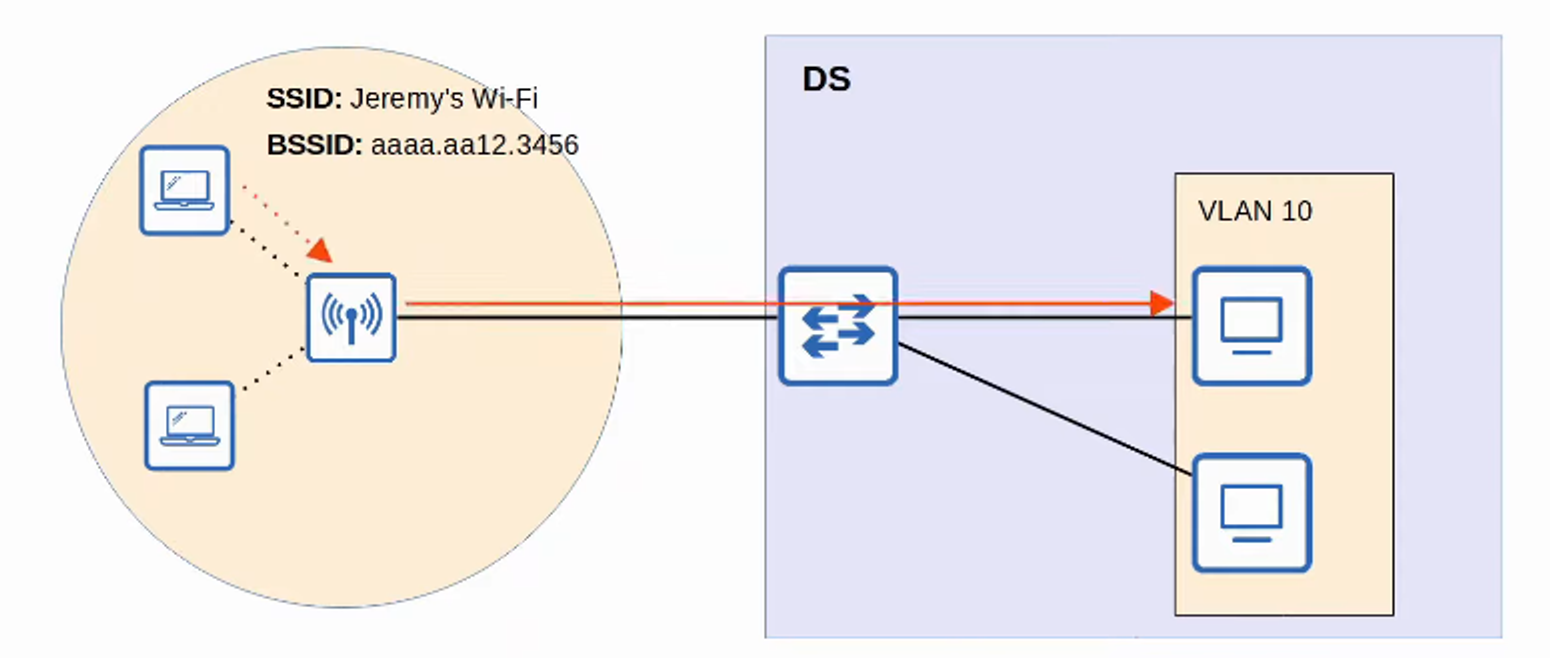
- It is possible for an AP to provide MULTIPLE WIRELESS LANs, each with a unique SSID
- Each WLAN is mapped to a separate VLAN and connected to the WIRED NETWORK via a TRUNK
- Each WLAN uses a UNIQUE BSSID, usually by INCREMENTING the LAST digit of the BBSID by one
ADDITIONAL AP OPERATIONAL MODES
-
APs can operate in ADDITIONAL MODES beyond the ones we’ve introduced so far
-
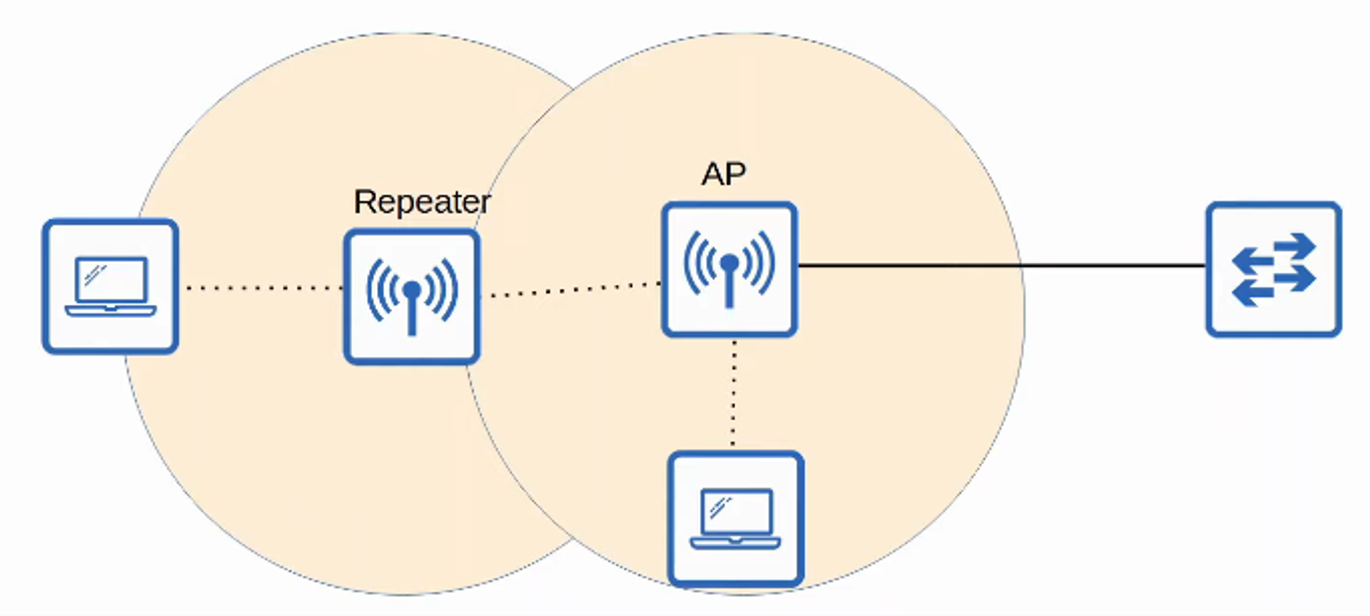
An AP in REPEATER MODE can be used to EXTEND the RANGE of a BSS
-
The REPEATER will re-transmit ANY SIGNAL it receives from the AP
- A REPEATER with a SINGLE RADIO must operate on the SAME CHANNEL as the AP, but this can drastically reduce the overall THROUGHPUT on the CHANNEL
- A REPEATER with TWO RADIOS can receive on ONE CHANNEL and then retransmit on ANOTHER CHANNEL
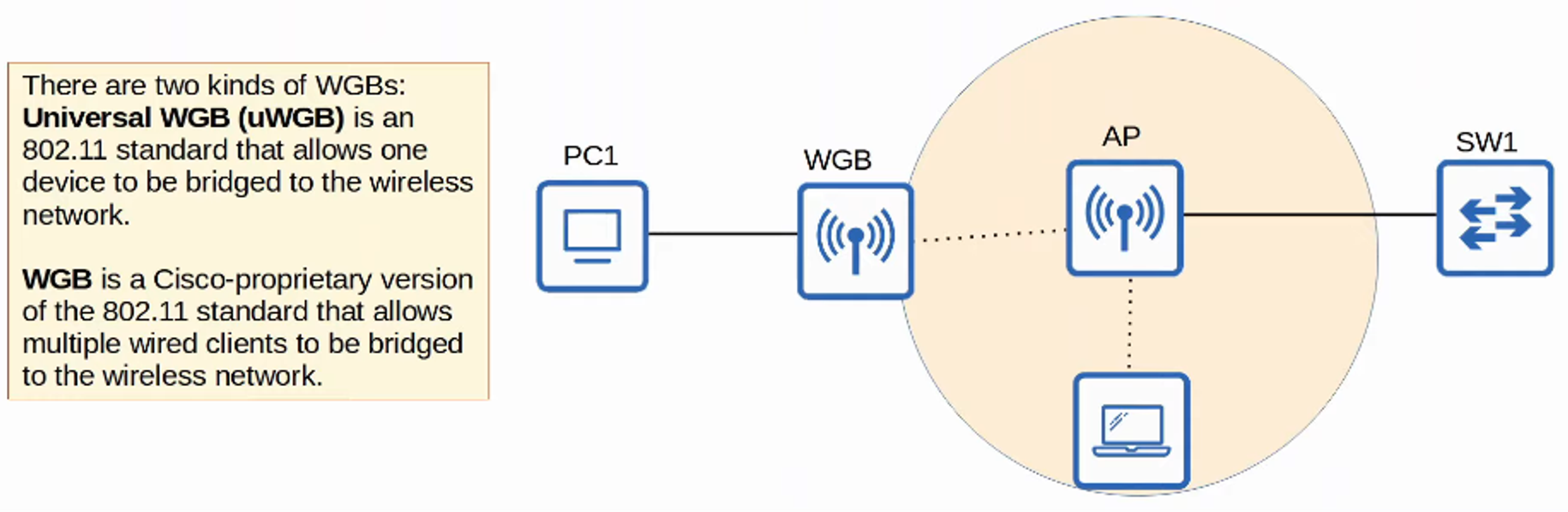
- A WORKGROUP BRIDGE (WGB) operates as a WIRELESS CLIENT of another AP and can be used to CONNECT WIRED DEVICES to the WIRELESS NETWORK
- In the example below, PC1 does NOT have WIRELESS CAPABILITIES, and also DOES NOT have ACCESS to WIRED CONNECTIONS to SW1
- PC1 has a WIRED CONNECTION to the WGB, which has a WIRELESS CONNECTION to the AP
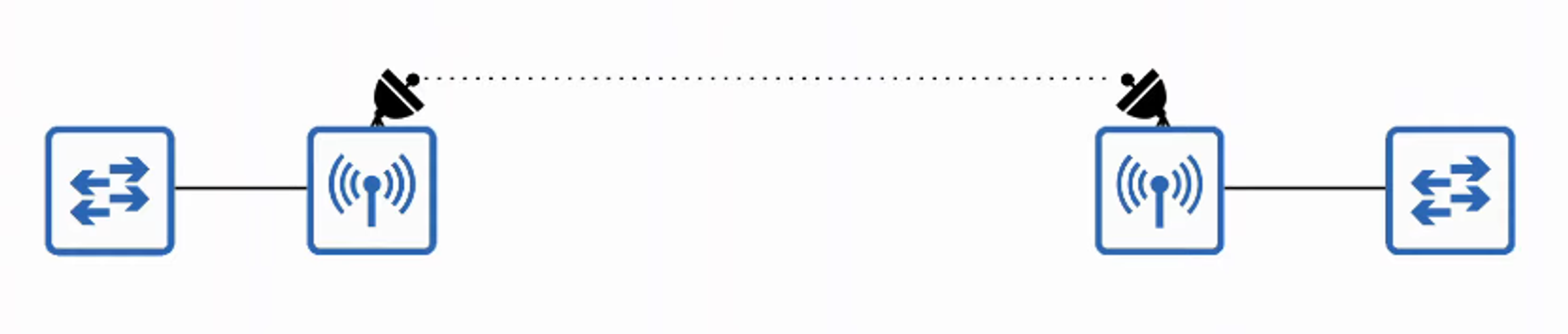
AN OUTDOOR BRIDGE
- Can be used to connect NETWORKS over LONG DISTANCES without a PHYSICAL CABLE connecting them
- The APs will use SPECIALIZED ANTENNAS that focus most of the SIGNAL POWER in one direction, which allows the WIRELESS CONNECTION to be made over LONGER DISTANCES than normally possible
- The CONNECTION can be POINT-TO-POINT as in the diagram below, or POINT-TO-MULTIPOINT in which MULTIPLE SITES connect to on CENTRAL SITE
REVIEW