Key Security Concepts
Why is Security Important?
The primary goal of security in an enterprise is to protect its data, systems, and network from unauthorized access, tampering, and disruption. The core principles of security are embodied in the CIA Triad, which forms the foundation of security practices:
-
Confidentiality:
- Ensures that only authorized users can access specific information.
- Some data may be public and accessible by anyone, while sensitive or confidential information should only be accessible to specific individuals or groups.
-
Integrity:
- Data must remain unaltered by unauthorized users, ensuring its accuracy and reliability.
- The data must be both correct and authentic.
-
Availability:
- Ensures that networks and systems are operational and accessible by authorized users when needed.
Attackers threaten the confidentiality, integrity, and availability of an organization’s systems and information.
Vulnerability, Exploit, Threat, and Mitigation
-
Vulnerability: A potential weakness in a system that could compromise its CIA (Confidentiality, Integrity, Availability). While a vulnerability is not an issue on its own, it represents a possible entry point for attacks.
-
Exploit: A method or tool that can take advantage of a vulnerability. Simply having an exploit available does not guarantee a problem, but it increases the risk.
-
Threat: The potential for a vulnerability to be exploited. For instance, a hacker finding and using a vulnerability poses a direct threat to the system.
-
Mitigation: A strategy or technique used to protect against threats. These measures should be applied to all areas where vulnerabilities exist, including:
- Client devices
- Servers, switches, routers, and firewalls
💡 No system is perfectly secure! Mitigation strategies help minimize risks but cannot eliminate them entirely.
Common Attack Types
Denial of Service (DoS) Attacks
-
A DoS attack threatens the availability of a system.
-
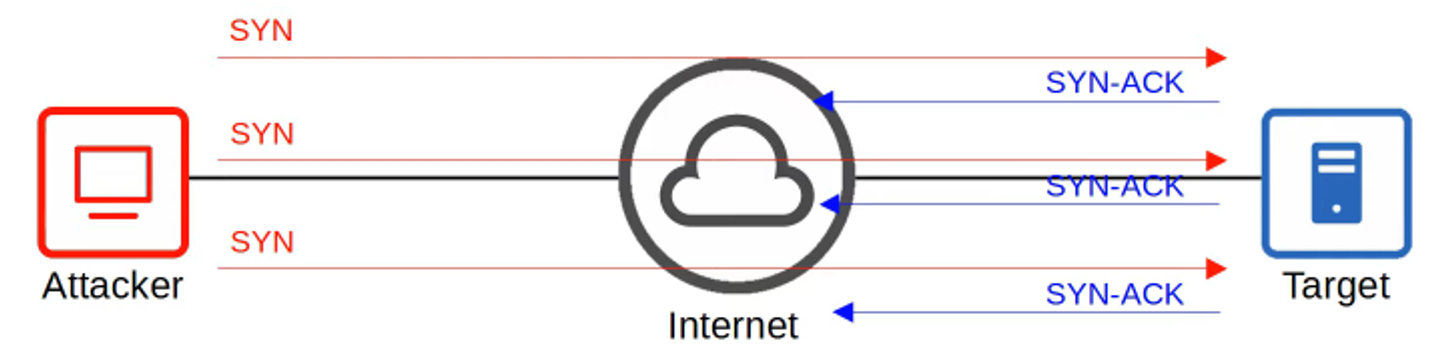
One common type is the TCP SYN flood attack, which exploits the three-way handshake in TCP communications (SYN | SYN-ACK | ACK).
How it works:
- The attacker sends repeated TCP SYN messages to the target.
- The target responds with SYN-ACK messages.
- The attacker never completes the handshake with an ACK.
- As a result, the target’s connection table fills up, preventing legitimate connections.
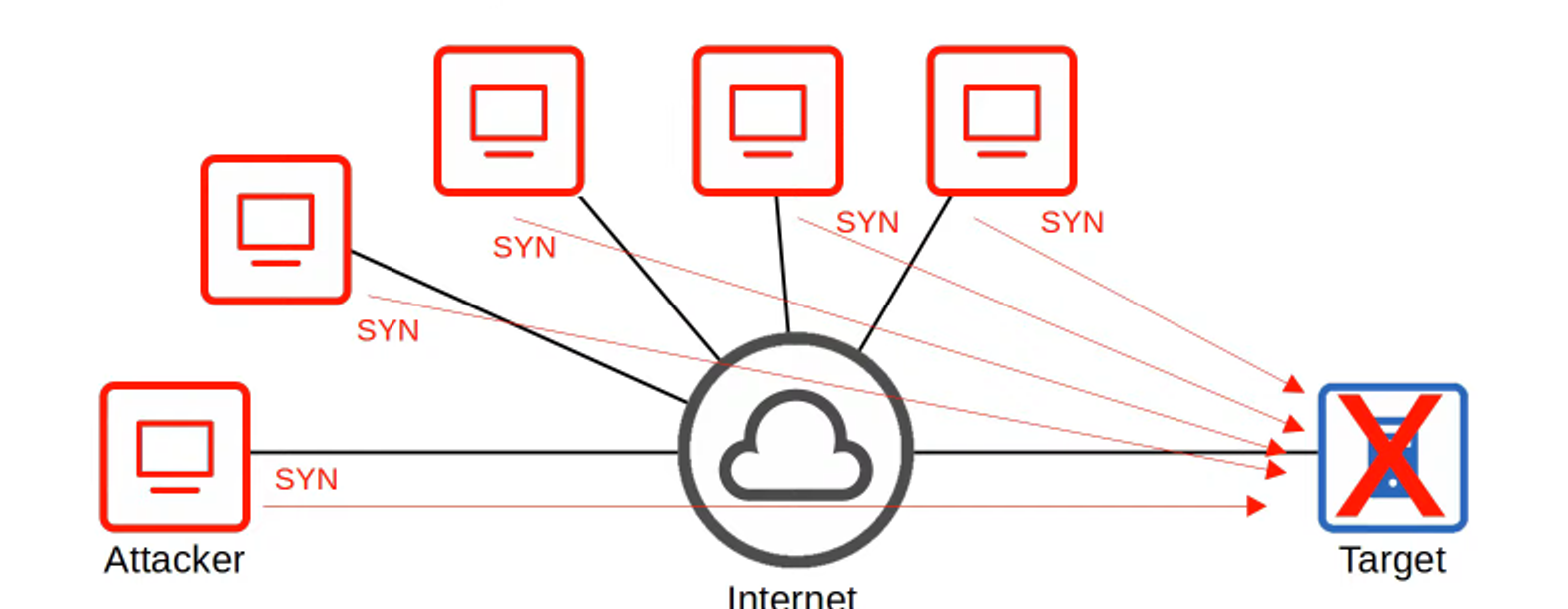
- In a DDoS (Distributed Denial of Service) attack, multiple computers infected with malware (known as a botnet) are used to overwhelm the target system.
Spoofing Attacks
- Spoofing involves using a fake source address (IP or MAC) to impersonate another device.
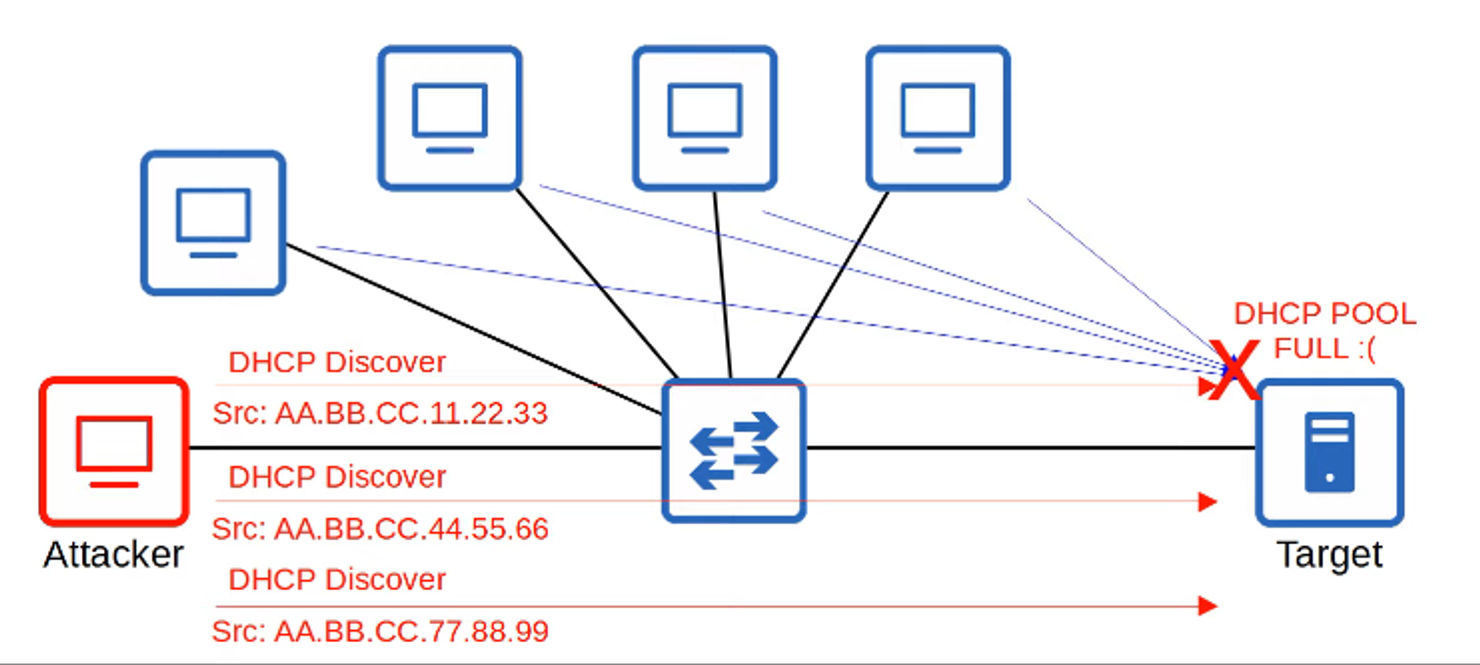
- This technique is commonly used in a variety of attacks. One example is a DHCP exhaustion attack, where an attacker uses spoofed MAC addresses to flood the network with DHCP Discover messages. This depletes the DHCP server’s pool of addresses, causing a Denial of Service for legitimate users.
Reflection and Amplification Attacks
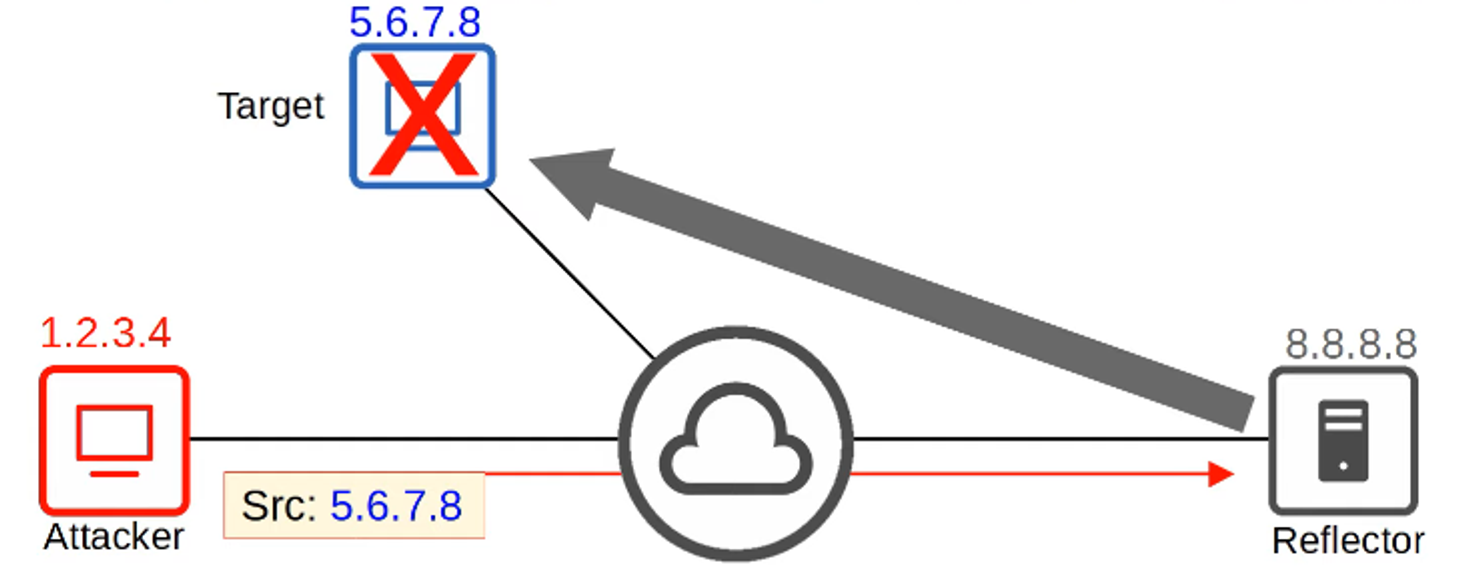
- In a Reflection attack, the attacker sends traffic to an intermediary system (the reflector) but spoofs the source IP as the target’s. The reflector responds, sending traffic to the target.
- An Amplification attack occurs when the attacker sends a small request, which triggers a much larger response from the reflector to the target, causing a DoS.
Man-in-the-Middle (MITM) Attacks
-
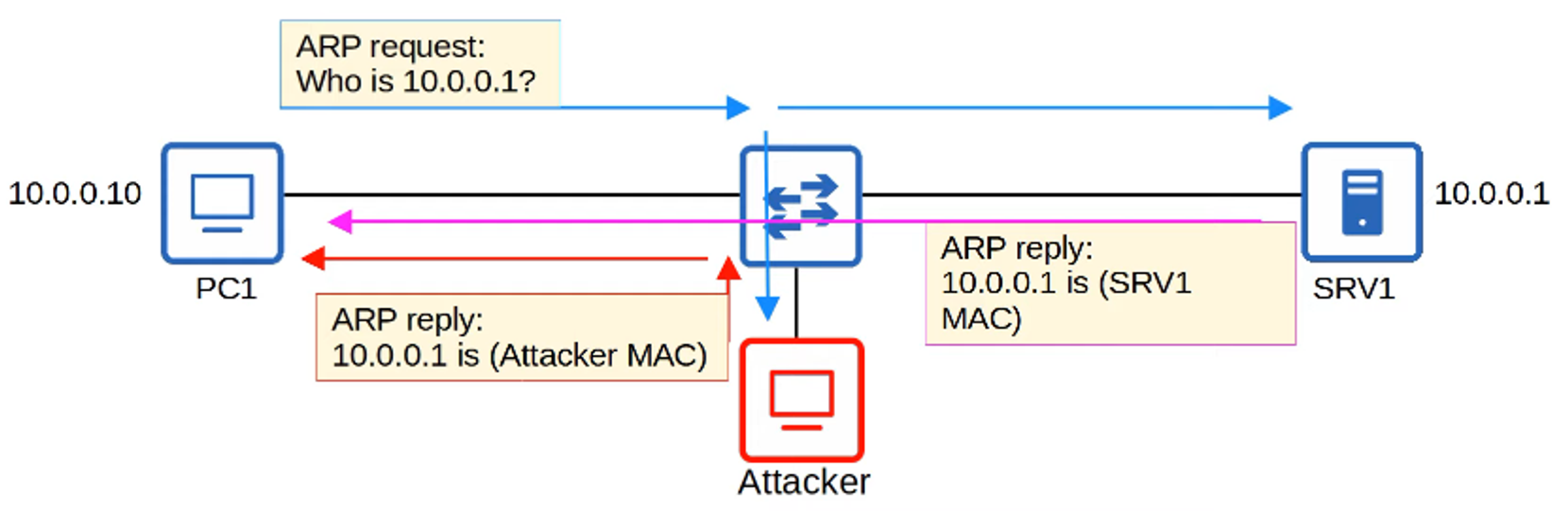
In a Man-in-the-Middle attack, the attacker secretly intercepts and possibly modifies communications between two parties.
Example: ARP spoofing (or ARP poisoning)
- The attacker responds to an ARP request pretending to be the intended recipient.
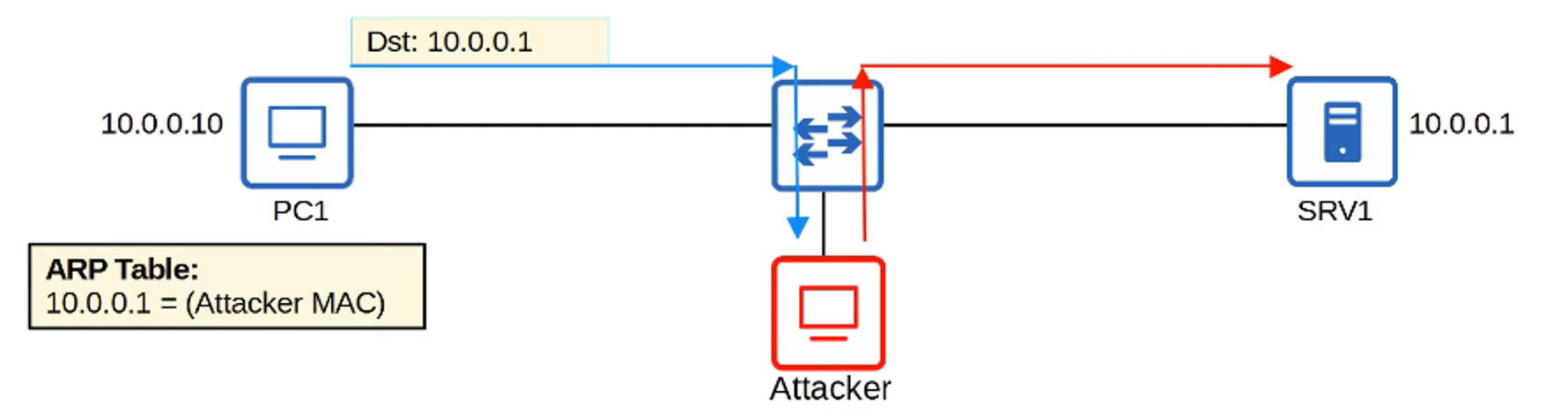
- This causes the victim’s device to send its traffic to the attacker instead of the legitimate destination.
The attacker can eavesdrop on or alter the data before forwarding it.
Reconnaissance Attacks
-
Reconnaissance attacks are typically information-gathering efforts, often using public information to learn about a target. This information is then used to carry out future attacks.
Examples:
- Running an nslookup to find the IP address of a domain.
- Using a WHOIS query to gather details like email addresses or phone numbers.

Malware
Malware refers to harmful software designed to damage or compromise a system. Types of malware include:
-
Viruses: Infect legitimate software and spread as the software is shared, often corrupting or modifying files.
-
Worms: Standalone malware that spreads without needing a host program. Worms can congest networks, and their payload can harm target devices.
-
Trojans: Disguised as legitimate software, Trojans require user interaction (e.g., opening an email attachment) to execute malicious actions.
Each malware type can exploit vulnerabilities and impact the confidentiality, integrity, or availability of a target system.
Social Engineering Attacks
Social engineering attacks exploit human psychology rather than technical weaknesses. They manipulate users into divulging sensitive information or performing actions.
-
Phishing: Fraudulent emails masquerading as legitimate businesses to steal login credentials.
- Spear Phishing: Targeted phishing aimed at specific individuals.
- Whaling: Phishing attacks on high-profile individuals.
-
Vishing: Voice phishing, where attackers use phone calls to steal information.
-
Smishing: Phishing through SMS messages.
-
Watering Hole Attacks: Compromise trusted websites the victim frequently visits.
-
Tailgating: Gaining access to secure areas by following someone with legitimate access.
Password-Related Attacks
Systems often rely on username and password combinations for authentication, but passwords can be stolen in several ways:
- Guessing
- Dictionary Attacks: A program tests common words and passwords.
- Brute Force Attacks: A program attempts all possible character combinations.
To mitigate this, strong passwords should:
- Be at least 8 characters long.
- Include uppercase and lowercase letters.
- Mix letters and numbers.
- Incorporate special characters (e.g., #, @, !).
Multi-Factor Authentication (MFA)
Multi-Factor Authentication enhances security by requiring more than just a password for access. It combines two or more of the following factors:
- Something you know: A password or PIN.
- Something you have: A phone notification, security token, or badge.
- Something you are: Biometrics like fingerprint or facial recognition.
MFA greatly reduces the risk of unauthorized access, even if passwords are compromised.
Digital Certificates
Digital Certificates are used to verify the identity of a certificate holder. Websites use certificates to prove their authenticity, protecting users from accessing fraudulent sites.
- To obtain a certificate, entities send a Certificate Signing Request (CSR) to a Certificate Authority (CA), which then issues the certificate.
Controlling and Monitoring Users with AAA
AAA stands for Authentication, Authorization, and Accounting. It is a framework used to control and monitor access to network resources:
- Authentication: Verifying a user’s identity (e.g., logging in).
- Authorization: Determining what resources the user is allowed to access.
- Accounting: Tracking the user’s activity on the system.
Organizations typically use AAA servers such as Cisco’s Identity Services Engine (ISE). Two common AAA protocols are:
- RADIUS: An open standard protocol using UDP ports 1812 and 1813.
- TACACS+: Cisco proprietary protocol using TCP port 49.
💡 For the CCNA, understand the differences between Authentication, Authorization, and Accounting.
Security Program Elements
- User Awareness Programs: Educate employees about potential security risks.
- User Training Programs: Provide more formal training to address specific security concerns.
- Physical Access Controls: Protect equipment and data by restricting access to secure areas such as network closets and data centers.