Corrections to Prior Lectures
RFC Requirements for IPv6 Address Representation
-
Leading Zeros: Must be removed.
- Example:
2001:0db8:0000:0001:0f2a:4fff:fea3:00b1 - Becomes:
2001:db8:0:1:f2a:4fff:fea3:b1
- Example:
-
Longest Sequence of All-Zero Quartets: Use
::to shorten.- If there is only one all-zero quartet, do not use
::. - Example:
2001:0000:0000:0000:0f2a:0000:0000:00b1 - Becomes:
2001::f2a:0:0:b1
- If there is only one all-zero quartet, do not use
-
Two Equal-Length Choices for
::: Use::to shorten the leftmost sequence.- Example:
2001:0db8:0000:0000:0f2a:0000:0000:00b1 - Becomes:
2001:db8::f2a:0:0:b1
- Example:
-
Hexadecimal Characters: Must be written in lowercase.
- Use
a,b,c,d,e,finstead ofA,B,C,D,E,F.
- Use
IPv6 Header
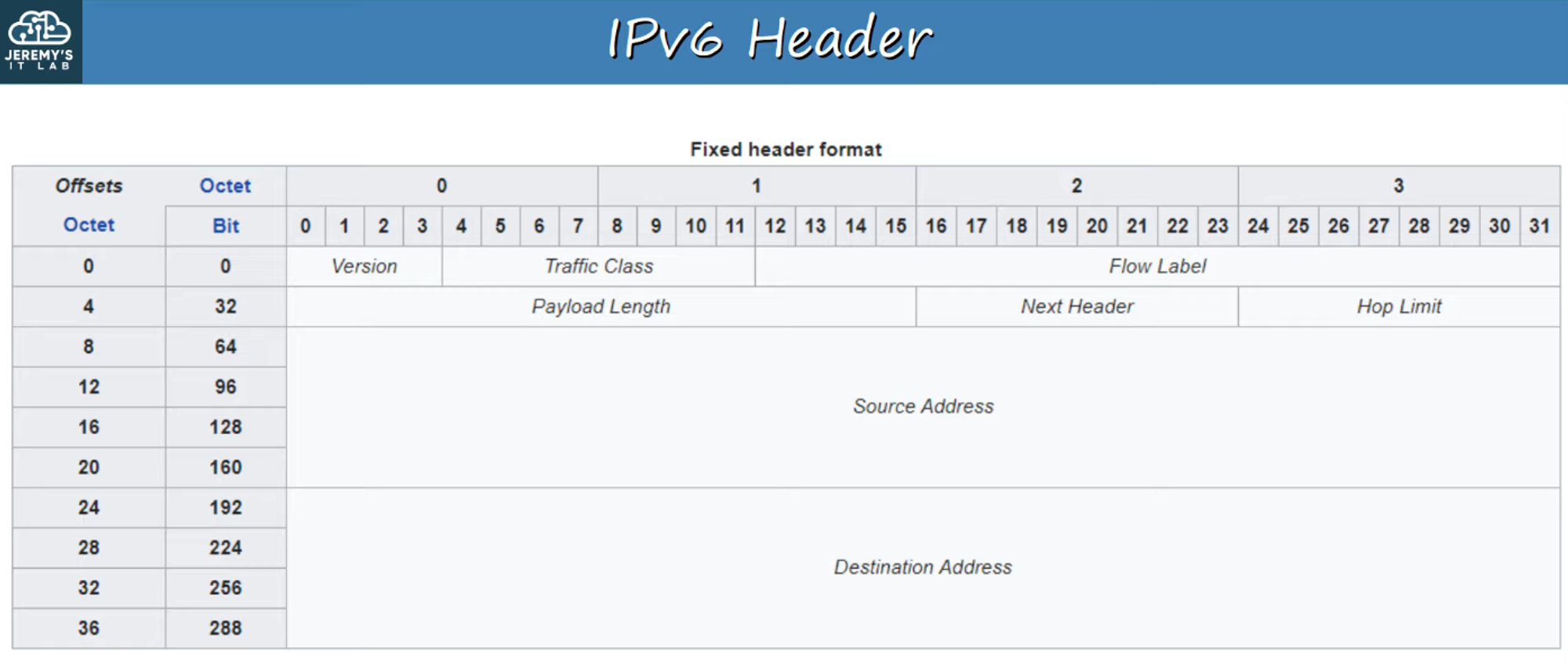
Fixed Header Length
- The IPv6 header is always 40 bytes.
Header Fields
-
Version (4 bits):
- Indicates the IP version used.
- Fixed value:
6(0b0110) for IPv6.
-
Traffic Class (8 bits):
- Used for Quality of Service (QoS) to prioritize traffic, such as IP phone calls or live video.
-
Flow Label (20 bits):
- Identifies specific traffic flows between the source and destination.
-
Payload Length (16 bits):
- Specifies the length of the payload (Layer 4 segment) in bytes.
- The IPv6 header itself is not included in this length, as it is always 40 bytes.
-
Next Header (8 bits):
- Indicates the type of the next header (e.g., TCP or UDP).
- Equivalent to the IPv4 header’s “Protocol” field.
-
Hop Limit (8 bits):
- Decrements by 1 each time a router forwards the packet. If it reaches
0, the packet is discarded, similar to the TTL field in IPv4.
- Decrements by 1 each time a router forwards the packet. If it reaches
-
Source Address (128 bits):
- The address of the packet’s source.
-
Destination Address (128 bits):
- The address of the packet’s destination.
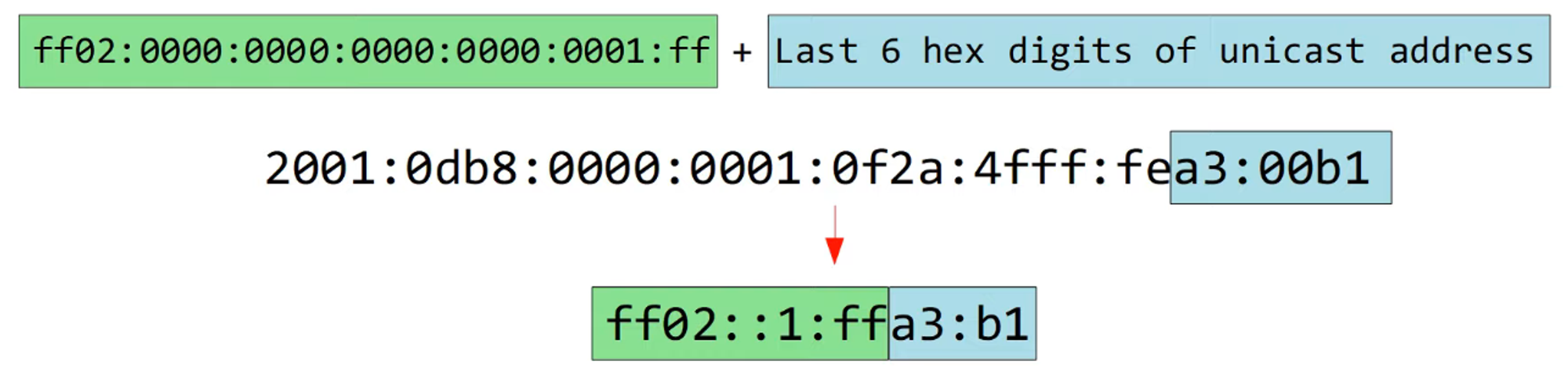
Solicited-Node Multicast Address
- Purpose: An IPv6 solicited-node multicast address is derived from a unicast address.
Generating a Solicited-Node Multicast Address
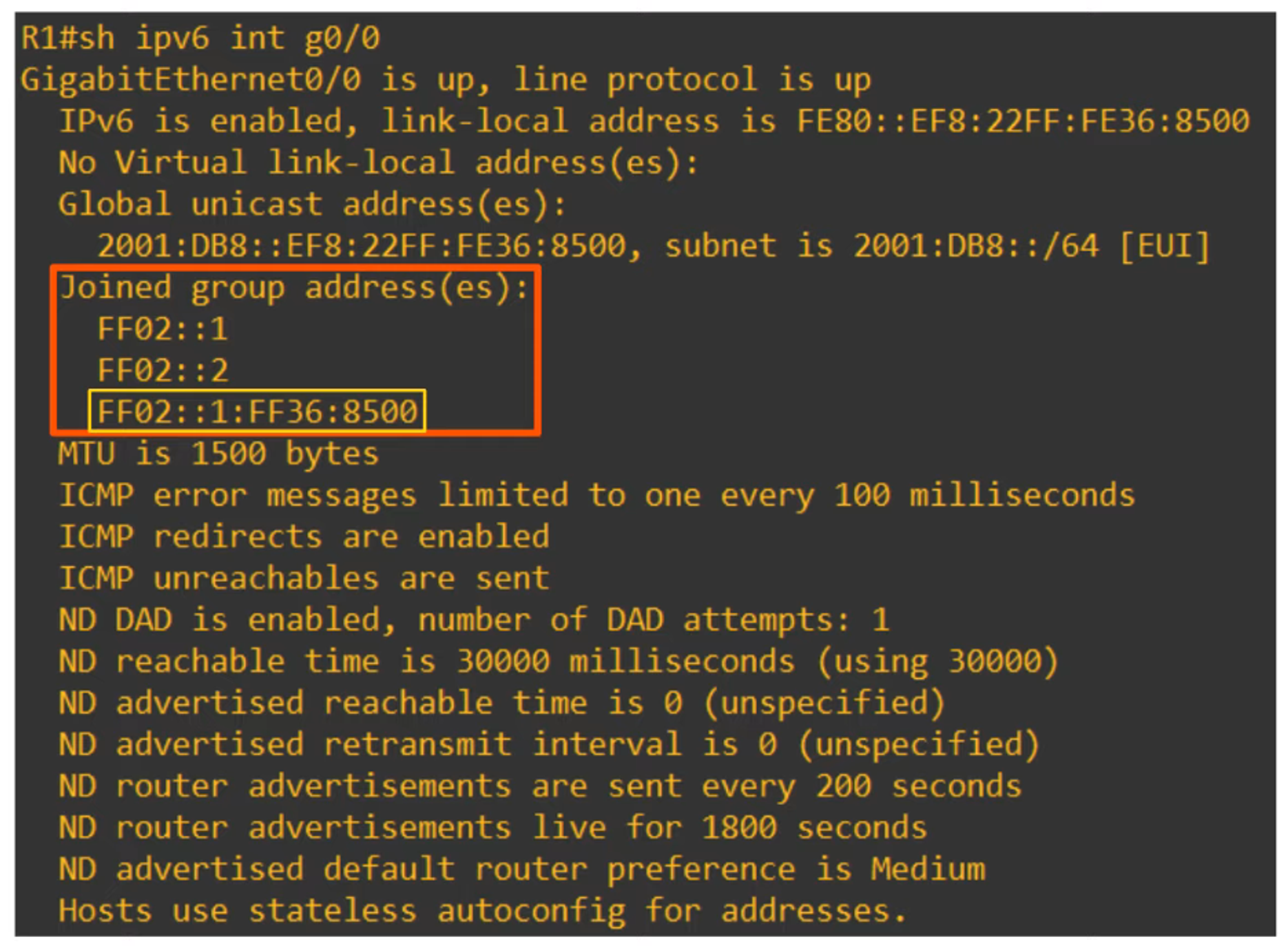
Group Addresses for IPv6 Interface
Neighbor Discovery Protocol (NDP)
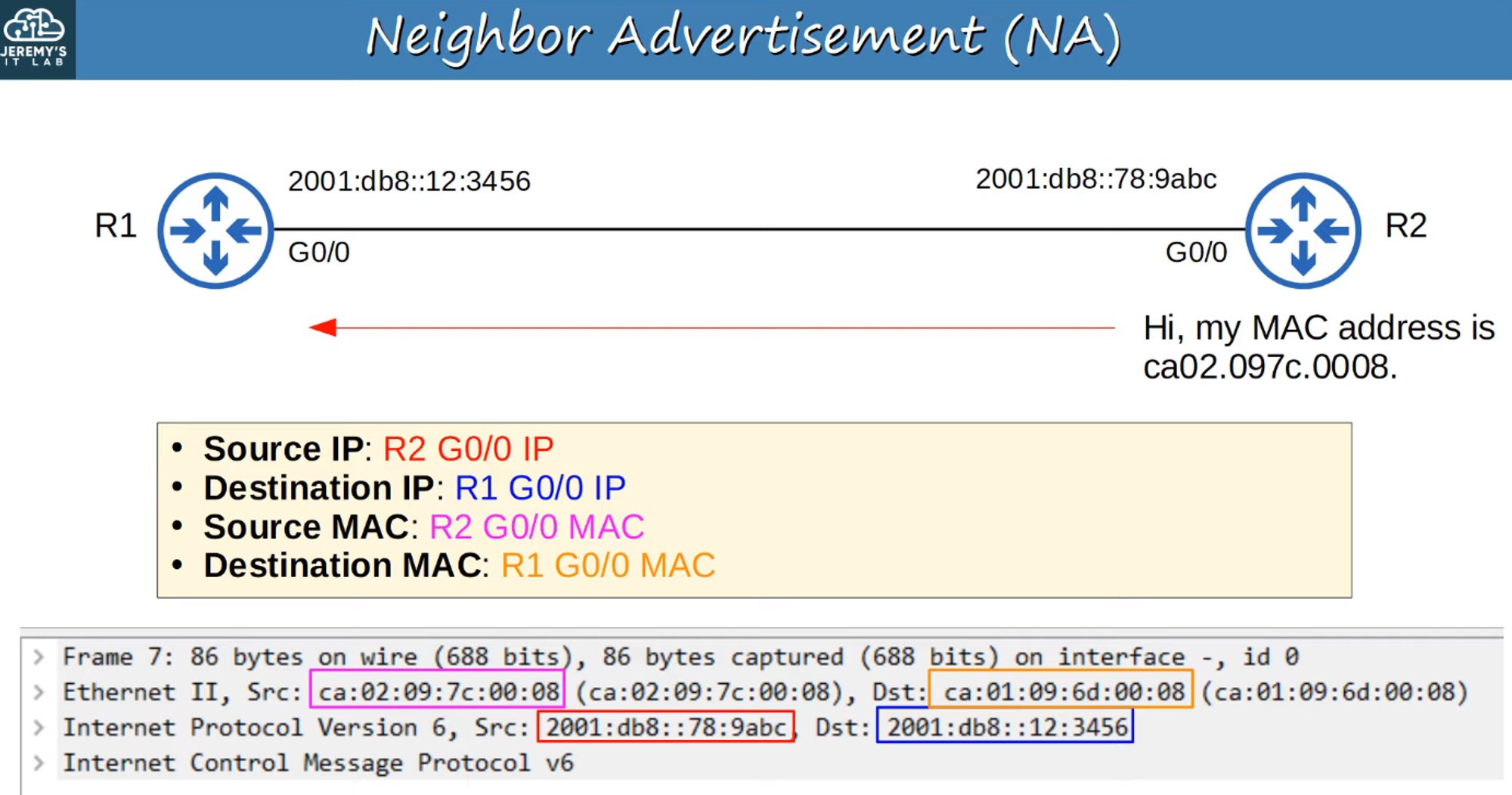
- Overview: NDP is used with IPv6 to replace ARP from IPv4. It employs ICMPv6 and solicited-node multicast addresses to discover MAC addresses.
Message Types
-
Neighbor Solicitation (NS):
- ICMPv6 Type 135.
-
Neighbor Advertisement (NA):
- ICMPv6 Type 136.
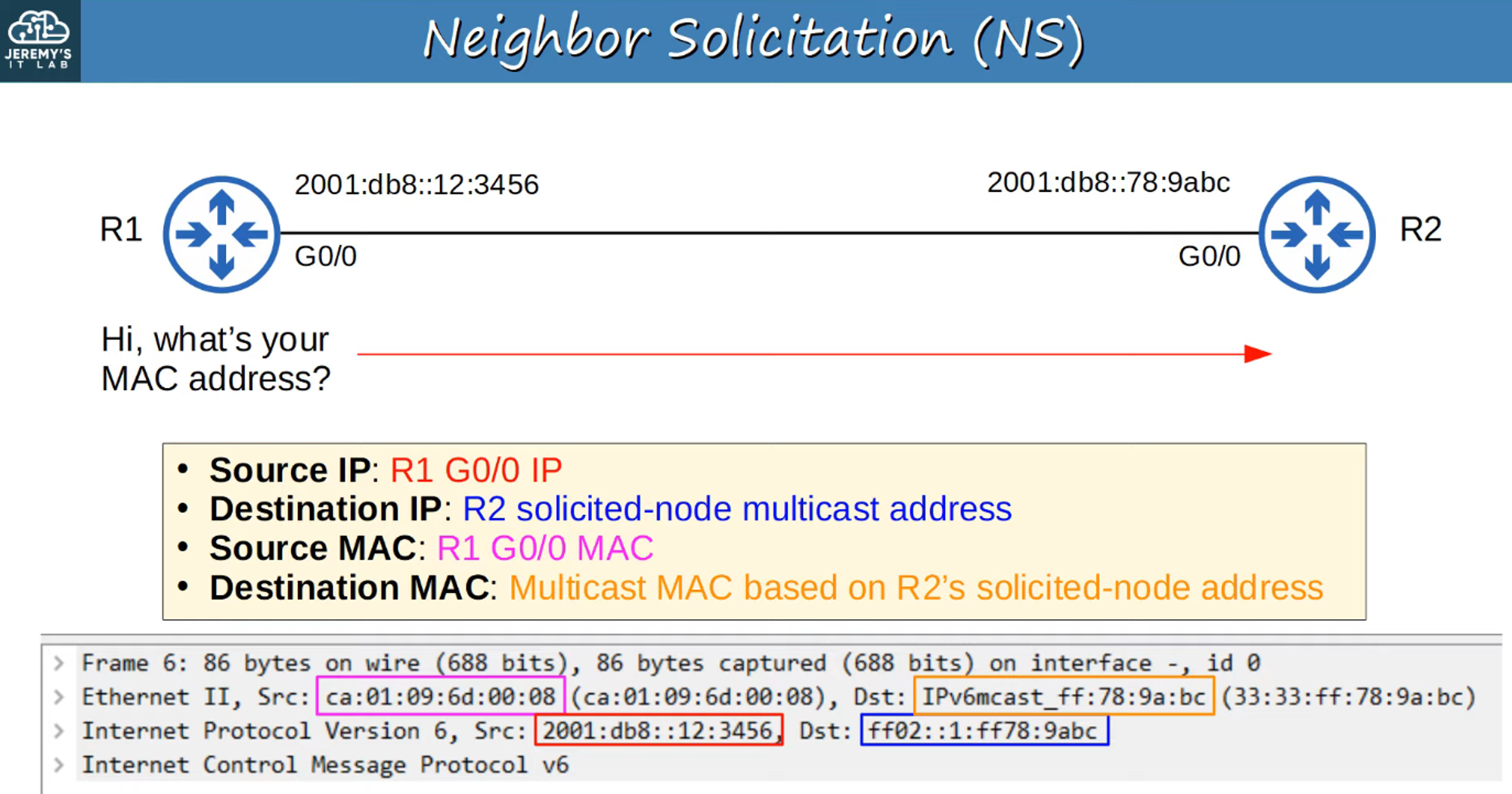
Neighbor Table
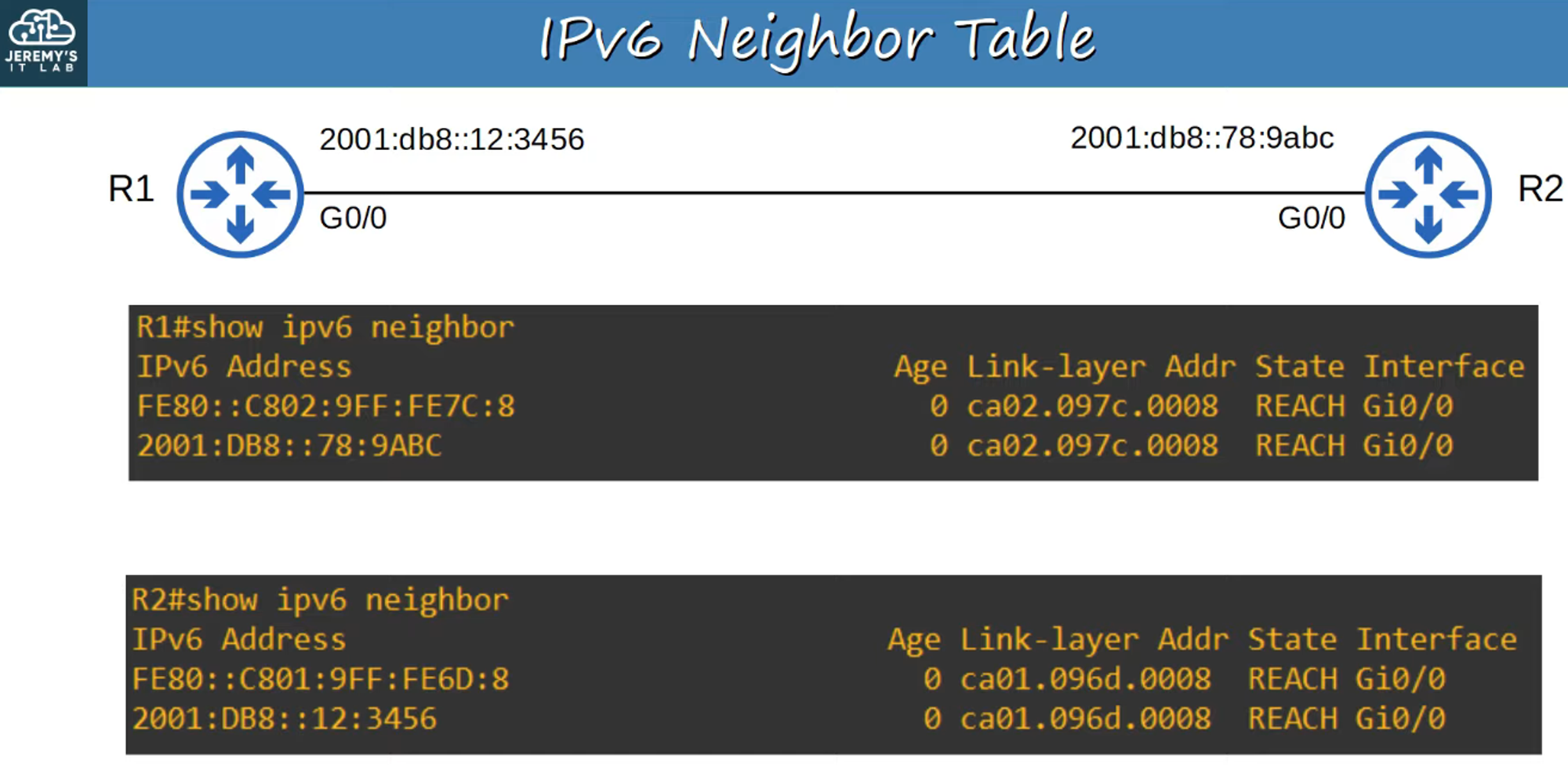
- Router Discovery: NDP also enables hosts to discover routers on the local network.
Router Discovery Messages
-
Router Solicitation (RS):
- ICMPv6 Type 133.
- Sent to multicast address
FF02::2(All Routers). - Requests routers on the local link to identify themselves when an interface is enabled or a host connects to the network.
-
Router Advertisement (RA):
- ICMPv6 Type 134.
- Sent to multicast address
FF02::1(All Nodes). - Announcements from routers about their presence and other link information.
- Sent in response to RS messages and periodically.

Stateless Address Auto-Configuration (SLAAC)
-
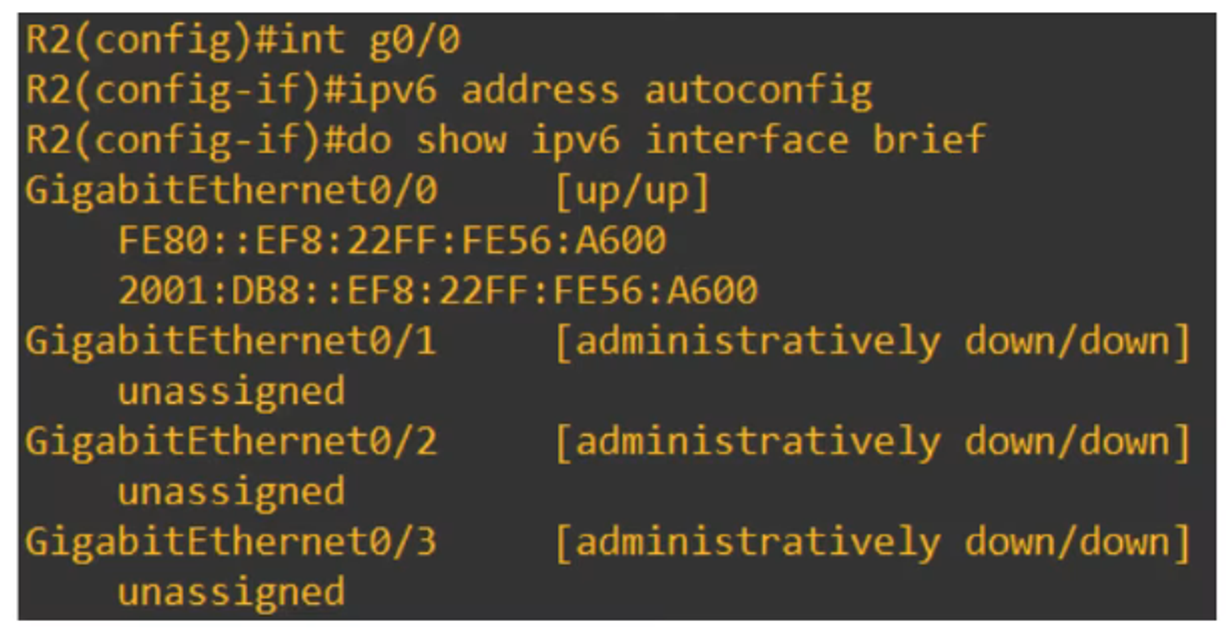
Definition: SLAAC allows hosts to automatically configure their IPv6 addresses using RS/RA messages.
-
Commands:
- Manual prefix entry:
ipv6 address prefix/prefix-length eui-64. - Auto-configured prefix:
ipv6 address autoconfig, where the device uses NDP to determine the local prefix.
- Manual prefix entry:
-
Interface ID Generation: Can be done using EUI-64 or randomly generated, depending on the device.
Duplicate Address Detection (DAD)
-
Purpose: DAD ensures that an IPv6 address is unique on the local link.
-
Process:
- Performed when an interface is initialized or an IPv6 address is configured.
- Uses NS and NA messages:
- The host sends an NS to its own address.
- If no reply is received, the address is unique.
- If a reply is received, another device is using the same address.
IPv6 Static Routing
-
Routing Basics:
- IPv6 routing operates similarly to IPv4 but with separate processes and tables.
- IPv4 routing is enabled by default; IPv6 routing is disabled by default and must be enabled with
ipv6 unicast-routing.
-
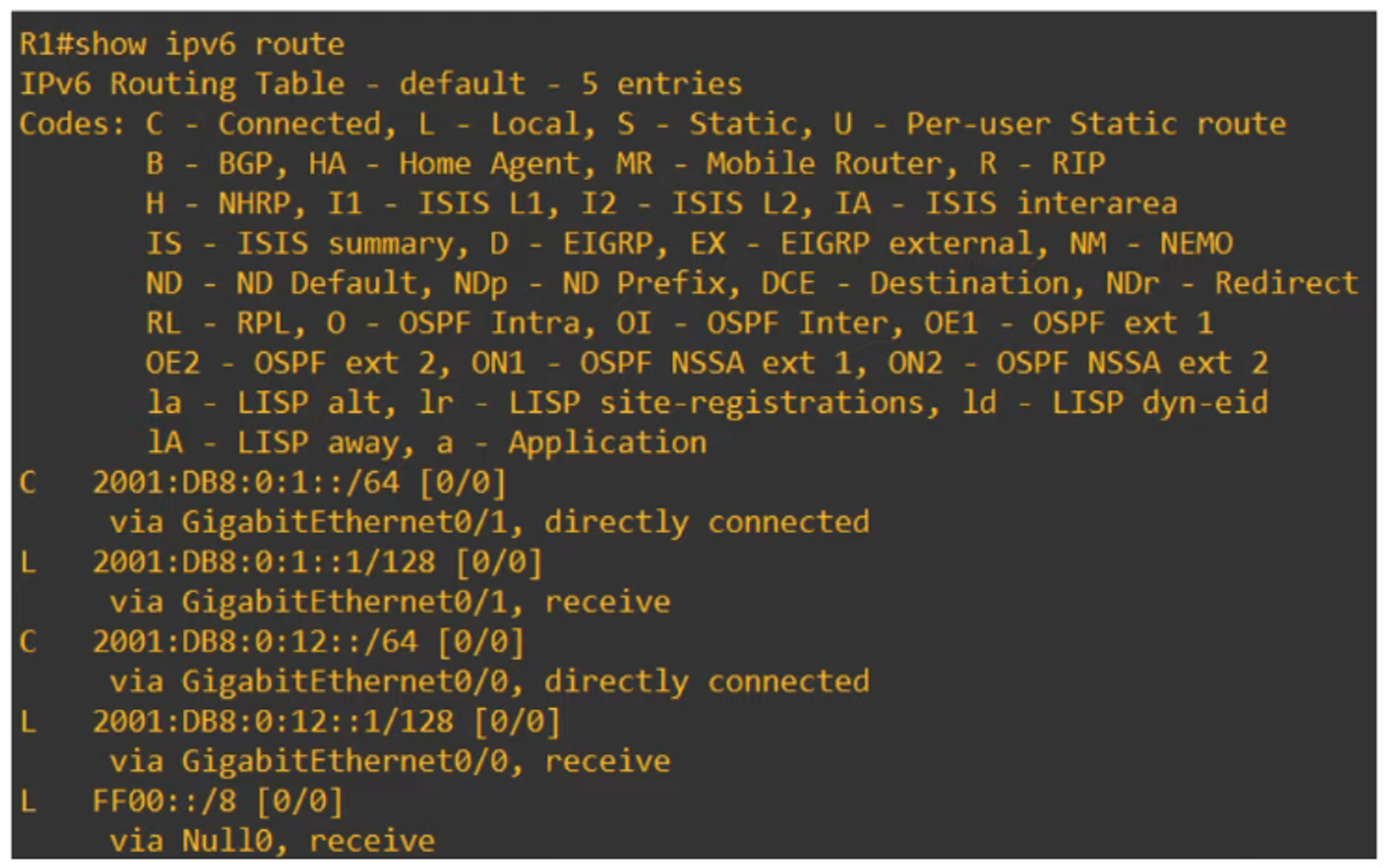
Automatic Routes:
- Connected Network Route: Added automatically for each connected network.
- Local Host Route: Added automatically for each address configured on the router.
- Link-Local addresses are not included in the routing table.


Static Route Types
- Directly Attached:
- Only the exit interface is specified.
- Command:
ipv6 route destination/prefix-length exit-interface. - Example:
ipv6 route 2001:db8:0:3::/64 g0/0.
-
Recursive:
- Only the next-hop address is specified.
- Command:
ipv6 route destination/prefix-length next-hop. - Example:
ipv6 route 2001:db8:0:3::/64 2001:db8:0:12::2.
-
Fully Specified:
- Both exit interface and next-hop address are specified.
- Command:
ipv6 route destination/prefix-length exit-interface next-hop. - Example:
ipv6 route 2001:db8:0:3::/64 g0/0 2001:db8:0:12::2.
Recursive Routes Example
-
Network Route:
- Command:
ipv6 route 2001:db8:0::/64 2001:db8:0:12::2. - Routes to R3/PC2 network via R2’s G0/0 interface.
- Command:
-
Host Route:
- Command:
ipv6 route 2001:db8:0:1::100/128 2001:db8:0:12::1. - Command:
ipv6 route 2001:db8:0:3::100/128 2001:db8:0:23::2. - Routes to specific hosts PC1 and PC2 via next-hop addresses of R1 and R3 G0/0 interfaces.
- Command:
-
Default Route:
- Command:
ipv6 route ::/0 2001:db8:0:23::1. - Equivalent to
0.0.0.0/0in IPv4.
- Command:
Floating Static Routes
- Configuration: Requires increasing the Administrative Distance (AD) above the current IGP AD value.
Link-Local Next Hops
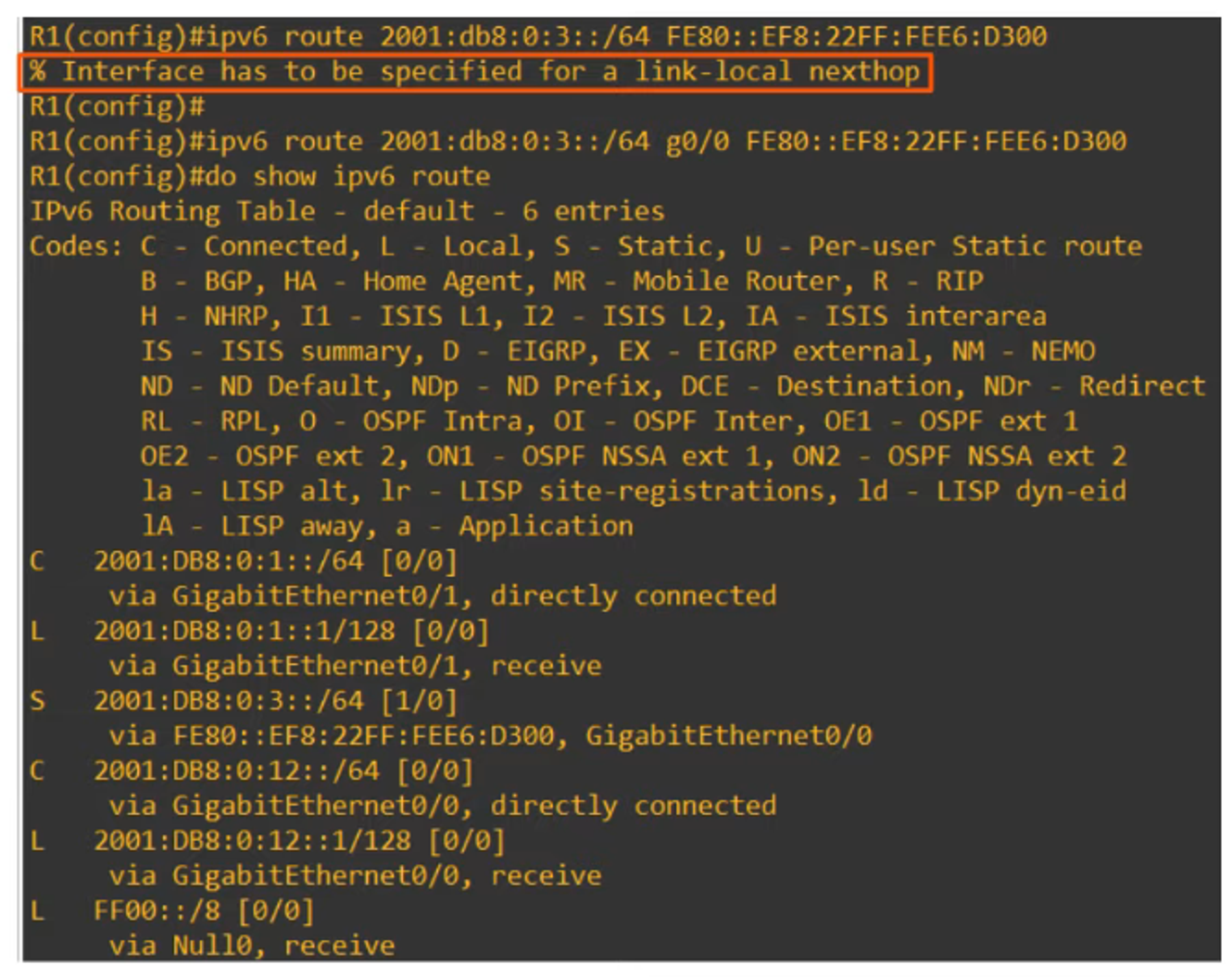
- Note: When using link-local next hops, specify the interface name, similar to a fully specified static route.