ROUTING INFORMATION PROTOCOL (RIP)
- Routing Information Protocol (RIP) is an industry-standard Distance Vector IGP.
- Utilizes Routing-By-Rumor logic to learn and share routes.
- Employs HOP COUNT as its metric (one router = one hop); bandwidth is irrelevant.
- Maximum hop count is 15 (any hop count greater than 15 is considered unreachable).
- There are three versions:
- RIPv1 and RIPv2 for IPv4
- RIPng (RIP Next Generation) for IPv6
- Uses two message types:
- REQUEST: Asks RIP-enabled neighbor routers to send their routing tables.
- RESPONSE: Sends the local router’s routing table to neighboring routers.
By default, RIP-enabled routers share their routing table every 30 seconds.
RIPv1 and RIPv2
-
RIPv1:
- Only advertises classful addresses (Class A, Class B, Class C).
- Does not support VLSM or CIDR.
- Does not include subnet mask information in advertisements.
- Example:
10.1.1.0/24becomes10.0.0.0(assumed to be /8).172.16.192.0/18becomes172.16.0.0(assumed to be /16).192.168.1.40/30becomes192.168.1.0(assumed to be /24).
- Example:
- Messages are broadcast to
255.255.255.255.
-
RIPv2:
- Supports VLSM and CIDR.
- Includes subnet mask information in advertisements.
- Messages are multicast to
224.0.0.9.- Broadcast messages are delivered to all devices on the local network.
- Multicast messages are delivered only to devices that have joined that specific multicast group.
CONFIGURING RIP
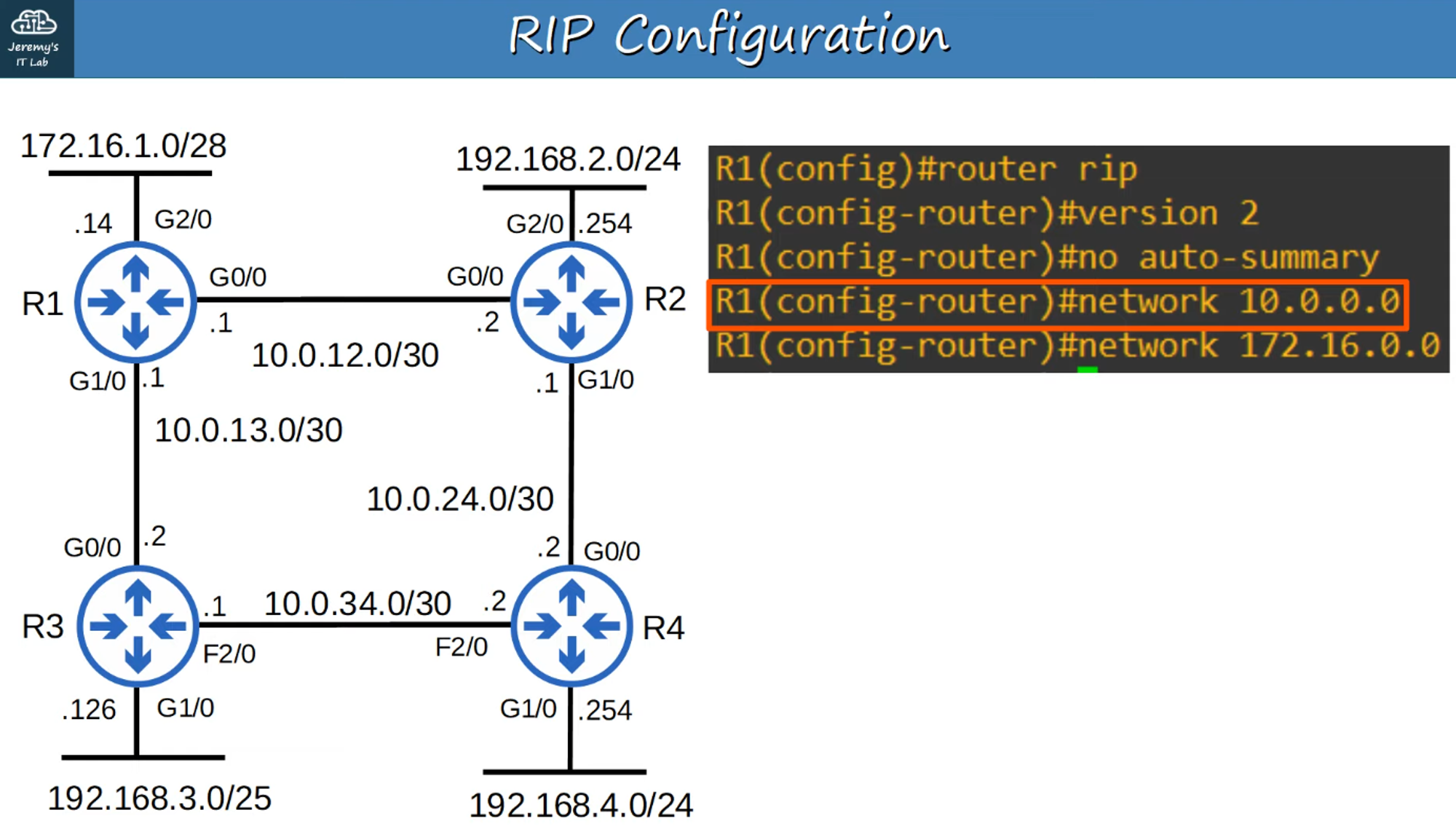
The “network” command tells the router to:
- Look for interfaces with an IP address in the specified range.
- Activate RIP on the interfaces that fall within this range.
- Form adjacencies with connected RIP neighbors.
- Advertise the network prefix of the interface (not the prefix in the “network” command).
The OSPF and EIGRP “network” commands operate similarly. Because the RIP “network” command is classful, it will automatically convert to classful networks:
10.0.0.0is assumed to be10.0.0.0/8.- R1 looks for any interfaces with an IP address that matches
10.0.0.0/8(only needs to match the first 8 bits). 10.0.12.1and10.0.13.1both match, so RIP is activated on G0/0 and G0/1.- R1 then advertises
10.0.12.0/30and10.0.13.0/30(not10.0.0.0/8) to its RIP neighbors.
- R1 looks for any interfaces with an IP address that matches

- The “network” command for
172.16.0.0is assumed to be172.16.0.0/16. - R1 looks for any interfaces matching
172.16.0.0/16. 172.16.1.14matches, so R1 activates RIP on G2/0.- There are no RIP neighbors connected to G2/0, so no new adjacencies are formed.
- Although there are no RIP neighbors, R1 will still send advertisements out of G2/0. This creates unnecessary traffic, so G2/0 should be configured as a passive interface.

- The “passive-interface” command tells the router to stop sending RIP advertisements out of the specified interface (G2/0).
- However, the router will continue to advertise the network prefix of the interface (
172.16.1.0/28) to its RIP neighbors (R2, R3). - You should always use this command on interfaces that do not have any RIP neighbors.
- EIGRP and OSPF both have the same passive interface functionality, using the same command.
HOW TO ADVERTISE A DEFAULT ROUTE INTO RIP
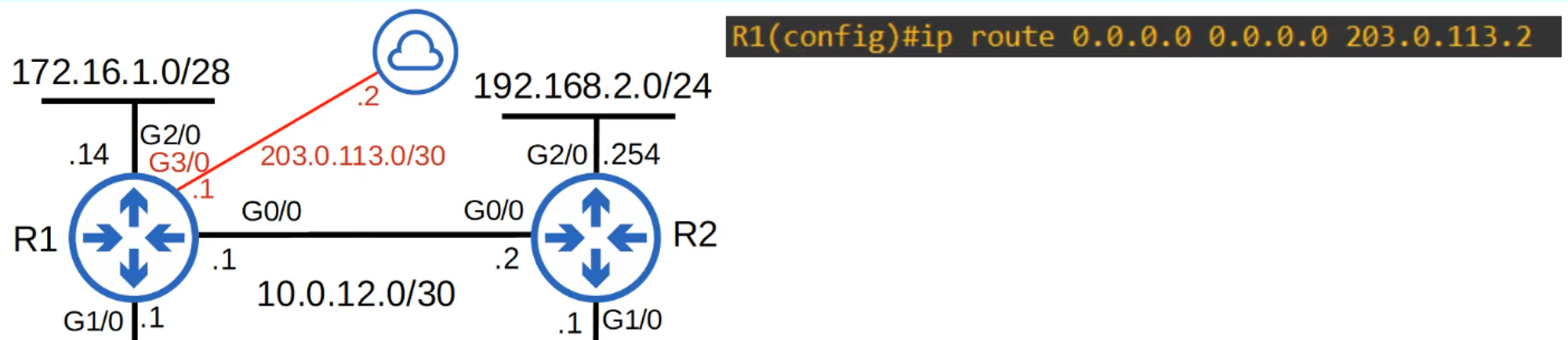

To share the default route with R1’s RIP neighbors, use this command:

RIP doesn’t consider interface administrative costs (RIP cost is 120); it only counts hops.
Since both paths have an equal number of hops, both paths appear in the default route (Gateway of Last Resort).

Viewing RIP Configuration
To view RIP protocols, use:
show ip protocolsfor RIP
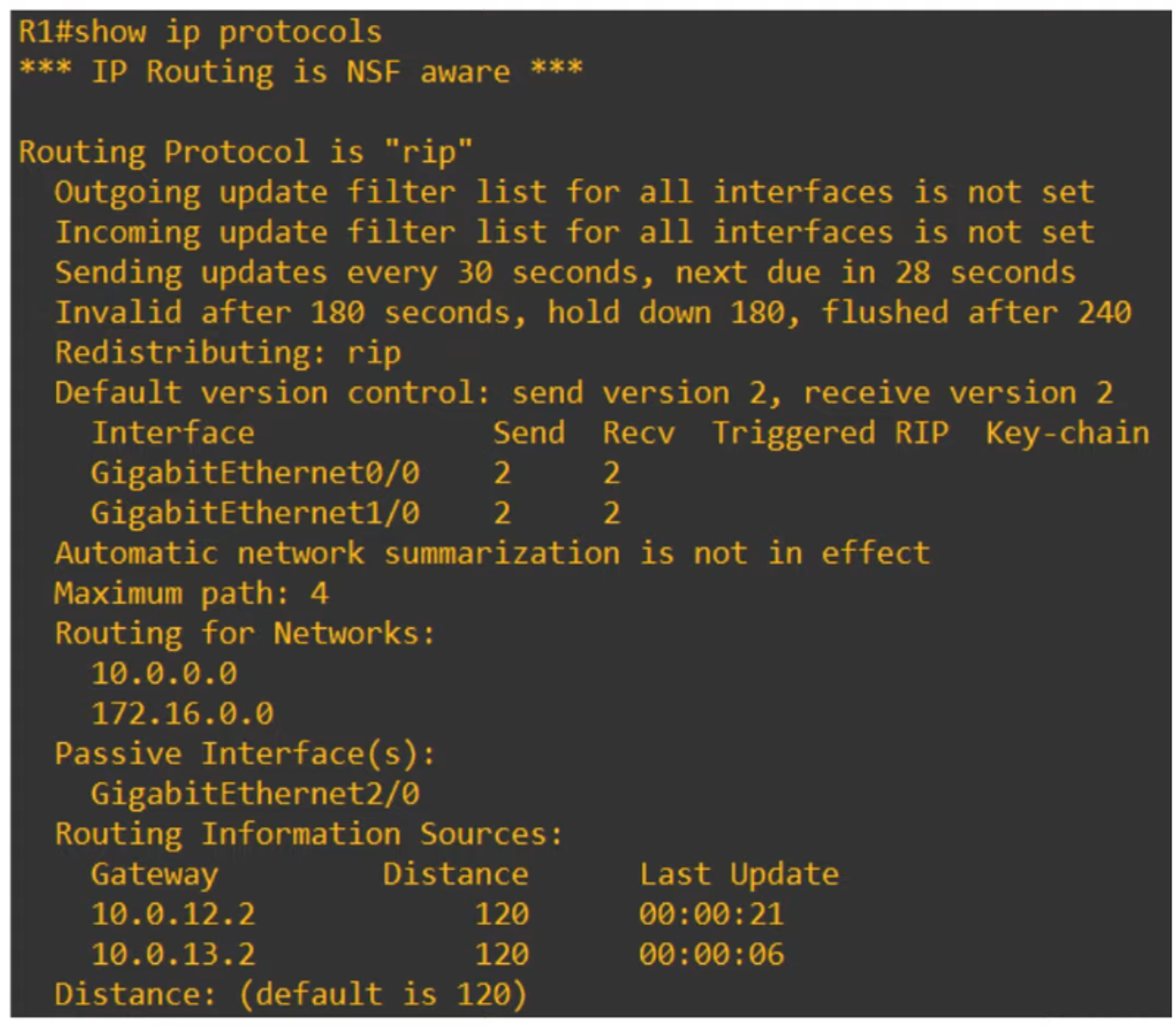
- “Maximum path: 4” is the default but can be changed with this command:
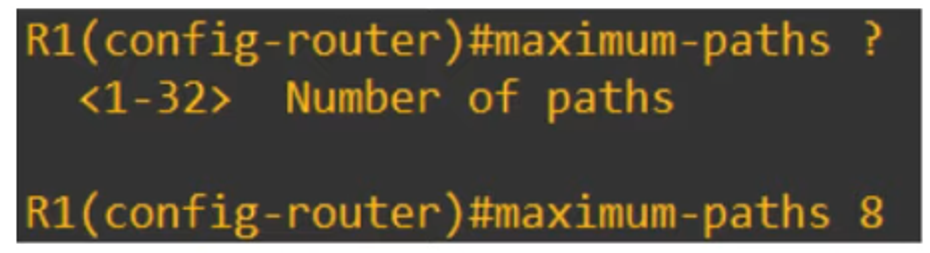
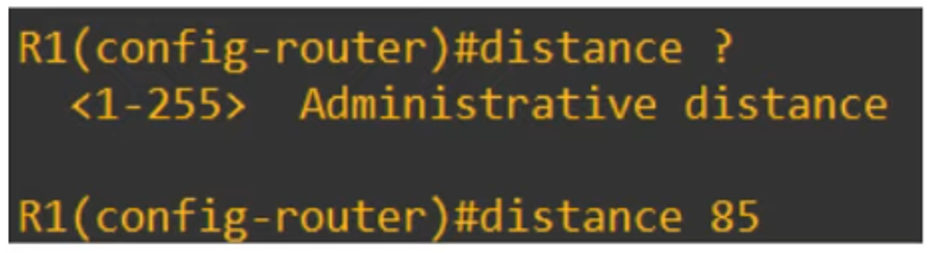
- “Distance” (AD) can be changed with this command (default is 120).
ENHANCED INTERIOR GATEWAY ROUTING PROTOCOL (EIGRP)
- Enhanced Interior Gateway Routing Protocol is a Distance Vector IGP.
- Originally Cisco proprietary, but now published openly for other vendors.
- Considered an “advanced”/“hybrid” Distance Vector Routing Protocol.
- Much faster than RIP in reacting to changes in the network.
- Does not have the 15 hop count limit of RIP.
- Sends messages using multicast address
224.0.0.10(remember this number). - The only IGP that can perform unequal-cost load balancing (by default, it performs ECMP load balancing over 4 paths, like RIP).
CONFIGURATION OF EIGRP
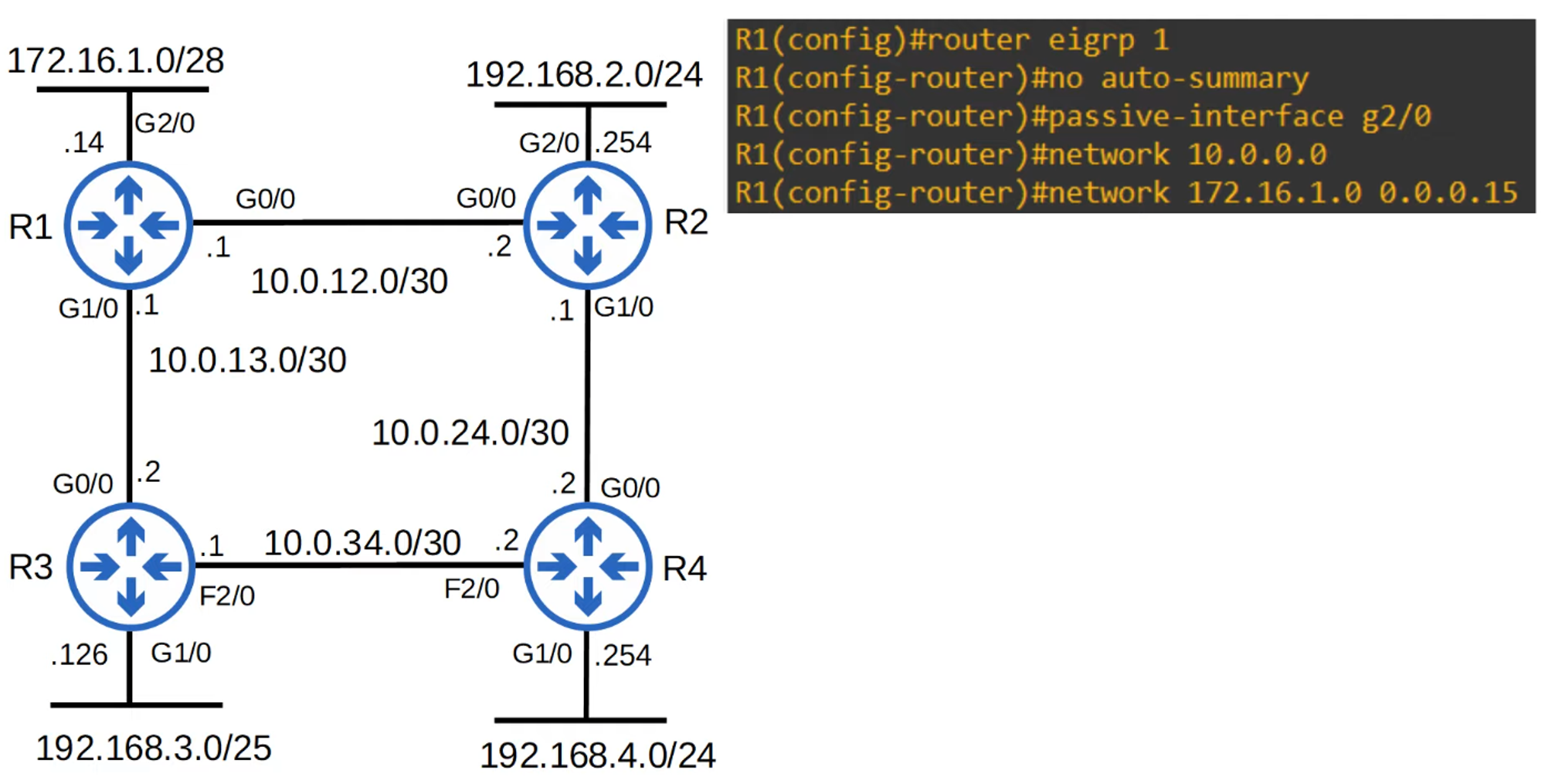
Use the command router eigrp <Autonomous System number>:
- The AS (Autonomous System) number must match between routers; otherwise, they will not form an adjacency and share route information.
- Auto-summary might be enabled or disabled by default, depending on the router/IOS version. If enabled, disable it.
- The “network” command will assume a classful address if you don’t specify the subnet mask.
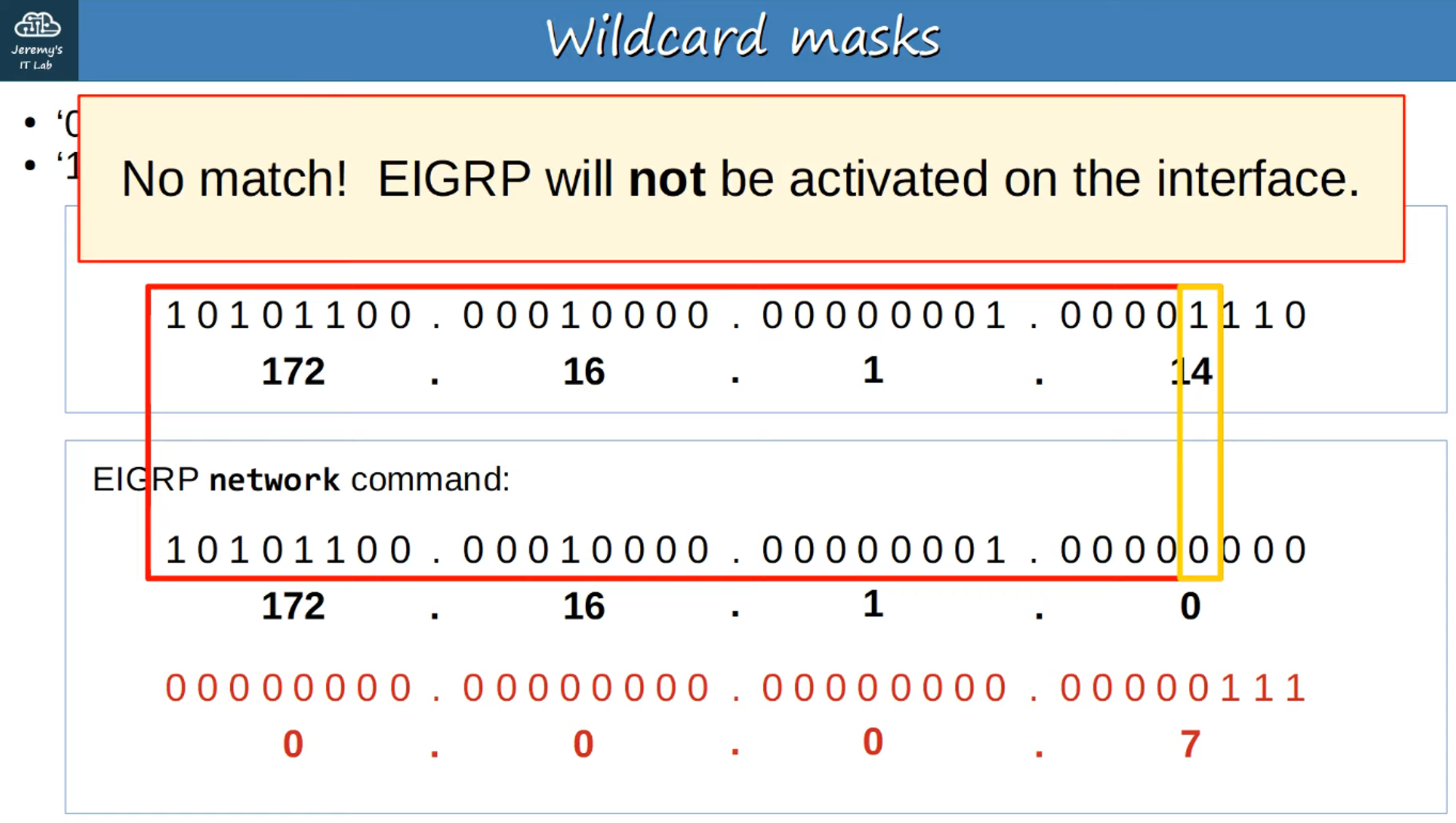
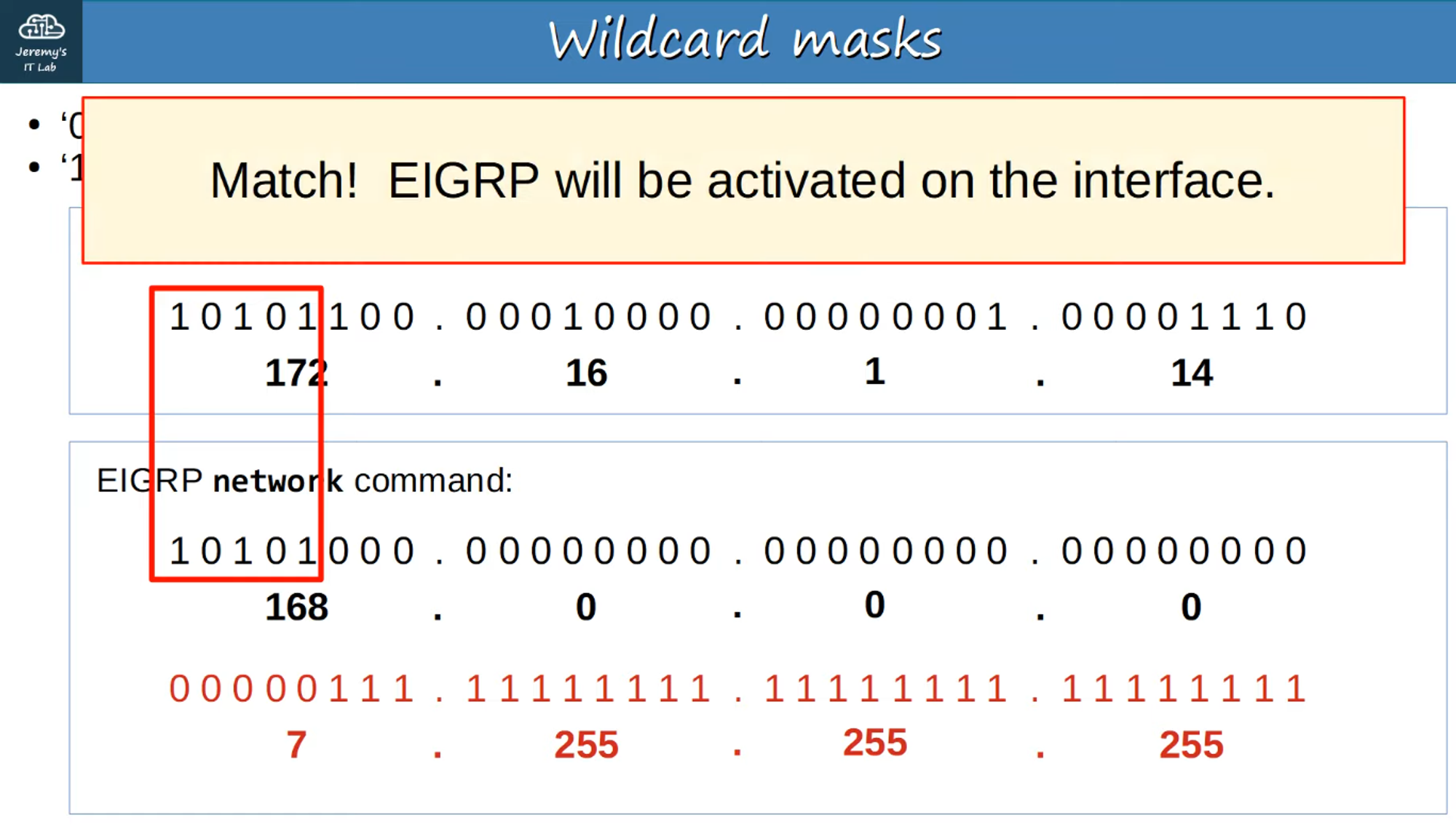
- EIGRP uses a wildcard mask instead of a regular subnet mask.
Wildcard Mask
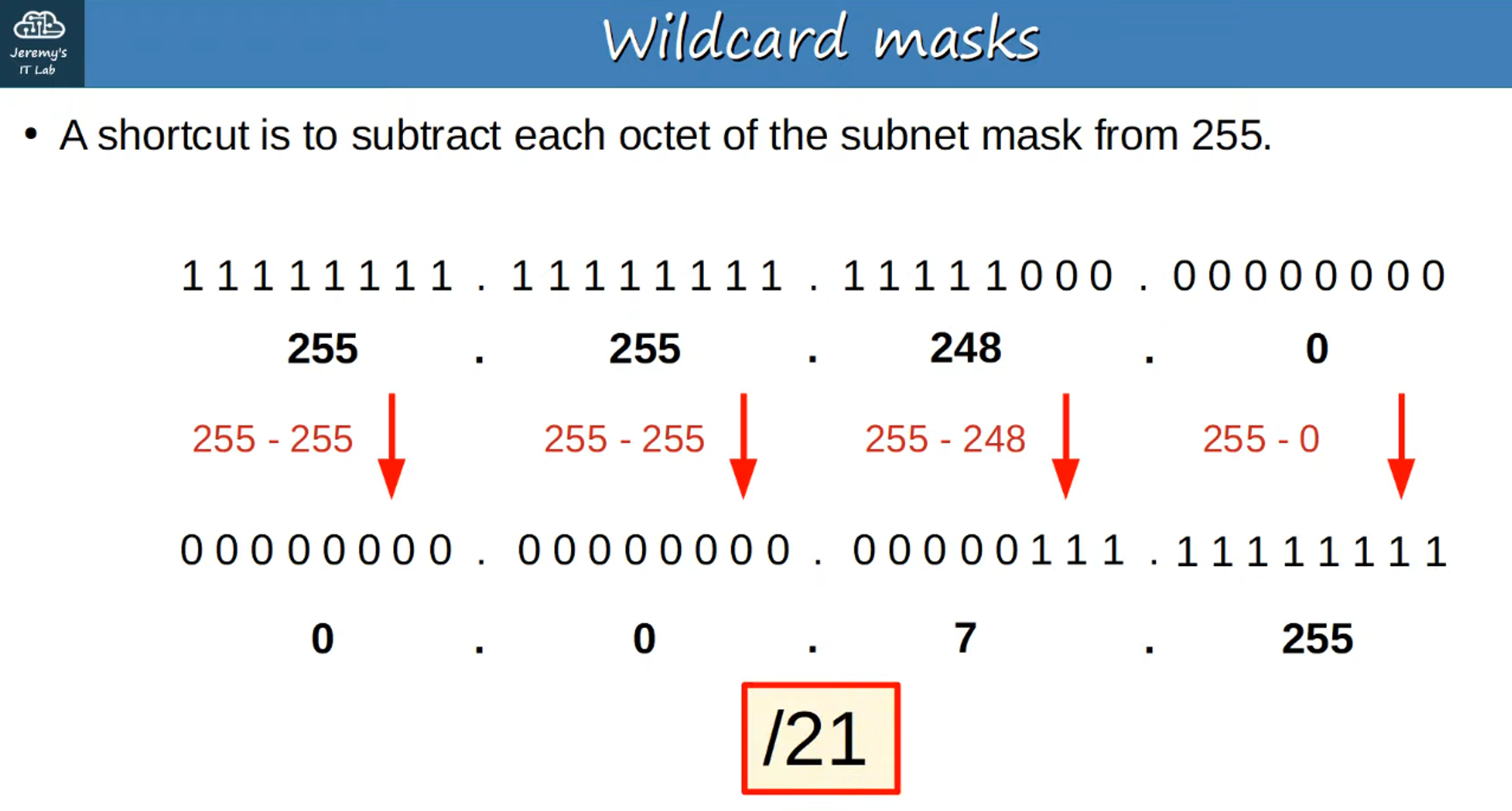
A wildcard mask is an “inverted” subnet mask:
- All 1’s in the subnet mask become 0 in the wildcard mask.
- All 0’s in the subnet mask become 1 in the wildcard mask.
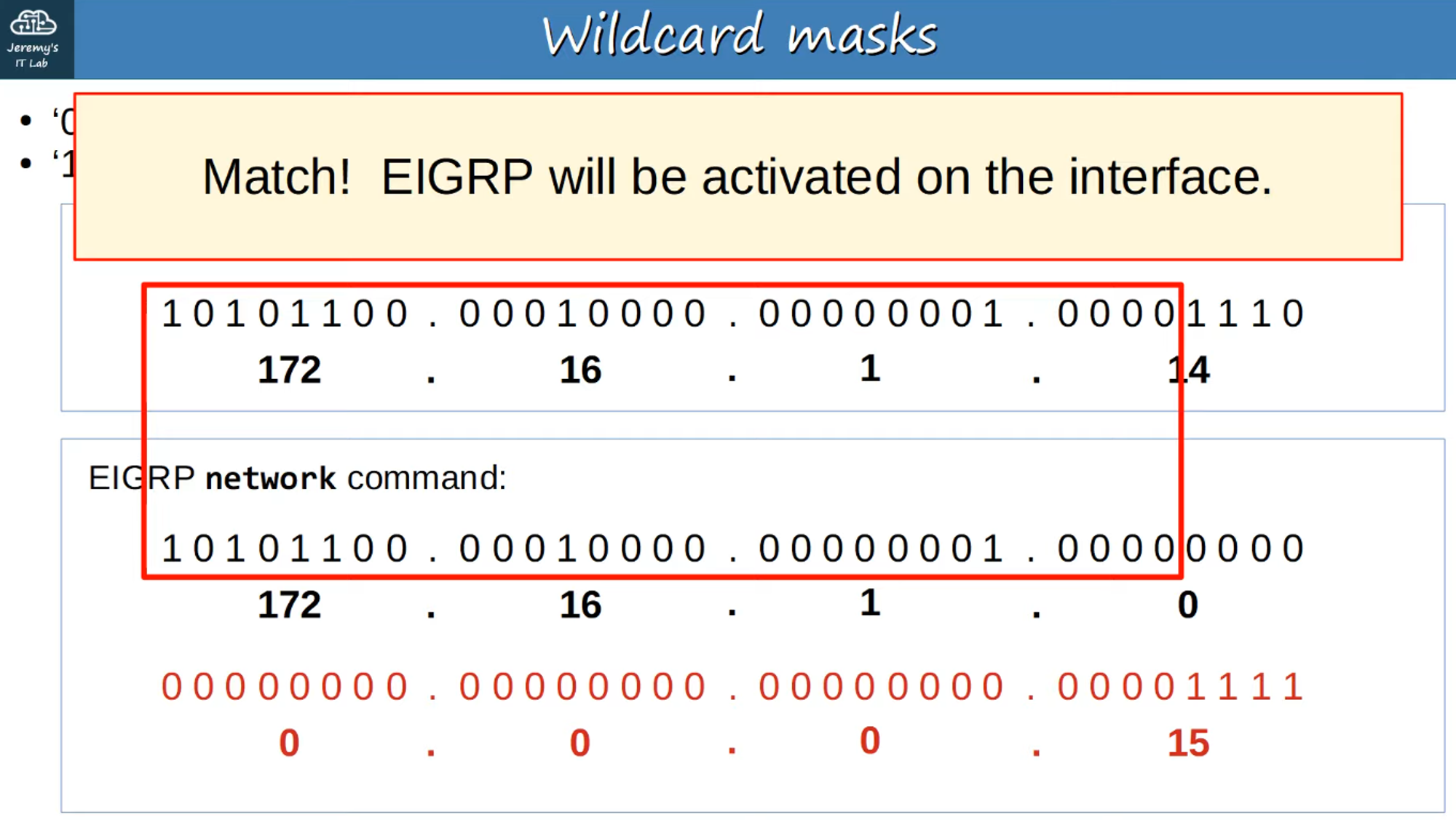
0in the wildcard mask means bits must match!1in the wildcard mask means do not have to match.
Viewing EIGRP Configuration
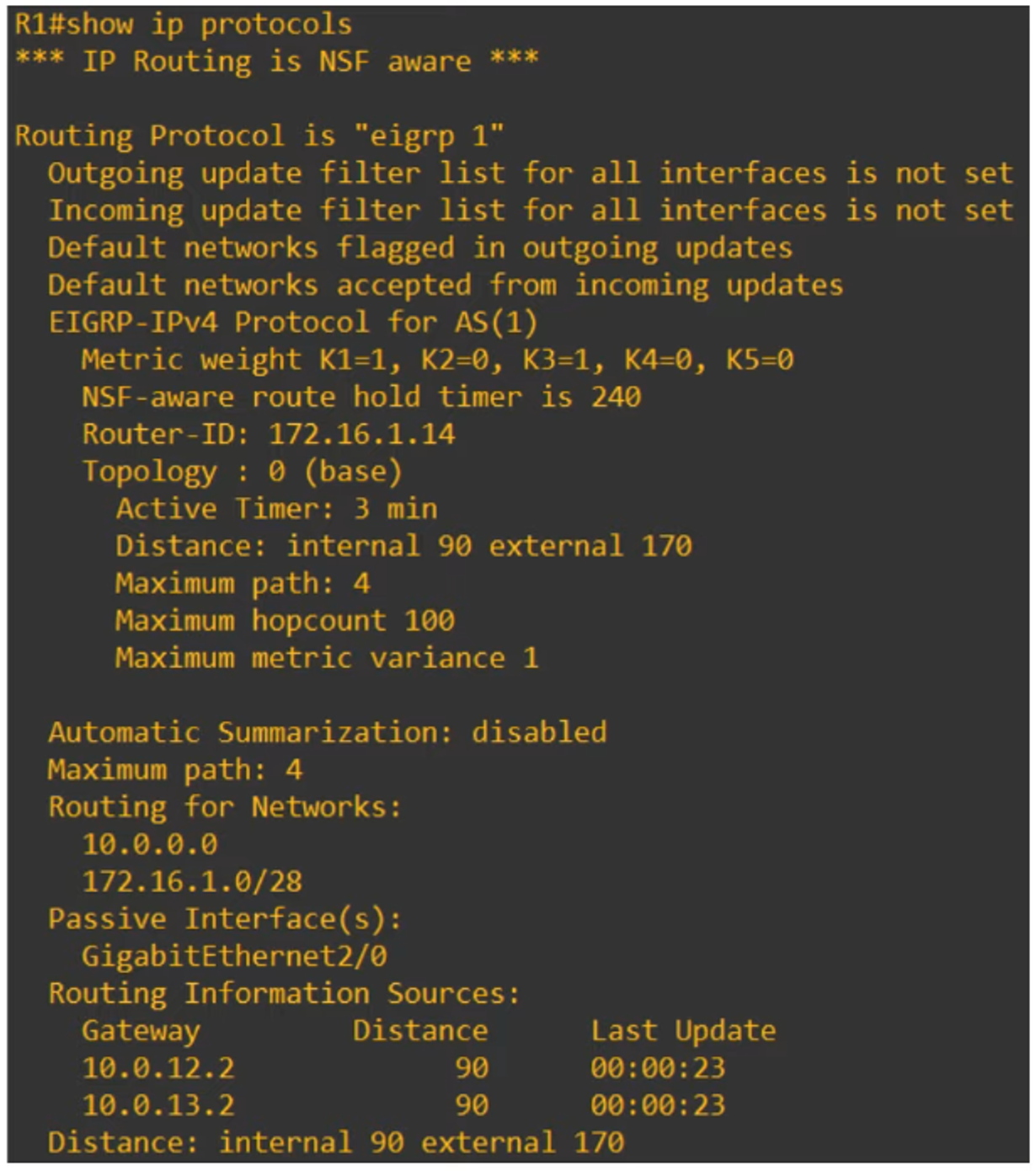
To view EIGRP protocols, use:
show ip protocolsfor EIGRP
Router ID
Router ID order of priority:
- Manual configuration
- Highest IP address on a loopback interface
- Highest IP address on a physical interface

Distance (AD)
EIGRP has two values:
- Internal = 90
- External = 170
Memorize these values!
To view the routing table for EIGRP, use:
show ip routefor EIGRP
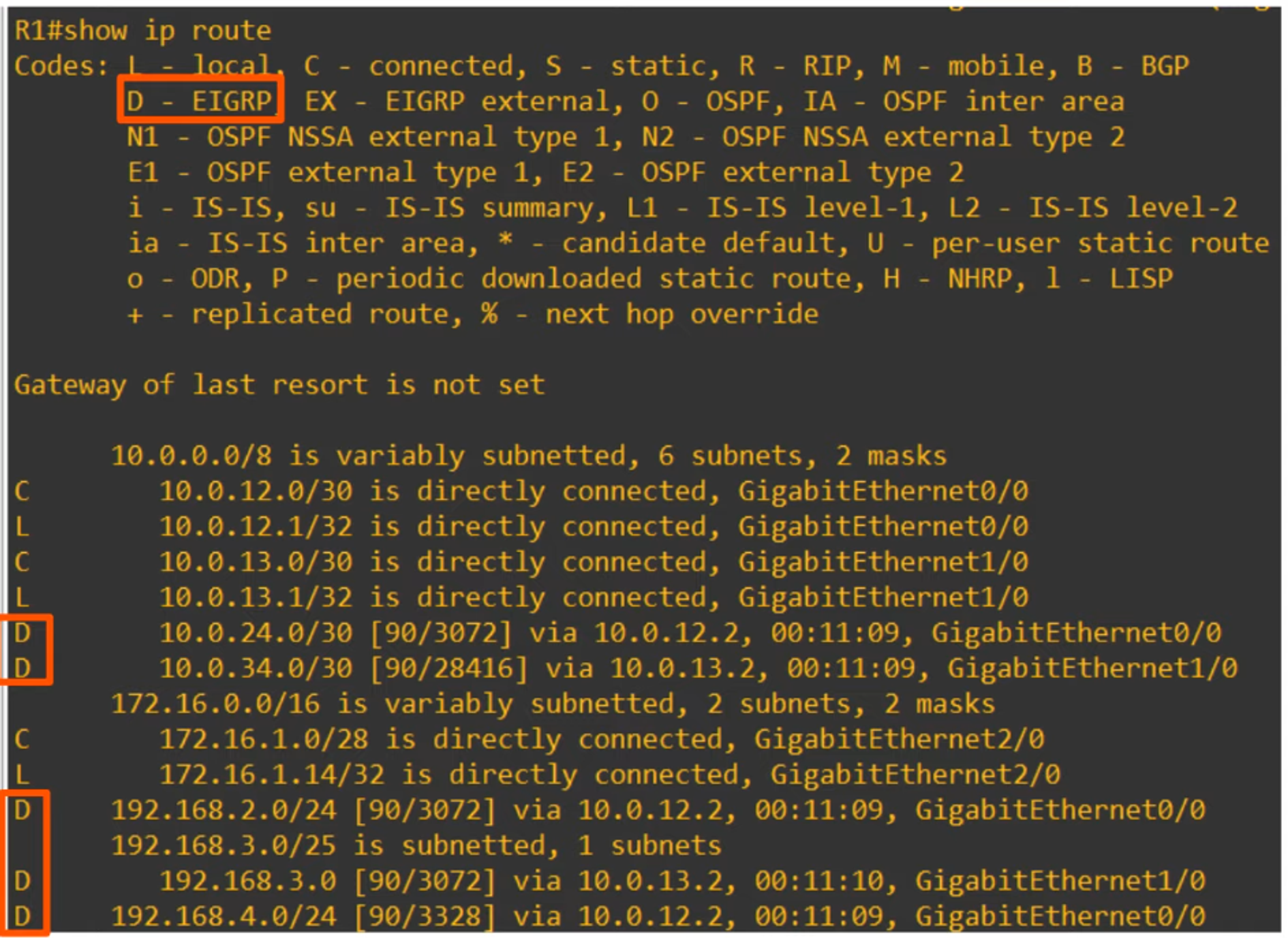
Note the large metric numbers. This is a downside to EIGRP, even on small networks!
EIGRP METRIC
By default, EIGRP uses bandwidth and delay to calculate its metric.
Default “K” Values
- K1 = 1
- K2 = 0
- K3 = 1
- K4 = 0
- K5 = 0
💡 Simplified calculation: [ \text{Metric} = \text{Bandwidth (Slowest Link)} + \text{Delay (of ALL LINKS)} ]
EIGRP TERMINOLOGY
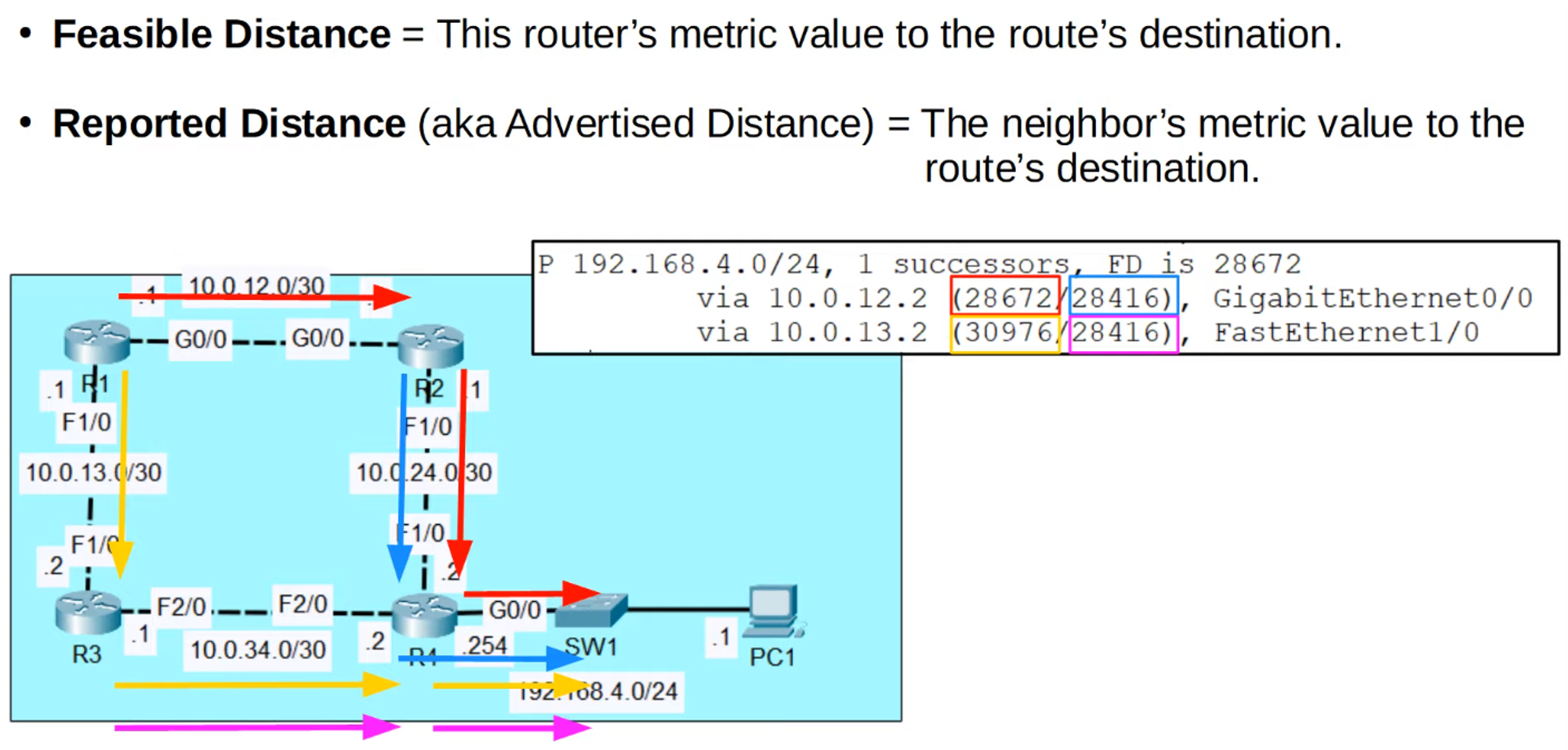
- Feasible Distance: This router’s metric value to the route’s destination.
- Reported Distance (aka Advertised Distance): The neighbor’s metric value to the route’s destination.
SUMMARY
- RIP is classful, based on hop count, with a maximum of 15 hops.
- EIGRP is considered an advanced distance vector protocol that utilizes bandwidth and delay for metric calculation and can perform unequal-cost load balancing.