STP States
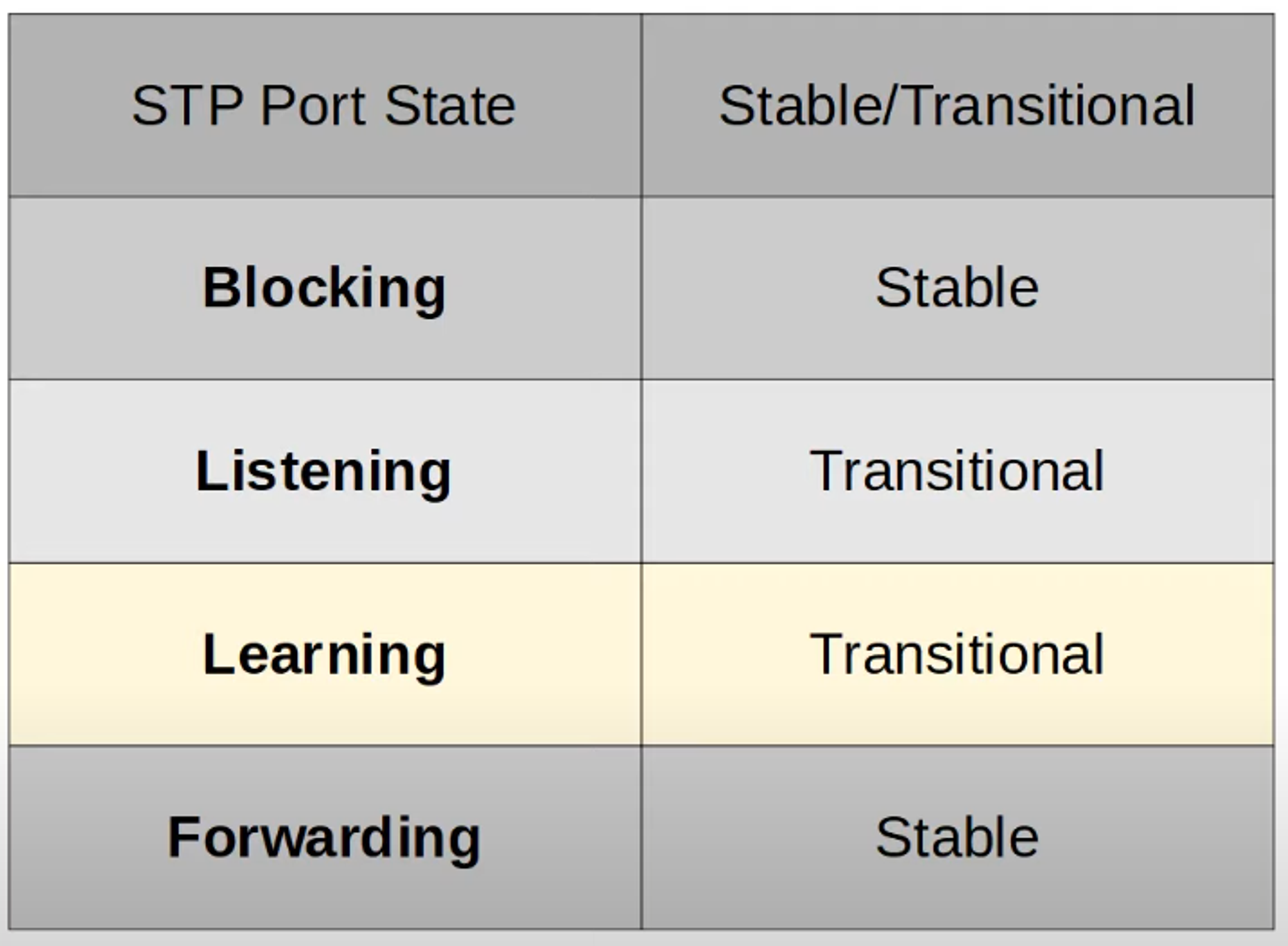
STP uses several states to manage network topology and prevent loops:
-
Blocking State (Stable)
- Purpose: Prevent loops by disabling ports.
- Characteristics:
- Traffic: Does not send or receive regular network traffic.
- BPDUs: Does not forward.
- MAC Address Learning: Not performed.
- Ports: Non-designated ports.
-
Listening State (Transitional)
- Purpose: Prepare for moving to the Forwarding state.
- Characteristics:
- Duration: 15 seconds (default, controlled by the Forward Delay timer).
- Traffic: Does not send or receive regular network traffic.
- BPDUs: Forwarded and received.
- MAC Address Learning: Not performed.
- Ports: Only designated or root ports enter this state.
-
Learning State (Transitional)
- Purpose: Begin learning MAC addresses before forwarding traffic.
- Characteristics:
- Duration: 15 seconds (same Forward Delay timer as Listening state).
- Traffic: Does not send or receive regular network traffic.
- BPDUs: Forwarded and received.
- MAC Address Learning: Performed.
- Ports: Designated or root ports.
-
Forwarding State (Stable)
- Purpose: Operate normally.
- Characteristics:
- Traffic: Sends and receives regular network traffic.
- BPDUs: Forwarded and received.
- MAC Address Learning: Performed.
- Ports: Root and designated ports.
STP Timers
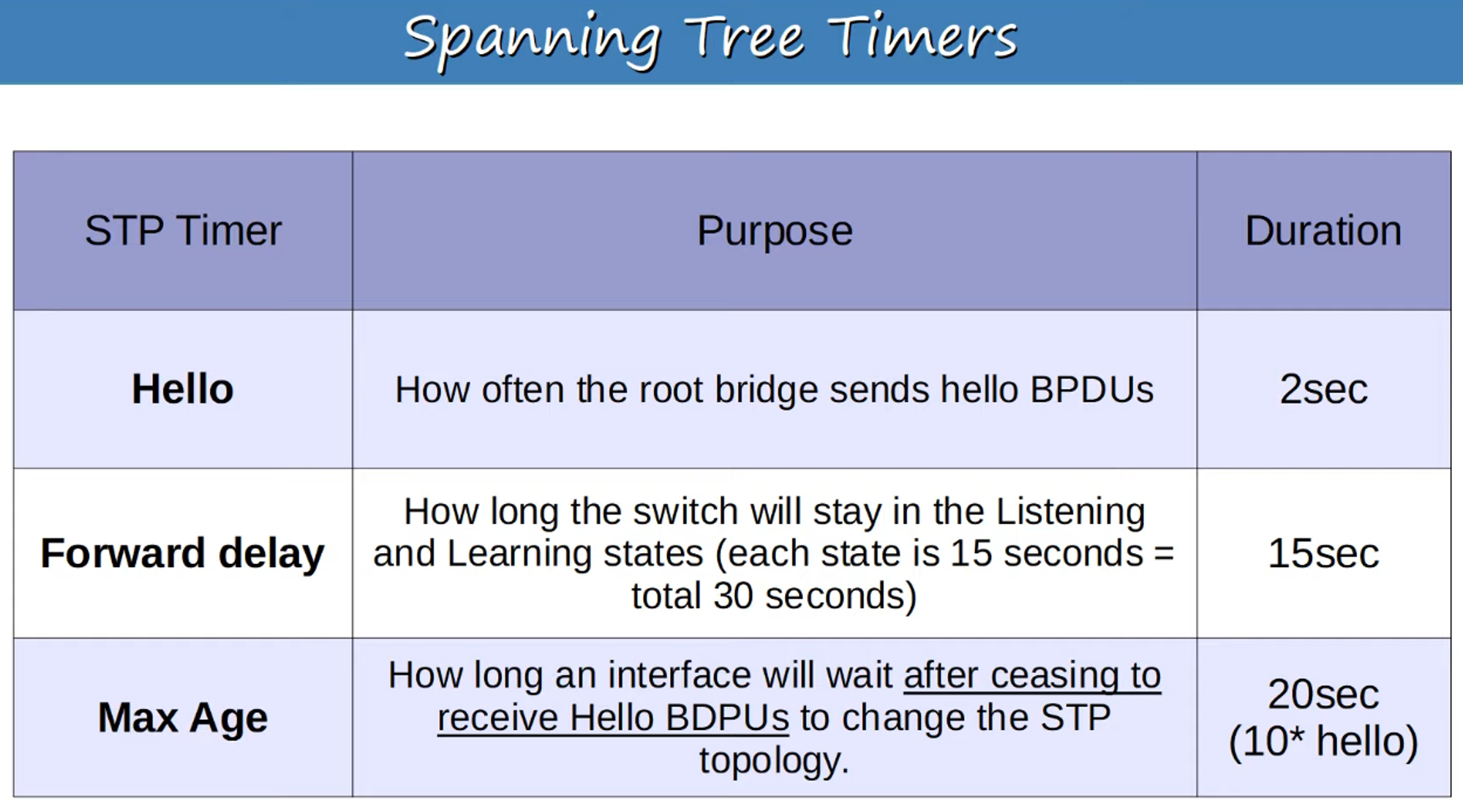
- Hello Timer: Frequency of BPDU transmission. Default is 2 seconds.
- Max Age Timer: Determines how long BPDUs are considered valid before re-evaluating the network topology. Default is 20 seconds.
- Forward Delay Timer: Time spent in Listening and Learning states. Default is 15 seconds.
Key Points:
- BPDUs are only forwarded out of designated ports.
- A Forwarding port can transition directly to Blocking state.
- A Blocking port must pass through Listening and Learning states before transitioning to Forwarding.
STP BPDU (Bridge Protocol Data Unit)
-
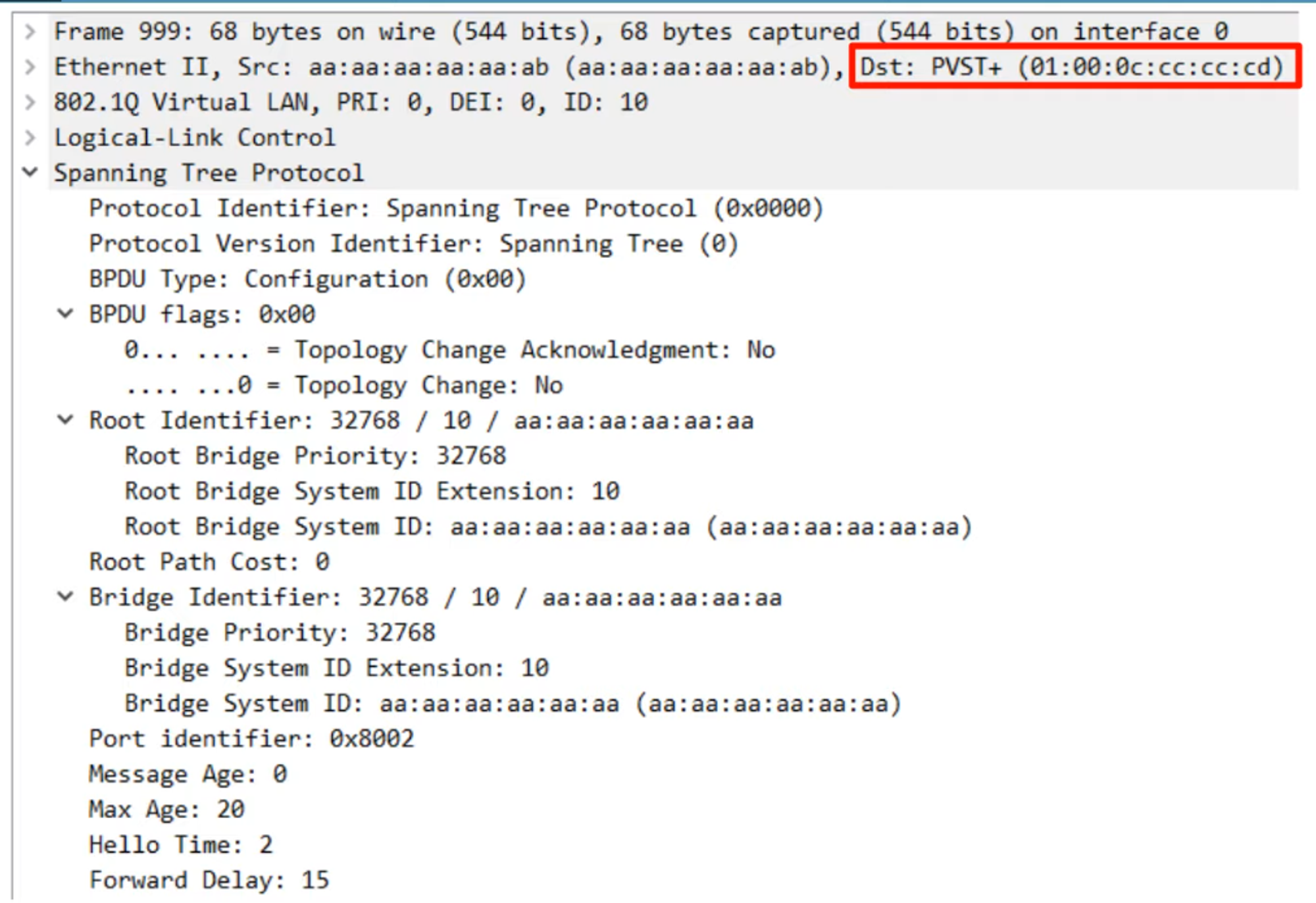
Regular STP MAC Address:
01:80:c2:00:00:00 -
PVST+ MAC Address:
01:00:0c:cc:cc:cd -
PVST: Uses ISL trunk encapsulation.
-
PVST+: Supports 802.1Q trunking.
The root bridge’s STP timers control all STP timers across the network.
STP Optional Features
-
PortFast
- Purpose: Allows a port to bypass Listening and Learning states and immediately transition to Forwarding.
- Usage: Should be enabled only on ports connected to end hosts to avoid loops.
- Command:
SW1(config)# spanning-tree portfast default - Effect: Enables PortFast on all access ports (not trunk ports).
-
BPDU Guard
- Purpose: Shuts down a port that receives a BPDU to prevent potential loops.
- Command:
SW1(config)# spanning-tree portfast bpduguard default - Effect: Enables BPDU Guard on all PortFast-enabled interfaces.
-
Root Guard / Loop Guard
- These features help prevent topology changes and loops but are less critical for basic CCNA understanding.
STP Configuration Commands
-
Set Spanning-Tree Mode
- Modern Cisco switches use
rapid-pvstby default.
- Modern Cisco switches use
-
Configure the Primary Root Bridge
- Command:
SW1(config)# spanning-tree vlan <vlan-number> root primary - Effect: Sets STP priority to 24576. If another switch with a lower priority exists, this switch’s priority is set to 4096 less than the other switch’s priority.
- Command:
-
Configure the Secondary Root Bridge
- Command:
SW1(config)# spanning-tree vlan <vlan-number> root secondary - Effect: Sets STP priority to 28672 (4096 higher than the primary).
- Command:
-
Configure STP Port Settings
- Command:
SW1(config)# interface <interface-id> SW1(config-if)# spanning-tree cost <cost-value> SW1(config-if)# spanning-tree port-priority <priority-value> - Effect:
- Cost: Sets the cost to reach the root bridge.
- Port Priority: Sets the port’s priority in STP decisions.
- Command:
VLAN Topologies
-
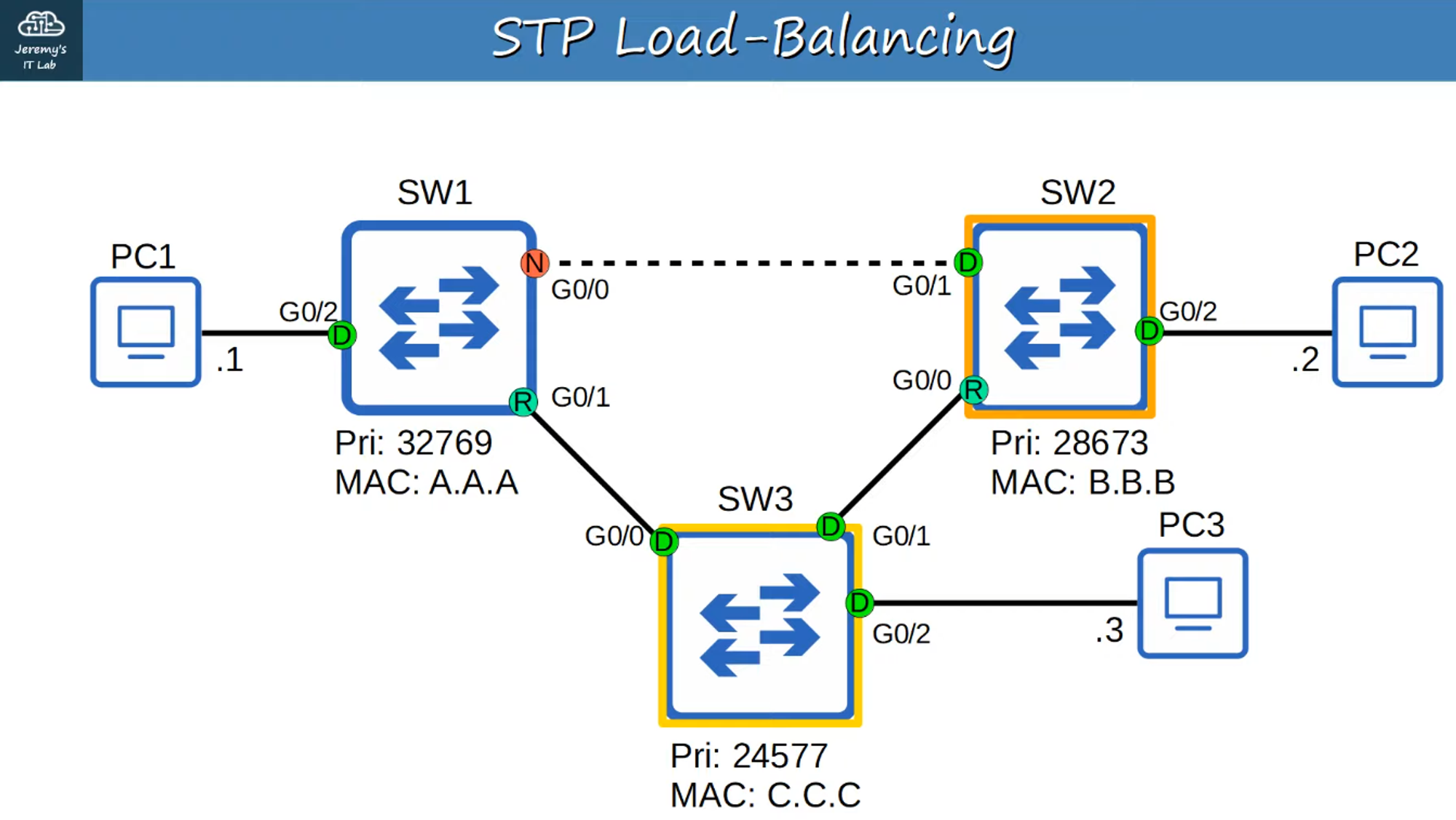
VLAN 1 Topology:
- Originally, SW1 was the primary root bridge.
- Configured SW3 as the primary root and SW2 as the secondary root.
-
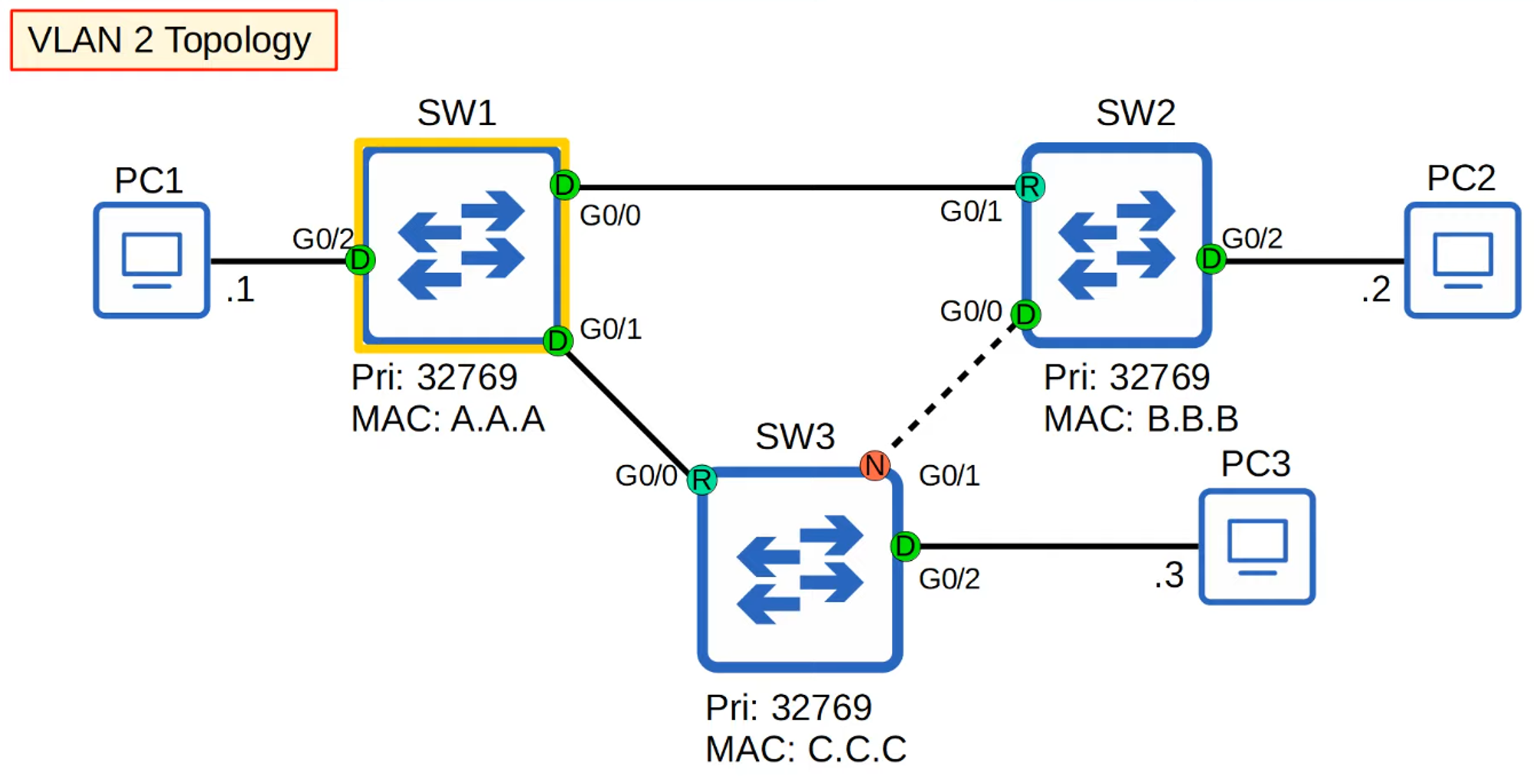
VLAN 2 Topology:
- Changes to VLAN 1 do not affect VLAN 2. VLAN 2 maintains the old topology unless reconfigured.
STP Port Settings

- Cost: Represents the path cost to the root bridge.
- Port Priority: Determines the port’s role in STP decision-making.
Understanding these concepts will help you manage STP effectively and ensure a loop-free network environment.