DTP (Dynamic Trunking Protocol)
- DTP allows switches to automatically negotiate their switchport status as either:
- Access ports
- Trunk ports
- DTP is enabled by default on all Cisco switch interfaces.
However, we have been manually configuring switchports using:
switchport mode accessswitchport mode trunk
💡 You can use show interfaces <interface-id> switchport to display the switchport’s settings.
For security reasons, it is recommended to manually configure switchports and disable DTP on all ports.

Dynamic Desirable Mode
- Actively tries to form a trunk with other Cisco switches.
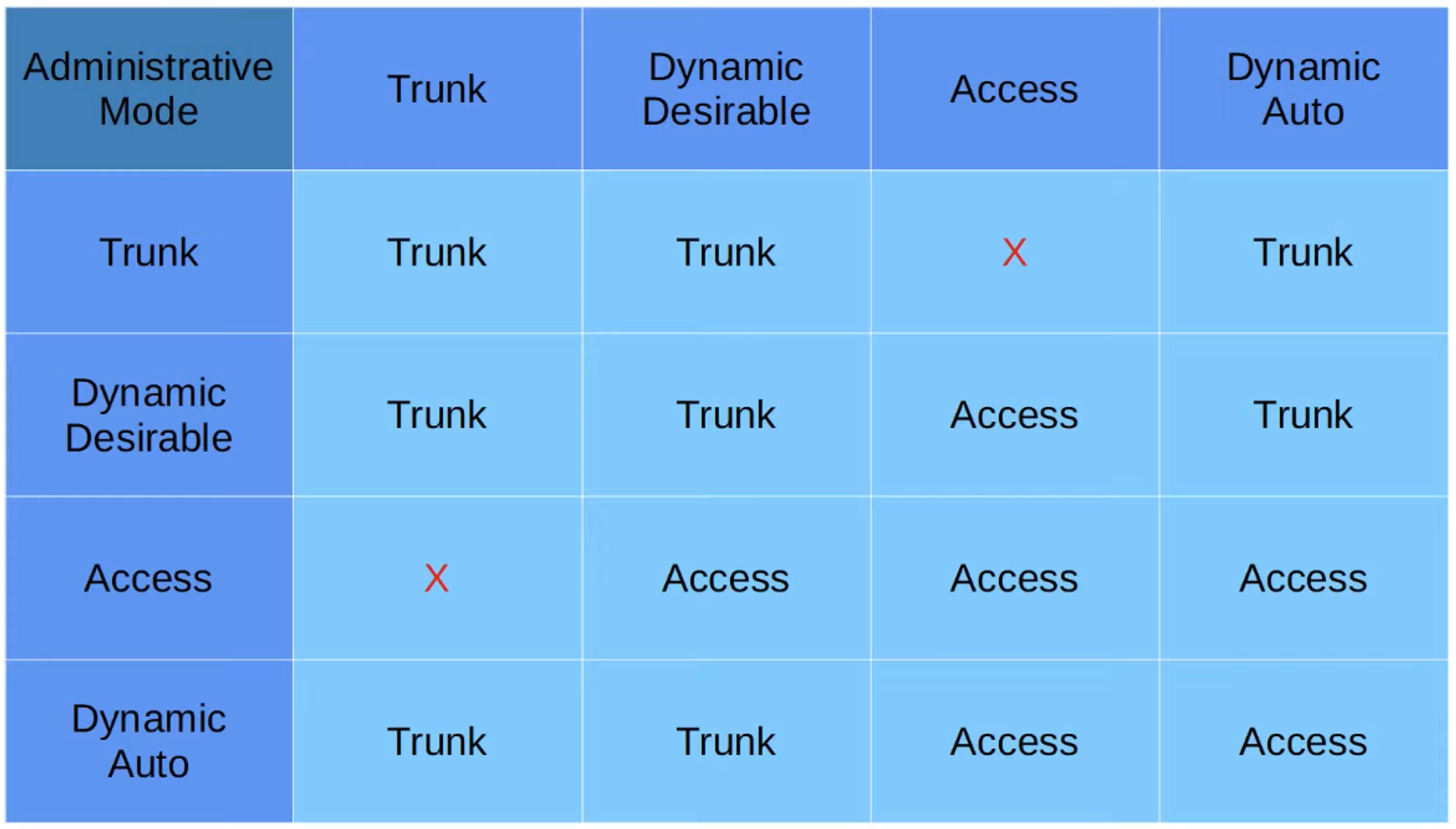
- Forms a trunk when connected to another switchport configured as:
switchport mode trunkswitchport mode dynamic desirableswitchport mode dynamic auto
If the other switchport is set to static access, a trunk will not form, and the port will function as an access port.
Dynamic Auto Mode
- Does not actively attempt to form a trunk.
- Will form a trunk only if the connected switch is actively trying to create one.
- Forms a trunk with a switchport in these modes:
switchport mode trunkswitchport mode dynamic desirable
⚠️ Trunk to access mode connection results in a mismatched configuration and should generate an error. Traffic will not function properly in this case.
Mode Compatibility Table
The table below shows the compatibility between different modes for forming a trunk:
DTP with Non-Switch Devices
- DTP will not form a trunk with non-switch devices like:
- Routers
- PCs
- Other devices (servers, etc.)
- In these cases, the switchport will default to access mode.
DTP on Old vs. New Switches
- Old switches: The default mode was
switchport mode dynamic desirable. - Newer switches: The default mode is
switchport mode dynamic auto.
Disabling DTP Negotiation on an Interface
To prevent DTP negotiation on a switchport, use the following commands:
switchport nonegotiateswitchport mode access
💡 Security Tip: It is highly recommended to disable DTP on all switchports and manually configure them as either access or trunk ports.
Trunk Encapsulation
Cisco switches that support both:
- 802.1Q
- ISL (Inter-Switch Link)
Use DTP to negotiate the trunk encapsulation method.
💡 switchport trunk encapsulation negotiate
- ISL is preferred over 802.1Q.
- If both switches support ISL, ISL will be chosen.
- DTP frames are sent:
- In VLAN1 for ISL encapsulation.
- In the native VLAN for 802.1Q encapsulation (default is VLAN1).
VTP (VLAN Trunking Protocol)
💡 To view VTP status, use: #show vtp status (in Privileged EXEC mode).
- VTP is a protocol used to centralize VLAN configuration on a server switch.
- Other switches configured as VTP clients will synchronize their VLAN databases with the server.
- VTP is rarely used and not generally recommended.
- Three VTP versions exist:
- VTP v1: Does not support extended VLAN ranges (1006-4094).
- VTP v2: Same as v1 but adds support for Token Ring VLANs.
- VTP v3: Supports extended VLAN ranges (1006-4094) and stores the VLAN database in NVRAM on client switches.
VTP Modes
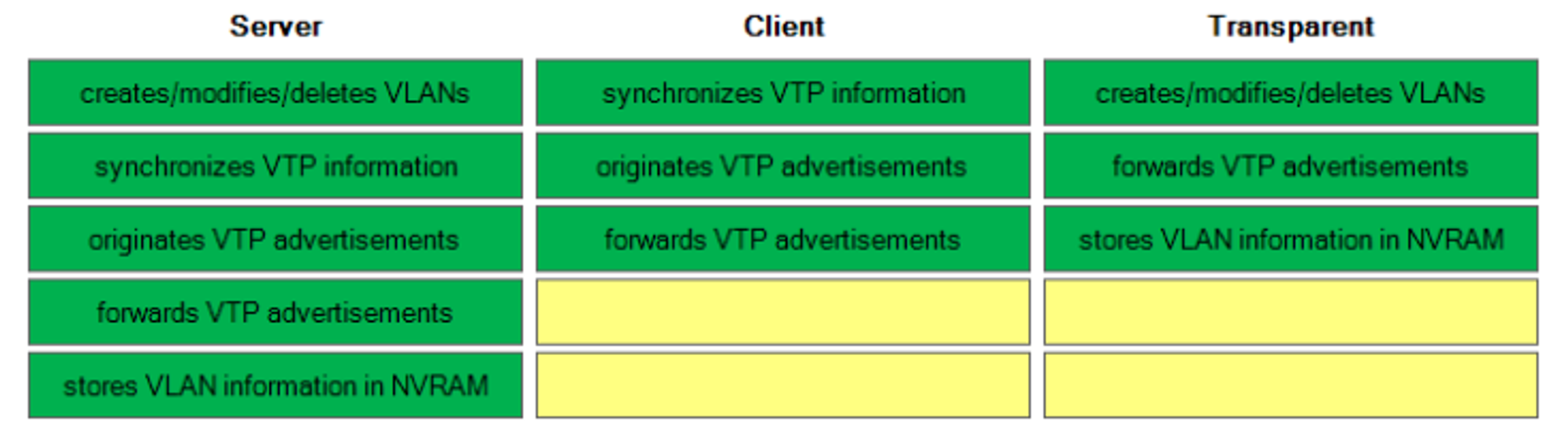
- Server Mode:
- Can add, modify, or delete VLANs.
- Stores the VLAN database in NVRAM.
- Advertises the latest VLAN database version to client switches over trunk interfaces.
- Client Mode:
- Cannot add, modify, or delete VLANs.
- Synchronizes its VLAN database with the VTP server.
- Transparent Mode:
- Does not participate in the VTP domain or synchronize its VLAN database.
- Can still add, modify, or delete VLANs locally but won’t advertise them to other switches.
- Forwards VTP advertisements between switches in the same domain.
VTP Servers
- Can add, modify, or delete VLANs and store the database in NVRAM.
- Advertises the latest version of the VLAN database to VTP clients.
- VTP servers can also act as VTP clients, synchronizing with another server if it has a higher revision number.
🚨 Danger: Connecting an old switch with a higher revision number to the network may cause all switches to synchronize with its VLAN database, potentially causing network disruptions.
VTP Clients
💡 To configure a switch as a VTP client, use: (config)# vtp mode client
- Cannot add, modify, or delete VLANs.
- VTP v3 clients store the VLAN database in NVRAM.
- They synchronize with the server that has the highest revision number.
- Forward VTP advertisements to other switches over trunk ports.
VTP Transparent Mode
💡 To configure a switch in transparent mode, use: (config)# vtp mode transparent
- Does not synchronize its VLAN database with other switches or participate in the VTP domain.
- Stores its VLAN database locally in NVRAM.
- Can add, modify, or delete VLANs but will not advertise them to other switches.
- Forwards VTP advertisements between other switches in the same domain.
VTP Domains
- If a switch with no VTP domain receives a VTP advertisement, it will automatically join that domain.
- If a switch receives a VTP advertisement with a higher revision number in the same domain, it will update its VLAN database to match.
Resetting the VTP Revision Number
There are two ways to reset the VTP revision number to 0:
- Change the VTP domain to an unused domain.
- Change the VTP mode to transparent.
VTP Version
💡 To change the VTP version, use: (config)# vtp version <version number>
- Changing the VTP version forces all connected switches to synchronize with the latest version.